Tag: IT Solutions

  • Unveiling the Benefits of Cyber Essentials: The Unite Group’s Expertise in Cyber Security

    Unveiling the Benefits of Cyber Essentials: The Unite Group’s Expertise in Cyber Security

    3 computer screens with the text on top: Unveiling the Benefits of Cyber Essentials: The Unite Group's Expertise in Cyber Security

    In the digital age, where data breaches and cyber threats loom large, safeguarding your business against potential vulnerabilities is paramount. Enter Cyber Essentials, a government-backed certification designed to fortify your organisation’s cyber security posture.

    In this blog, we’ll delve into the benefits of Cyber Essentials and highlight how The Unite Group, armed with a team of qualified Cyber Essentials assessors, is your trusted ally in navigating the complex landscape of digital security.

    Understanding Cyber Security: A Crucial Certification for Digital Defence

    Cyber Essentials is more than just a certification; it’s a shield against the rising tide of cyber threats. Recognising the escalating risks in the digital realm, the UK government introduced Cyber Essentials to ensure that organisations, regardless of size, implement fundamental cyber security measures. This certification serves as a baseline for robust cyber security practices. Covering areas such as secure configuration, access control, and malware protection.

    The Unite Group’s Team of Qualified Cyber Essentials Assessors: Your Guardians in Cyber Security

    At The Unite Group, we understand the dynamic and evolving nature of cyber security. Our commitment to excellence is reflected in our team of qualified Cyber Essentials assessors. Each equipped with the knowledge and expertise to guide your organisation through the certification process. As your guardians in cyber security, our assessors play a pivotal role in ensuring that your business is fortified against potential threats.

    Benefits of Cyber Essentials: Fortifying Your Digital Fortress

    1. Protection Against Common Threats:

    Cyber Essentials provides a robust defence against prevalent cyber threats. By implementing essential security measures, organisations can mitigate the risk of common attacks such as phishing, malware, and other malicious activities.

    2. Enhanced Customer Trust:

    Displaying the Cyber Essentials badge communicates to your clients and partners that you take cyber security seriously. It enhances your reputation, instilling trust and confidence in your ability to protect sensitive information.

    3. Competitive Edge in Contracts:

    Many government contracts and business tenders now require Cyber Essentials certification. By obtaining this certification, you not only meet compliance requirements but also gain a competitive edge in securing contracts and partnerships.

    4. Improved Data Security:

    Cyber Essentials emphasises secure configuration and access control, ensuring that your organisation’s data is shielded from unauthorised access. This focus on data security is fundamental in today’s interconnected digital landscape.

    5. Cost-Effective Cyber Security Measures:

    Implementing Cyber Essentials does not require a significant financial investment. The certification focuses on practical and cost-effective cyber security measures, making it accessible for businesses of all sizes. Here at The Unite Group, we offer packages that allow businesses to pay monthly for their certification, meaning they can spread out the cost.

    6. Prevention of Financial Loss:

    Cyber security incidents can result in significant financial losses. Cyber Essentials helps prevent such losses by establishing a solid foundation for cyber security, reducing the risk of data breaches and the associated financial repercussions.

    7. Cyber Insurance Premium Reductions:

    Some insurance providers offer reduced premiums for organisations with Cyber Essentials certification. This recognition reflects the proactive steps taken to enhance cyber security, potentially resulting in financial benefits.

    The Unite Group’s Comprehensive Approach to Cyber Security:

    Beyond the benefits outlined, The Unite Group takes a comprehensive approach to cyber security. Our qualified Cyber Essentials assessors work collaboratively with your team to understand the unique aspects of your business. We tailor our approach to address specific vulnerabilities and challenges, ensuring that the certification process is not only a compliance requirement but a strategic investment in your organisation’s resilience.

    In conclusion, Cyber Essentials is a cornerstone in the defence against cyber threats, offering a range of benefits that extend beyond compliance. As your trusted partner in cyber security, The Unite Group combines expertise, dedication, and a team of qualified assessors to guide your organisation towards achieving Cyber Essentials certification.

    Secure your digital future with The Unite Group, where cyber security excellence is not just a certification; it’s a commitment to safeguarding the heart of your business. Contact us today to learn more!
  • Elevating Your Business: The Unite Group – Your Premier Technology Provider in the UK

    Elevating Your Business: The Unite Group – Your Premier Technology Provider in the UK

    black and white image of 3 members of the unite group team sitting round a meeting table with a laptop. The text on top reads Elevating Your Business: The Unite Group - Your Premier Technology Provider in the UK

    At The Unite Group, we take immense pride in being your go-to partner for a comprehensive suite of technology services. Our journey is not just about providing solutions; it’s about empowering your business to thrive in the digital age.

    Let’s explore the world of IT Management, Telecommunications, Cyber Essentials, Secure Public Wi-Fi, and Digital Marketing through our lens.

    1. IT Management: Tailoring Solutions for Optimal Performance

    In the realm of IT Management, we see ourselves as architects of efficiency. We work closely with you to understand your unique needs, ensuring that our IT solutions not only meet but exceed your expectations. From network infrastructure to cloud computing, we are dedicated to optimising your IT ecosystem for seamless operations. We offer smart cost per user pricing. Meaning multiple devices are covered per person. Meaning you can focus on running your business, while we’ll ensure your technology is up and running.

    2. Telecommunications: Unleashing the Power of Unified Communications

    Communication lies at the heart of every successful enterprise. At The Unite Group, we’re not just providing Telecommunications services; we’re enabling seamless collaboration. Our Unified Communications solutions are designed to streamline internal communication, enhance customer interactions, and foster advanced collaboration tools to propel your business forward. Our Cloud Hosted Phone Systems not only improve efficiency but also cut costs.

    3. Cyber Essentials: Your Shield in the Digital Battlefield

    Cyber security is not just a service; it’s a commitment to your digital safety. As your trusted partner, we offer Cyber Essentials services to fortify your defences against evolving cyber threats. Our team of experts conducts thorough risk assessments, manages vulnerabilities, and ensures an effective incident response, providing you with robust protection in the digital battlefield.

    4. Secure Public Wi-Fi: Connecting You Safely to the World

    In the era of connectivity, providing Secure Public Wi-Fi is our way of ensuring that you stay connected without compromising security. We understand the importance of reliable and safe internet access, and our Secure Public Wi-Fi solutions are designed to deliver just that. Connect confidently, knowing that your data and that of your customers is protected.

    5. Digital Marketing: Elevating Your Brand in the Digital Sphere

    Digital Marketing is not just about promoting products; it’s about crafting a compelling narrative that resonates with your audience. At The Unite Group, our Digital Marketing services are geared towards creating impactful online experiences. From SEO strategies to social media campaigns, we’re here to elevate your brand in the ever-evolving digital landscape. Our in-house Digital Marketing team, Social+, are here to take your marketing to new heights in 2024.

    Our First-Person Approach: A Consultative Journey

    Beyond the array of services, we see ourselves as consultants on your digital journey. We listen, understand, and collaborate closely with you to provide strategic guidance. Whether it’s navigating the complexities of IT Management or crafting a Digital Marketing strategy, our first-person approach ensures that every service is tailored to your unique business objectives.

    Innovation as Our Guiding Light

    The Unite Group is not just a service provider; we are champions of innovation. Our commitment is not only to deliver current solutions but to future-proof your business. By staying at the forefront of industry trends, we ensure that our services are not just relevant today but also equipped to adapt seamlessly to the technologies of tomorrow.

    Conclusion: Your Technological Partner in Progress

    As The Unite Group, we invite you to embark on a journey where technology meets empowerment. Whether you’re seeking robust IT Management, seamless Telecommunications, fortified Cyber Essentials, secure Public Wi-Fi, or strategic Digital Marketing, we’re here to elevate your business. Visit our website and experience firsthand the range of services that can transform your technological landscape. Together, let’s write the next chapter of success for your business. Contact us today!

  • Preventative Maintenance: How Managed IT Services Can Reduce Downtime

    Preventative Maintenance: How Managed IT Services Can Reduce Downtime

    Preventative Maintenance: How Managed IT Services Can Reduce Downtime

    Maintaining seamless IT operations is paramount for any successful business. A single glitch or downtime can lead to significant financial losses and a dent in customer trust. This is where managed IT services come into play. With our proactive approach and comprehensive strategies, these services effectively reduce IT downtime and keep your business running smoothly.

    In this blog, we will explore how managed IT services, with their focus on preventative maintenance, can significantly minimise downtime and its associated woes.

    Reduce IT Downtime: The Importance of Proactive Measures

    When IT systems fail, the consequences can be far-reaching and detrimental. From halted productivity to missed opportunities, the repercussions of IT downtime can be severe. To address this challenge, businesses are turning to managed IT services to not only react to problems but to prevent them from arising in the first place.

    Proactive Monitoring and Maintenance

    Managed IT services employ proactive monitoring tools that continuously track the health of your IT infrastructure. By keeping a vigilant eye on your systems, potential issues are identified and addressed before they escalate into major problems. This approach, therefore, ensures that IT downtime is minimised, as potential pitfalls are nipped in the bud.

    Regular Updates and Patch Management

    Outdated software and applications are breeding grounds for vulnerabilities that can lead to downtime. Managed IT services tackle this issue by implementing regular updates and patch management. By staying current, your systems are fortified against security breaches and technical glitches that can cause extended periods of downtime.

    Strategic Data Backups

    Data loss is a nightmare scenario for any business. Managed IT services tackle this concern by implementing strategic data backup plans. These services ensure that your critical data is regularly backed up and can be restored swiftly in the event of an unexpected failure. With redundant copies of your data, downtime caused by data loss is effectively reduced.

    24/7 Helpdesk Support

    When technical issues arise, quick and efficient support is crucial. Managed IT services provide round-the-clock helpdesk support, ensuring that your employees have access to assistance whenever they need it. Whether it’s a minor glitch or a major system failure, immediate support can significantly reduce the downtime associated with IT problems.

    Minimising Human Error

    Human error is a leading cause of IT downtime. Managed IT services work to mitigate this risk through training and education. By ensuring that your employees are well-versed in best practices and cyber security protocols, the likelihood of errors that lead to downtime is substantially reduced.

    Predictive Analytics for Early Detection

    Managed IT services utilise predictive analytics to identify potential issues before they manifest. By analysing historical data and patterns, these services can predict when certain systems or components are likely to fail. This early detection allows for proactive intervention, reducing the downtime caused by unexpected failures.

    Conclusion

    In conclusion, the role of managed IT services in reducing IT downtime cannot be overstated. Their proactive approach through continuous monitoring, regular updates, strategic backups, and quick support ensures that your business experiences minimal disruptions. By addressing potential problems before they escalate, these services keep your IT infrastructure robust and reliable. So, if you’re looking to safeguard your business from the damaging effects of IT downtime, embracing managed IT services is a strategic choice that can keep your operations running smoothly and efficiently.

    Incorporating managed IT services into your business strategy goes beyond mere troubleshooting; it’s about paving the way for uninterrupted productivity, enhanced security, and improved customer satisfaction. With the right preventative measures in place, the specter of IT downtime becomes a thing of the past, and your business can focus on what truly matters: growth and success.

    Here at The Unite Group we can provide Managed IT Support from as little as £25 a month per user, this includes all of the preventative measures detailed above, to learn more, click here or alternatively contact us today on 0191 466 1050.

  • Why Outsourcing IT Support Makes Sense For Growing Companies

    Why Outsourcing IT Support Makes Sense For Growing Companies

    Outsourcing IT Support banner- includes a man sitting at a computer working
    The Unite Group – Outsourcing IT Services

    In today’s fast-paced and technology-driven business world, companies, particularly those in the growth phase, face the challenge of managing their IT infrastructure efficiently. As operations expand and technological requirements become more and more complex, the need for robust IT support becomes crucial. While some companies choose to build an in-house IT team, others opt to outsource their IT support to specialised providers.

    In this blog, we will explore the reasons why outsourcing IT support makes sense for growing companies.

    Cost efficiency

    One of the primary reasons why outsourcing IT support is an attractive option for growing companies is its cost-effectiveness. Building and maintaining an in-house IT team requires significant investments in recruitment, training, salaries, benefits, and infrastructure. On the other hand, outsourcing allows businesses to access skilled IT professionals for a fraction of the cost. With outsourcing, companies can avoid the burden of overhead expenses. Having access to these extra funds allows the business to allocate resources more efficiently to fuel their growth.

    Access to Expertise

    IT support providers specialise in offering a range of services to various clients across different industries. When companies outsource their IT support, they gain access to a pool of highly skilled and certified IT professionals with diverse expertise. This expertise extends from routine IT maintenance and troubleshooting to complex tasks such as cybersecurity, cloud management, and data analytics. Outsourcing IT support ensures businesses can constantly evolve alongside emerging technologies without the need for constant training and development in-house.

    Focus on Core Competencies

    For a growing company, focusing on its core competencies is essential for success. By outsourcing IT support, businesses can divert their attention and resources elsewhere. This abundance of time and resources redirected towards product development, marketing, and customer service has the potential to increase sales significantly. Outsourcing enables businesses to streamline operations and increase overall productivity, thereby accelerating their growth trajectory.

    Scalability and Flexibility

    As a business expands, its IT support needs can rapidly change. Scaling an in-house IT team to meet evolving requirements can be a time-consuming and costly process. In contrast, outsourcing IT support offers flexibility and scalability. Professional IT support providers can quickly adapt to changing demands and efficiently handle fluctuations in workload, ensuring that the company’s infrastructure remains reliable and responsive at all times. Whether it’s handling temporary IT projects, onboarding new employees, or adapting to seasonal fluctuations, an outsourced IT support provider can quickly adjust the level of support to match the company’s demands.

    Proactive Maintenance and Enhanced Security

    IT support providers operate on proactive maintenance models, constantly monitoring systems and networks to identify and resolve potential issues before they escalate. This approach ensures maximum uptime and minimizes downtime, contributing to increased operational efficiency. Moreover, cybersecurity is a top priority for growing companies, as they are susceptible to cyber threats due to the valuable data they possess. Outsourcing IT support allows businesses to benefit from robust security measures and access the latest cybersecurity technologies to safeguard their sensitive information.

    Conclusion

    In conclusion, outsourcing IT support is a logical choice for growing companies. It presents a cost-effective, scalable, and flexible solution that grants access to expert IT professionals while allowing businesses to concentrate on their core competencies. With proactive maintenance and enhanced security, outsourcing IT support ensures that companies can maintain a robust and reliable IT infrastructure, essential for their continued growth and success in today’s competitive market. As technology continues to evolve, outsourcing IT support will undoubtedly remain a strategic advantage for businesses striving to achieve their full potential.

    To learn more about our Managed IT Services click here or Contact Our Team today!

  • 10 reasons why you should outsource your IT Support

    10 reasons why you should outsource your IT Support

    10 reasons why you should outsource your it support

    In today’s rapidly evolving business landscape, technology plays a critical role in driving efficiency, productivity, and growth. However, managing an efficient and reliable IT infrastructure can be a complex and resource-intensive task. This is where outsourcing IT support can offer a strategic advantage to companies of all sizes and industries. By partnering with a specialised IT support provider, like ourselves here at The Unite Group. Businesses can tap into a wealth of expertise, experience, and resources that can help them overcome various pain points and achieve their technology goals.

    In this blog, we cover 10 reasons why you should outsource your IT Support.

    1. Lack of in-house expertise

    If your company does not have the necessary skills or expertise in managing IT infrastructure and support, you should consider outsourcing these services to a specialised IT support provider. IT issues if not resolved quickly can be expensive for businesses. It could also damage your reputation it you are not able to deliver the high levels of service your customers would expect.

    2. Cost considerations:

    Maintaining an in-house IT support team can be expensive. Outsourcing IT support can be a cost-effective solution as it eliminates the need for hiring, training, and managing a dedicated IT department. Here at The Unite Group, we offer price-per-user IT Support. Meaning as long as the user is covered, we will support all their devices.

    3. Scalability and flexibility

    If your company experiences fluctuations in its IT support needs, you may find it challenging to scale your in-house team accordingly. Outsourcing provides the flexibility to easily adjust the level of support required based on the company’s evolving needs. We have a large helpdesk team meaning any issues will be dealt with often on the same day.

    4. 24/7 support requirement

    Does your businesses require round-the-clock IT support to ensure their systems are operational at all times? Outsourcing IT support provides access to 24/7 support services, which may be challenging to maintain with an in-house team.

    5. Focus on core competencies

    Outsourcing your IT support allows you to focus on your core competencies and strategic initiatives while leaving IT infrastructure management to external experts. Be assured your IT is in safe hands, leaving you time to focus on your business.

    6. Access to advanced technology

    As IT support providers, we have access to the latest technologies, tools, and industry best practices. By outsourcing, you can leverage these resources without having to invest in them separately.

    7. Geographical reach

    If your company operates in multiple locations across the UK, outsourcing your IT support can ensure consistent support across all locations, regardless of the region.

    8. Compliance and security concerns

    Alongside IT Support, we also offer managed backup services as well as Cyber Essentials certifications. Our IT engineers can work closely with our cyber security experts to ensure your IT infrastructure is compliant and protected.

    9. Employee turnover and training

    Recruiting and retaining skilled IT professionals can be challenging. By outsourcing IT support, companies can avoid the risks associated with employee turnover and the need for ongoing training and skill development. Our team here at The Unite Group is kept up-to-date with the latest training within the industry to ensure you can be confident in their capabilities.

    10. Disaster recovery and business continuity

    Managing your IT in-house can often mean services like backup management, disaster recovery planning, and business continuity strategies can be forgotten. This ensures that critical data and systems can be quickly restored in the event of an outage or disaster. Here at The Unite Group, we can fully manage your backups to ensure your data is safe, secure, and up to date if you choose to outsource your IT support.

    From cost savings and scalability to accessing advanced technologies and round-the-clock support, outsourcing IT support allows companies to focus on their core competencies while leaving the management and maintenance of their IT infrastructure in capable hands. Ultimately, outsourcing IT support enables organisations to streamline operations, enhance security, improve user experience, and stay ahead in today’s highly competitive digital landscape.

    Interested in our Managed IT services and want to outsource your IT Support? Click here to learn more or contact our team today on 0191 466 1050

  • Creating Strong Passwords – World Password Day – 4th May 2023

    Creating Strong Passwords – World Password Day – 4th May 2023

    Introduction

    Today we join the celebrations of World Password Day by reminding you of the dangers of not using strong passwords. As well as, sharing top tips to create strong passwords. The internet is a dangerous place. That’s why we all need to be more careful about how we handle our online security. Strong passwords are your first line of defense against cybercrime and they’re actually pretty easy to create! So come along as we dive into the world of strong passwords and see how you can protect yourself from hackers in just five easy steps.

    Be aware of the latest threats

    You should also be aware of the latest threats and how they affect you. The first step is to stay up to date on new developments in password security, which can be done by following actively checking the National Cyber Security Centre website. Or by speaking with your IT support provider, such as our team here at The Unite Group.

    The consequences of being unaware of the latest threats are dire: if your password is compromised because it was too easy to guess or crack, then all your accounts could be hacked as well! This could result in identity theft or even financial loss.

    Use different passwords for each service you use

    • Use a password manager to store all of your passwords.
    • Use different passwords for each service you use.
    • Don’t use the same password for two services, even if they’re related (for example, don’t use the same password for both Facebook and Instagram).
    • Don’t use your email address or name as a password (it’s too easy to guess).
    • Don’t use common words that could be found in any dictionary–especially when those words are part of something personal about yourself (like your birthday).

    Use a password manager to manage your passwords

    A password manager is a tool that stores your passwords, often in an encrypted format. The benefit of using one is that it can create strong passwords for you and then remember them for each website or service you sign up for. This way, all your passwords are unique and significantly harder to crack than if they were all the same.

    You should use a password manager on all your devices so that any device has access to the same data without having to enter it manually each time (which could lead to forgetting). Most password managers also allow users to store credit card details or other sensitive information securely in case someone gets hold of their device somehow – this makes recovering from this kind of breach much easier!

    Use a unique and long password for each account

    The most important thing you can do to protect your accounts is to use a unique, long password for every account. If you’re having trouble remembering all of your passwords and login information, try using a password manager as mentioned above.

    We recommend using a range of numbers, symbols and both uppercase and lowercase letters within your password to create a complex password. Shorter passwords also become easier to guess, so try to ensure your passwords are always over 8 characters long.

    Don’t use dictionary words or personal information in passwords

    • Avoid dictionary words, personal information, and other common passwords.
    • Don’t use the same password for multiple accounts.
    • Don’t create passwords that are easy to guess (such as your birthday or pet’s name).

    Strong passwords are your first line of defense against cybercrime

    Strong passwords are your first line of defense against cybercrime. A strong password is hard to guess and easy to remember, which makes it much harder for someone else to steal your identity or break into your accounts.

    Let’s recap top tips to create a strong password that’s both secure and memorable:

    • Use a password manager
    • Use different passwords for each service you use, even if they’re all from the same company (e.g., Facebook, Gmail)
    • Make sure your passwords are at least 8 characters long
    • Change your passwords regularly (e.g. every month)

    Conclusion

    As you can see, there are many ways to create strong passwords. The most important thing is to use different passwords for each service you use and make sure they are unique and long. You should also use a password manager to help manage all of your passwords so that they are safe even if you get hacked by cyber criminals!

    If you would like to learn more about measures you can put in place to best protect your business from falling risk to cybercrime, visit our cyber security blog archive or speak to our experienced team today!

  • Cyber Security Misconceptions

    Introduction

    Cyber security misconceptions are real. It is a topic that’s been in the news a lot recently. You might have heard about hackers, data breaches, ransomware and so on. The topic might seem complicated and scary, but it doesn’t need to be! If you want to learn more about cyber security and dispel some of the myths surrounding it then keep reading!

    A firewall is enough

    Firewalls are not enough, they are not a panacea. They can be circumvented and evaded, as well as outdated and outmaneuvered by hackers who know how to exploit them.

    A firewall is only as good as its ability to keep attackers out, so if you think your company’s firewall alone will protect it from cyber criminals then you’re in for a rude awakening when they get inside your system anyway–and possibly worse: since many attacks happen through email or social media channels, it’s possible that no one would even notice if someone got through!

    The hacker is always a criminal

    Not all hackers are criminals. In fact, many are motivated by curiosity or a desire to help others.

    Some hackers may be motivated by profit and not know that their actions are illegal.

    Hackers are always in your network

    • Hackers are not always in your network.
    • Hackers can be anywhere in the world, and they don’t even need to be on your network to cause damage.
    • If a hacker has access to your computer through malware, he or she can use it as a proxy–a remote control device that allows him or her to manipulate information on that computer from afar.

    Hacking is easy

    Hacking is not always easy. In fact, it can be quite difficult. Hackers are often portrayed as criminals who break into networks and steal sensitive information. However, there are many other types of hackers with different motivations.

    In most cases, hacking requires knowledge about how computers work and how to exploit their vulnerabilities. Hacking can also include social engineering techniques that allow a hacker access to systems through human interaction instead of just technology alone.

    Data breaches are the norm

    Data breaches are not the norm, but they do happen. If you’re reading this article, it’s likely that you already know that data breaches are a big problem for businesses and individuals alike. Data breaches can have serious consequences for businesses–if their customers lose trust in them because of a breach, they may lose revenue as well and suffer other ill effects as well. Data breaches can also have serious consequences for individuals: if your personal information is stolen by an attacker who uses it to commit identity theft or some other crime against you (such as phishing), then your life will be turned upside down while the authorities try to sort out what happened and whether there was anything they could have done differently to prevent it from happening at all!

    Cyber security is not as simple as it seems.

    Cyber security is a complex area of study. It requires a lot of knowledge and experience, as well as resources and time.

    Many people think that cyber security is something they can do on the side while they are working at their day job or going to school full-time. However, this is not true! Cyber security requires constant attention and vigilance in order to keep your data secure at all times; if you aren’t able to commit yourself fully then it’s best not even starting down this path in the first place

    Conclusion

    In conclusion, there are a lot of cyber security misconceptions. In fact, cyber security can be quite complicated and difficult to understand. But with proper education and awareness, we can all work together to make sure our networks are safe from hackers!

    Here at The Unite Group, we are holding a free webinar – Webinars on Wednesday 29th March at 2 pm to give you more information on how you can keep your business safe.

  • Make the most of Microsoft Excel with these top 8 tips  

    Make the most of Microsoft Excel with these top 8 tips  

    Microsoft Excel, part of the Microsoft 365 suite of productivity and business tools, is the world’s most popular spreadsheet application. It’s used by businesses for finance, accounting, resource planning and more.

    Learning the ins and outs of Excel is one of the most effective ways to take your business to the next level, as Microsoft’s flagship spreadsheet program has been a cornerstone of the modern business world for its whole existence.

    With spreadsheeting being so important in the modern business world, we believe that knowing how to use Excel’s many features and shortcuts will save you time and truly unlock your company’s spreadsheeting potential. 

    That’s why in this article, we’re going to go over some of the top tips you should be utilising when using Microsoft Excel.

    Hide Rows and Columns

    When using Excel and going through your data, sometimes you’ll find that there are certain rows and columns that are just getting in the way. 

    Or even sometimes, there will be data that’s irrelevant currently that you want to hide for just the time being. 

    In any case, Microsoft Excel allows you to easily hide rows and columns with a few clicks.

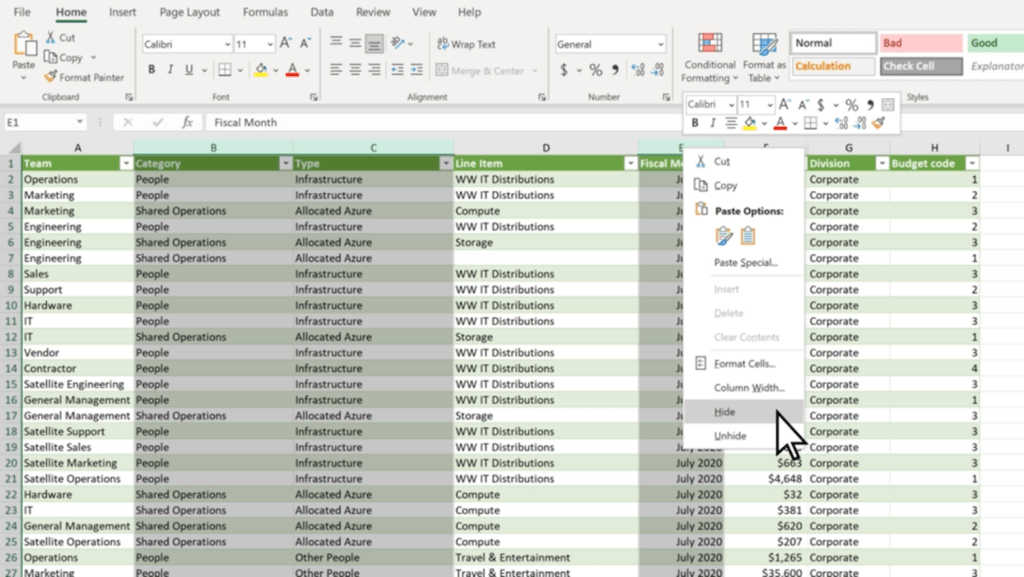
    1. Select all of the rows or columns that you want to hide. (You can use Ctrl to select columns that aren’t adjacent.)
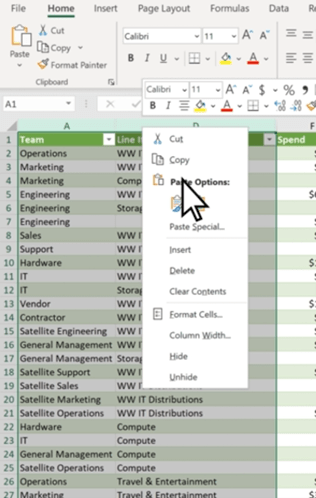
    2. Right-click, and click ‘Hide’

    The selected rows or columns will now be hidden, and won’t show up when you’re using the spreadsheet. 

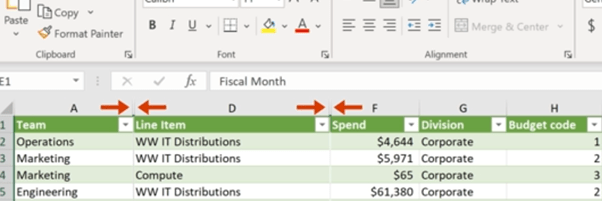
    You can see which parts of your spreadsheet have hidden rows or columns easily too, as there will be two lines in the row or column bar to show hidden cells.

    To easily unhide rows or columns, you can double-click the two aforementioned lines. Or, you can select the two adjacent rows or columns and right-click, and select ‘Unhide’.

    Hiding rows and columns is particularly useful for long spreadsheets such as day sheets or call logs – as you avoid having to scroll down to the end of the sheet. 

    Select Using Ctrl + Shift

    Excel has many elegant tools you can use to make tasks quick and easy, and selecting cells is no different. Microsoft allows you to quickly select multiple cells using both Shift and Ctrl, which can easily speed up your workflow when working in the program.

    Clicking on two cells while pressing Ctrl will select those cells simultaneously, as will any other cell you click while pressing Ctrl. 

    Shift, on the other hand, allows you to create a box selection of cells. Simply click whatever cell you want to be on the top left corner, and then Shift-click whichever cell is desired for the bottom right corner. Excel will automatically select a rectangular box based on the selected cells.

    However, you can use both Ctrl + Shift to select whole rows and columns. By selecting a cell and holding down Ctrl + Shift, you can use your arrow keys to select all the data above (by pressing Up), below (by pressing Down) or left and right (with the respective arrow keys).

    Use Quick Analysis

    Quick Analysis is another tool you can use to save time and quickly do what would usually be a time-consuming task. This tool lets you easily format your data, or even make a chart out of a set of data, with just a few button clicks.

    1. Select the cells you want to use.
    2. Press Ctrl + Q on your keyboard or the small Quick Analysis tool on the bottom right of your selection.
    3. Choose whatever you want to format your data with, or a chart if you want to use a chart.

    This tool saves a lot of time and has many functions that can generally improve your Excel experience and workflow.

    Automate with IF Functions

    Using IF functions to easily automate your spreadsheet is one of the most useful tools in Microsoft Excel. 

    In any cell, firstly type ‘=IF’.  The = symbol indicates to Excel that you’re entering a function, of which there are many you can learn and use. Then, you want to create your new function.

    For example, this function is looking to see if C2 is Greater than B2, and will display ‘Over Budget’ if it is. Otherwise, it will display ‘Within Budget’. IF functions work with the templating =IF(Condition, Is, Otherwise), with Is and Otherwise being your two outcomes. You can use this template to simply make your own simple IF functions with ease.

    Tag Colleagues in Comments

    Collaboration is key to any modern workplace, and Microsoft knows this. This is why Excel — and the other Microsoft 365 programs — have great collaboration features.

    One simple feature you should be utilising in collaboration is being able to tag colleagues in comments. This can be super useful and helps improve communication.

    To do so, simply right-click wherever you want to comment and select ‘New Comment’. Then, @Mention whoever you want to tag in the comment. This will automatically send them an email notifying them that you’ve tagged them. 

    Add More Than One Column

    Creating multiple columns in Excel is simple, and a great way to add more columns to a finished table or easily expand your spreadsheet.

    1. Click on the column to the right of where you want to make new columns.
    2. Press and hold Ctrl, and click on ‘Insert Columns’ in the pop-up menu.
    3. Enter the specified number of columns, then click Done.

    Make Use of Data Validation

    Data validation restricts user entry, ensuring that only correct data is being entered into the spreadsheet. For example, you can restrict entry on certain cells to only allow numerical values between 50 and 100. Or, you can only allow text that contains a certain word.

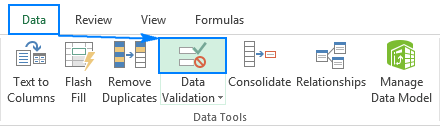
    To do so, select the cells you want to validate, then head over to the ‘Data’ Tab. Then, click ‘Data Validation’. This will bring up a data validation menu which you can use to create new rules for those specific cells.

    (Source: https://www.ablebits.com/office-addins-blog/data-validation-excel/)

    Bonus Shortcut Keys

    Excel has lots of shortcut keys that you can use to easily enter data or complete actions that would usually require you to type or click a few buttons. Some of the best ones are:

    • Start editing the current cell: F2 (This is a crucial one, as it speeds up your workflow significantly).
    • Insert the current time: Ctrl+Shift+:
    • Change a Date’s format: Ctrl+Shift+# 
    • View all formulas in a sheet: Ctrl + `
    • Hide the current column: Ctrl + 0
    • Hide the current row: Ctrl + 9
    • Strike through the text in a cell: Ctrl + 5
    • Switch between currently open workbooks in different windows: Ctrl + F6
    • Flick through the sheets in the whole workbook: Ctrl + PageUp/PageDown

    Get started with Excel and 365 Today

    These tips will help you become an Excel master and truly enhance your workflow, and show how powerful and useful Excel actually is in the modern world. With so many features, it’s no wonder that so many companies still utilise Excel daily.

    Getting started with Microsoft 365 is a great way to take your business to the next level. Including Excel, 365 has all of the programs any modern office needs to keep up with the current business world, and has many tools that will make your workplace truly shine. 

    Get in touch today and see how we can help you get started!

  • Cybersecurity – The real risks!

    Cybersecurity – The real risks!

    [et_pb_section admin_label=”section”] [et_pb_row admin_label=”row”] [et_pb_column type=”4_4″][et_pb_text admin_label=”Text”]

    Cybersecurity threats are constantly evolving, and companies must be aware of the risks.

    The risks are constantly evolving

    Cybersecurity threats are constantly evolving, and it’s important to be aware of the latest ones. The risks are changing all the time. The risks are growing in number and severity.

    The risk landscape is always shifting, so it’s important to stay up-to-date on new cybersecurity threats as well as known ones that might have changed or gotten worse over time.

    Who is most at risk?

    Small businesses, that don’t have the resources to protect themselves, are at the greatest risk. Companies that don’t have the right IT systems in place and those with a lot of data but not enough security are also vulnerable. Finally, companies that do not have a plan for dealing with a cyber attack are vulnerable because they cannot respond quickly or effectively when one occurs.

    What to do about it?

    • Build a prevention plan. This can include:
    • Monitoring for suspicious activity and responding quickly to it when it occurs.
    • Having a response plan in place that includes solutions such as backups, antivirus software and firewalls (to name just a few).
    • Ensuring that you know who to contact if there is an incident or breach so they can get started on resolving the problem as soon as possible.
    • Training you team

    Companies need prevention and detection plans.

    Companies need to have a plan in place. If a company is not prepared, it could face huge financial losses and even go out of business. It’s important to know how to respond if an attack occurs, as well as how to recover from one.

    The first step is understanding what cybersecurity threats are out there and how they work so that you can protect your business against them.

    Cyber Essentials – What is it and why do I need it?

    What is it?

    The Cyber Essentials scheme is an ISAMW self-assessment questionnaire process. The questionnaire will then be signed off by a member of the board or an equivalent signory. After this, it is then verified by a certification body trained and licensed to certify against the Cyber Essentials scheme (like ourselves here at The Unite Group). It is important before applying you ensure your organisation meets all the requirements. This includes having evidence ready to be provided to prove you meet the requirements.

    Now the why;

    • Reduce the risk of falling victim to a cyber attack
    • Demonstrate to your customers that you take cyber security seriously
    • Open your organisation to the opportunities of working with the Government and the Ministry of Defence
    • Feel confident you have the basic levels of protection in place

    Conclusion

    The cyber security landscape is changing rapidly, and companies need to stay ahead of the curve. The risks are constantly evolving and there are new threats every day. The best way to protect against these threats is with a proactive approach that includes prevention and detection plans.

    Cyber Essentials can help with this, and The Unite group can be the one to help you get it!

    [/et_pb_text][/et_pb_column] [/et_pb_row] [/et_pb_section]
  • Mobile Device Management Challenges and How to Solve Them

    Mobile Device Management Challenges and How to Solve Them

    Whether it’s simply to take calls on the go or to send and receive important information, mobile devices are part of every business. Mobile Device Management can help.

    However, they can bring significant challenges for businesses. These challenges are common, but some of these issues cause bigger problems if left unchecked.

    In this article, we’re going to explore these issues — and explain how your organisation can solve these challenges with ease.

    Security & Compliance

    By nature, mobile devices can be a risk for any company. This is because of the way mobile devices can take information outside of the workplace’s system and infrastructure. With this, in mind, this can potentially lead to a breach of important information.

    This is why it’s crucial to develop thorough security measures to ensure that mobile devices are safe:

    • Restricted access: Restrict important information behind biometrics or other forms of authentication.
    • Mobile Device Management (MDM): Implement Mobile Device management (MDM) software to ensure that all devices have the same security features.
    • Compliance: Ensure that each employee is compliant with the rules and requirements set for mobile device use.

    Bring Your Own Device

    Bring Your Own Device (BYOD) programs allow employees to use their own devices at work. While this has productivity benefits, it also comes with a host of challenges of its own:

    • Security Risks: Both with the device and the user, BYOD creates many risk factors. Bad password management, operating system vulnerabilities, and unauthorised applications are just some of the issues that can arise from this.
    • Compliance Issues: Even if the device is secure, BYOD has compliance issues. Due to the personal nature of the device, it’s not unusual for BYOD employees to break security compliance. This is due to having control over their own devices.
    • Vulnerability to attacks and malware: Unlike a managed device issued by your organisation, an external BYOD device can be vulnerable to external threats such as malware and other attacks, due to lower security.
    • Lack of device management/control: It’s unreasonable and unrealistic to expect BYOD employees to give you full control of their personal devices, which means that you’ll never get the same level of security as on work-issued devices.

    However, implementing hard restrictions on your employees’ personal devices with MDM software isn’t a good thing either. Instead, utilising a Mobile device management solution that can distinguish different rules between work-issued devices and BYOD devices is a great way to ensure that this isn’t an issue.

    For example, Microsoft Intune allows you to implement on-premises functionalities of your security network to your BYOD program, meaning that you can implement security features throughout your company’s BYOD setup without having to worry about over-restricting your employees’ use of their devices.

    Patch Management

    The software can — and often will — have vulnerabilities that need to be patched by the developers. This is a vulnerability that isn’t exactly in your control, but it’s vital that you ensure to install patches and fixes as soon as they become available for your organisation.

    It can be easy to delay or forget to install patches throughout your organisation, but this is crucial to patch up any vulnerabilities and exploits within the software that you’re using. 

    Using MDM software to manage and deploy patches throughout your organisation means that you can easily stop powerful vulnerabilities from being exploited. If you don’t make sure to keep on top of this, you’re putting your organisation at risk.

    Lost & Stolen Devices

    Mobile devices are incredibly vulnerable to being misplaced or stolen, which has a few consequences for your organisation:

    • Security: If a device is stolen while not being properly secured, it can cause a security vulnerability and become a breach point for your data.
    • Cost: Replacing stolen and lost devices can get quite expensive, especially if it’s a regular occurrence.
    • Management: Having to remotely remove a device from your organisation without having access to it can be a pain when using some Mobile device management solutions.

    Network Access Control

    Internal data breaches are becoming more and more common with the implementation of mobile devices into the business infrastructure. Network access control will mitigate this, and minimise the risk of an internal breach.

    The most commonly used control technique is the principle of least privilege (PoLP). This is ensuring that people only have access to the data that they need to be able to work, restricting unrequired access throughout your organisation. With this, you can ensure that data is only available to those who need it. 

    Privileged access management (PAM) will also help ensure that you can outline the restrictions and authorisations for each unique device on your network. This means that you can ensure that only the devices that are authorised to access said data can access it, instantaneously blocking other connections.

    How We Can Help

    Mobile devices can create some of the worst vulnerabilities and challenges for modern businesses. Ensuring you are prepared and equipped to deal with these challenges will save significant amounts of time and stress on your business’s resources and IT.

    By implementing the aforementioned security and management solutions that are necessary for your network, and ensuring that the importance of compliance is emphasised throughout your team, the struggles and challenges of utilising mobile devices throughout your organisation will be greatly reduced.

    Are you looking to help improve your organisation’s security posture? Get in touch with us today, and see how we can help!