Here at the Unite Group, we like to keep our clients and network up to date with the information that can help them in their business using our blog pages.
We cover topics such as IT support, Hosted telephony, Cyber security, Digital marketing, and much more. We think it is important to educate our audience using our blog, not only on these topics but to give a behind-the-scenes view on what is going on day to day at the Unite Group and the people who make up our team. Having knowledge of what we offer can help you to make a more informed choice on the services you need and which ones would work best for your business.
If there are topics you would like to see us create content around then drop us an email and we will get these added for you.
Cloud Hosted Telephony is the latest technology that allows you to do more, faster and with less hassle. You can replace your on-premise phone systems by moving them into the cloud and accessing it from anywhere. This helps businesses of all sizes. It saves money, time, and resources while making sure its employees stay connected.
Why choose hosted cloud telephony?
There are many reasons why you should choose hosted cloud telephony. Here are a few:
Reduced costs – Hosted cloud telephony can save you up to 80% on your telecom costs. Therefore making it an effective way of improving your bottom line and freeing up cash for other business initiatives.
Reduced complexity – There’s no need for expensive hardware or software because everything is managed in the cloud by our team of experts. We can also help with the transition process if required.
Increased flexibility – You can scale up or down as needed without having to worry about capital expenditure or maintenance costs, giving you greater control over how much capital is tied up in telecommunications infrastructure at any given time.
A phone number for your business. This can be a landline or cellular number. It should have a local area code and number that can be easily remembered by customers. If you plan on using the same number as your previous office location or home telephone, then this is a great way to keep things familiar for existing customers. While still maintaining an updated look for new ones!
A computer system that allows access via the internet (PC or Mac). Any device with an internet connection will work just fine!
The advantages of using Hosted Cloud Telephony
Hosted Cloud Telephony is a flexible and scalable solution that can be used to meet your business needs.
Scalability: It is easy to scale your Hosted Cloud Telephony solution as you grow, without having to worry about maintaining additional hardware or software. You just need to add more users, phones or features when required.
Reliability: The hosted service is always available, so there’s no downtime for maintenance or other issues that would affect the quality of service provided by traditional telephony systems.
Flexibility: A cloud-based system allows you great flexibility in terms of how you use it — whether it’s simply as an alternative way of making calls from home or at work; or as part of a larger business process involving video conferencing and integration with other applications such as CRM systems etc., there are many ways in which this technology can benefit your organization’s productivity levels while cutting costs at the same time!
As you can see, there are many benefits to using hosted cloud telephony. It’s easy to get started and it offers a number of features that make your business more efficient. If you’re looking for a new phone system or want to upgrade your existing one, consider this option as an alternative
For more information on telephony solutions and how we could help you contact us today on 01914661050
In this blog, we introduce you to Nic. Nic is one of our Project Engineers here at The Unite Group. Nic is the newest member of our team, having been with us for a little over a month. Nic spends a lot of his time out of the office, on our customer sites. Continue reading to learn more about Nic and his role here at The Unite Group.
Growing up, what did you want to be?
Growing up I always wanted to be a commercial pilot for an airline.
What is your role at The Unite Group and how did you end up where you are now?
My role here at The Unite Group is a Project Engineer. I have worked for a few companies since starting my career, first as a Service Desk Analyst before progressing to 2nd Line Support and then most recently I worked as an Operations Engineer for a SaaS company before going travelling through Asia for the latter half of 2022.
What does a typical day look like at The Unite Group?
So far during my time at The Unite Group, my days have varied a lot. Between working on projects in the office such as building new servers. As well as, remotely supporting customers with issues. I also have been getting out on site to onboard new customers and deliver projects. So it’s fair to say no two days have been the same since I started at The Unite Group just over a month ago.
What is your most and least favourite part of the job?
This is a tricky one to answer! Since I have been here just over a month, I will reserve judgement for now 🤐
What is your greatest achievement?
My greatest achievement is actually still pending. But I have been working towards my private pilot’s license over the past couple of years. I will hopefully be completing it this summer. When this happens it will definitely be my biggest achievement!
What is the best piece of advice you’ve been given?
The best piece of advice I have been given is to take pride in what you do and try your best! I think this has helped me progress throughout my career.
Where do you see yourself in 10 years’ time?
I have not yet fully decided what I want to specialise in. However, I do know that I would like to be working in the cloud space, potentially either in Platform Engineering or as a Solutions Architect. So in 10 years’ time, I picture myself working in one of those areas.
How do you unwind outside of work?
Outside of work I enjoy going karting regularly with a friend. Also, more recently I have taken up hiking. I have climbed some local hills in Northumberland and Yorkshire. Moreover, since I enjoy travelling and visiting new places in general I have also been learning Spanish in my free time to help me on future adventures.
Nic has fit into our team here at The Unite Group perfectly and has really hit the ground running. He is an asset to the projects team and we look forward to seeing him progress within his role with us.
If you would like to learn more about how Nic and The Unite Group can help you with your business technology needs, contact us on, 0191 466 1050.
Has Nic or another member of our team resolved any of your issues recently? Why not leave us a Google review and let us know about the service you received! We’d love to hear your feedback.
Cyber security misconceptions are real. It is a topic that’s been in the news a lot recently. You might have heard about hackers, data breaches, ransomware and so on. The topic might seem complicated and scary, but it doesn’t need to be! If you want to learn more about cyber security and dispel some of the myths surrounding it then keep reading!
A firewall is enough
Firewalls are not enough, they are not a panacea. They can be circumvented and evaded, as well as outdated and outmaneuvered by hackers who know how to exploit them.
A firewall is only as good as its ability to keep attackers out, so if you think your company’s firewall alone will protect it from cyber criminals then you’re in for a rude awakening when they get inside your system anyway–and possibly worse: since many attacks happen through email or social media channels, it’s possible that no one would even notice if someone got through!
The hacker is always a criminal
Not all hackers are criminals. In fact, many are motivated by curiosity or a desire to help others.
Some hackers may be motivated by profit and not know that their actions are illegal.
Hackers are always in your network
Hackers are not always in your network.
Hackers can be anywhere in the world, and they don’t even need to be on your network to cause damage.
If a hacker has access to your computer through malware, he or she can use it as a proxy–a remote control device that allows him or her to manipulate information on that computer from afar.
Hacking is easy
Hacking is not always easy. In fact, it can be quite difficult. Hackers are often portrayed as criminals who break into networks and steal sensitive information. However, there are many other types of hackers with different motivations.
In most cases, hacking requires knowledge about how computers work and how to exploit their vulnerabilities. Hacking can also include social engineering techniques that allow a hacker access to systems through human interaction instead of just technology alone.
Data breaches are the norm
Data breaches are not the norm, but they do happen. If you’re reading this article, it’s likely that you already know that data breaches are a big problem for businesses and individuals alike. Data breaches can have serious consequences for businesses–if their customers lose trust in them because of a breach, they may lose revenue as well and suffer other ill effects as well. Data breaches can also have serious consequences for individuals: if your personal information is stolen by an attacker who uses it to commit identity theft or some other crime against you (such as phishing), then your life will be turned upside down while the authorities try to sort out what happened and whether there was anything they could have done differently to prevent it from happening at all!
Cyber security is not as simple as it seems.
Cyber security is a complex area of study. It requires a lot of knowledge and experience, as well as resources and time.
Many people think that cyber security is something they can do on the side while they are working at their day job or going to school full-time. However, this is not true! Cyber security requires constant attention and vigilance in order to keep your data secure at all times; if you aren’t able to commit yourself fully then it’s best not even starting down this path in the first place
Conclusion
In conclusion, there are a lot of cyber security misconceptions. In fact, cyber security can be quite complicated and difficult to understand. But with proper education and awareness, we can all work together to make sure our networks are safe from hackers!
Here at The Unite Group, we are holding a free webinar – Webinars on Wednesday 29th March at 2 pm to give you more information on how you can keep your business safe.
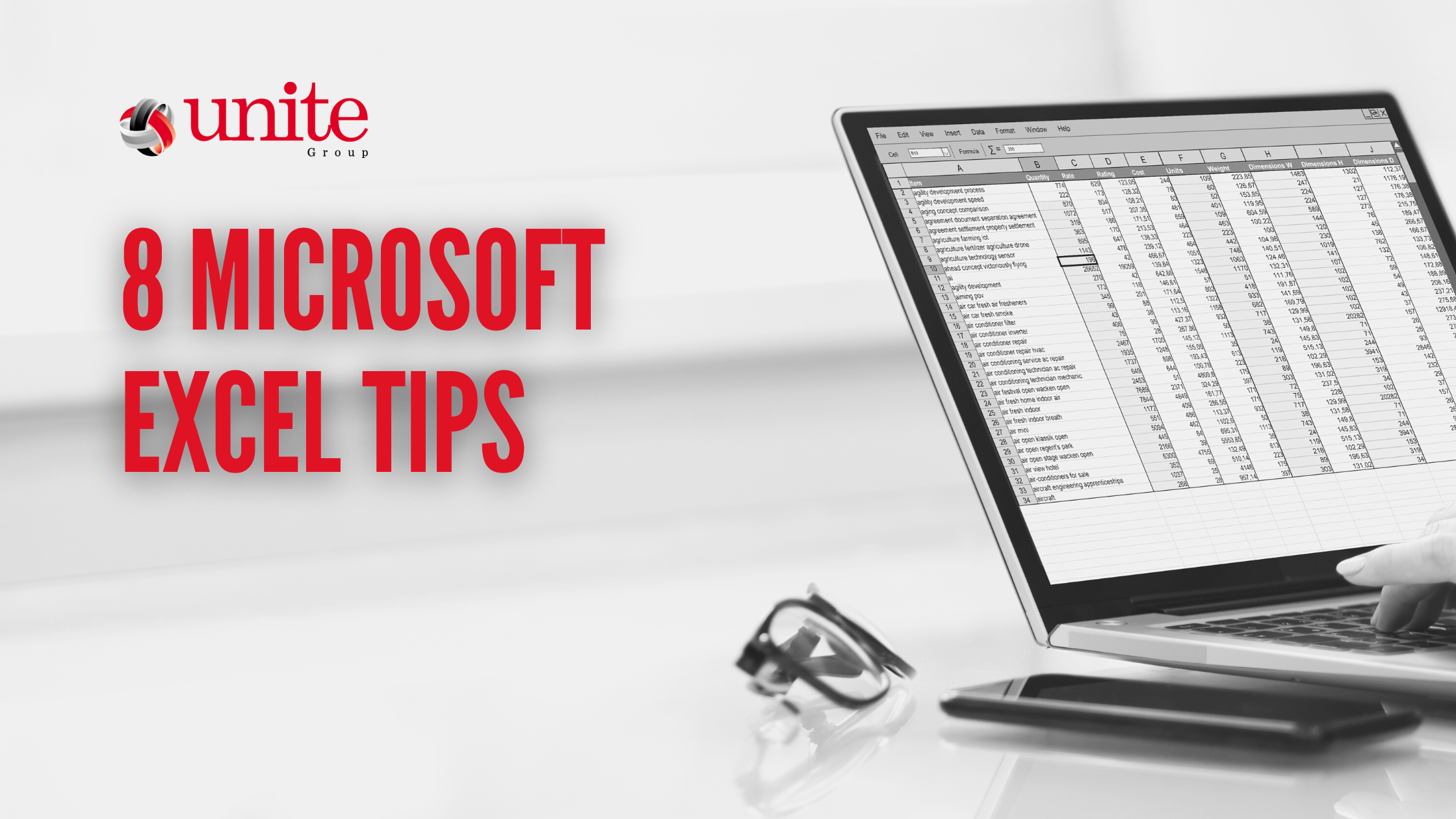
Microsoft Excel, part of the Microsoft 365 suite of productivity and business tools, is the world’s most popular spreadsheet application. It’s used by businesses for finance, accounting, resource planning and more.
Learning the ins and outs of Excel is one of the most effective ways to take your business to the next level, as Microsoft’s flagship spreadsheet program has been a cornerstone of the modern business world for its whole existence.
With spreadsheeting being so important in the modern business world, we believe that knowing how to use Excel’s many features and shortcuts will save you time and truly unlock your company’s spreadsheeting potential.
That’s why in this article, we’re going to go over some of the top tips you should be utilising when using Microsoft Excel.
Hide Rows and Columns
When using Excel and going through your data, sometimes you’ll find that there are certain rows and columns that are just getting in the way.
Or even sometimes, there will be data that’s irrelevant currently that you want to hide for just the time being.
In any case, Microsoft Excel allows you to easily hide rows and columns with a few clicks.
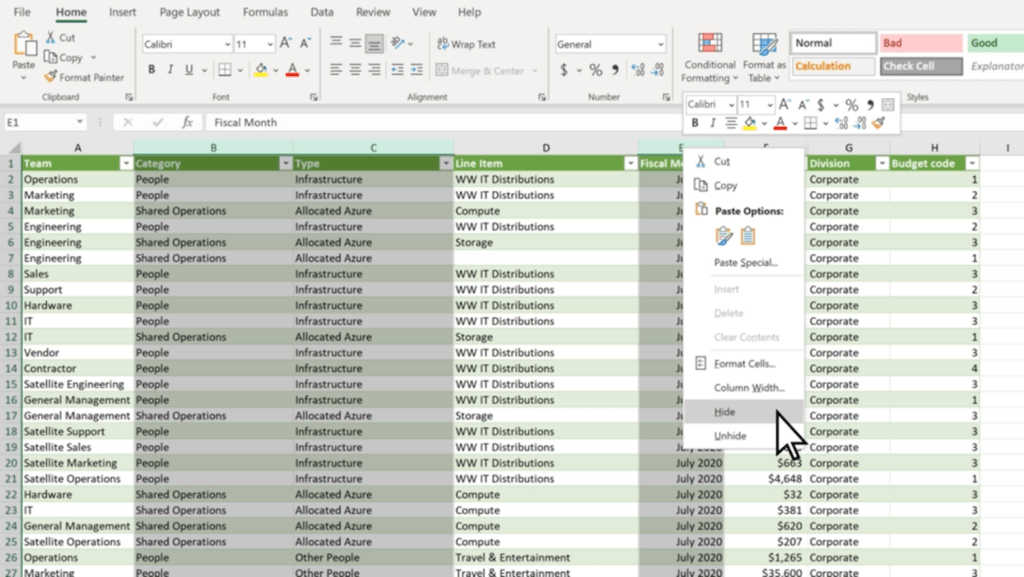
Select all of the rows or columns that you want to hide. (You can use Ctrl to select columns that aren’t adjacent.)
Right-click, and click ‘Hide’
The selected rows or columns will now be hidden, and won’t show up when you’re using the spreadsheet.
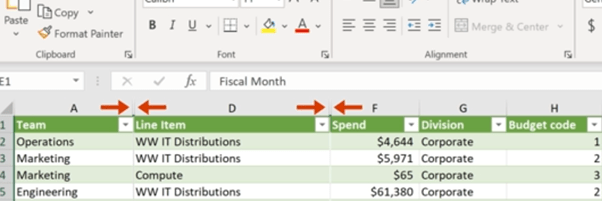
You can see which parts of your spreadsheet have hidden rows or columns easily too, as there will be two lines in the row or column bar to show hidden cells.
To easily unhide rows or columns, you can double-click the two aforementioned lines. Or, you can select the two adjacent rows or columns and right-click, and select ‘Unhide’.
Hiding rows and columns is particularly useful for long spreadsheets such as day sheets or call logs – as you avoid having to scroll down to the end of the sheet.
Select Using Ctrl + Shift
Excel has many elegant tools you can use to make tasks quick and easy, and selecting cells is no different. Microsoft allows you to quickly select multiple cells using both Shift and Ctrl, which can easily speed up your workflow when working in the program.
Clicking on two cells while pressing Ctrl will select those cells simultaneously, as will any other cell you click while pressing Ctrl.
Shift, on the other hand, allows you to create a box selection of cells. Simply click whatever cell you want to be on the top left corner, and then Shift-click whichever cell is desired for the bottom right corner. Excel will automatically select a rectangular box based on the selected cells.
However, you can use both Ctrl + Shift to select whole rows and columns. By selecting a cell and holding down Ctrl + Shift, you can use your arrow keys to select all the data above (by pressing Up), below (by pressing Down) or left and right (with the respective arrow keys).
Use Quick Analysis
Quick Analysis is another tool you can use to save time and quickly do what would usually be a time-consuming task. This tool lets you easily format your data, or even make a chart out of a set of data, with just a few button clicks.
Select the cells you want to use.
Press Ctrl + Q on your keyboard or the small Quick Analysis tool on the bottom right of your selection.
Choose whatever you want to format your data with, or a chart if you want to use a chart.
This tool saves a lot of time and has many functions that can generally improve your Excel experience and workflow.
Automate with IF Functions
Using IF functions to easily automate your spreadsheet is one of the most useful tools in Microsoft Excel.
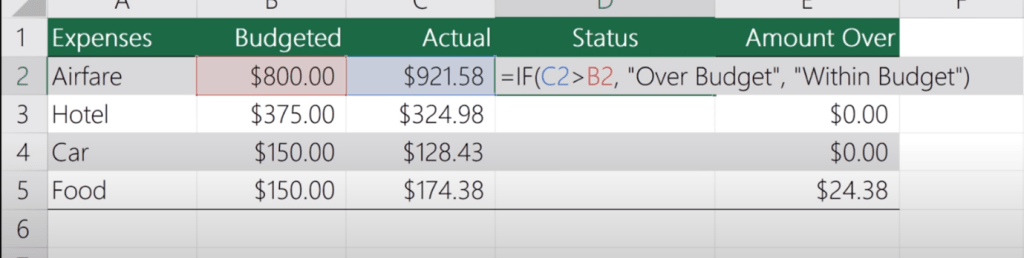
In any cell, firstly type ‘=IF’. The = symbol indicates to Excel that you’re entering a function, of which there are many you can learn and use. Then, you want to create your new function.
For example, this function is looking to see if C2 is Greater than B2, and will display ‘Over Budget’ if it is. Otherwise, it will display ‘Within Budget’. IF functions work with the templating =IF(Condition, Is, Otherwise), with Is and Otherwise being your two outcomes. You can use this template to simply make your own simple IF functions with ease.
Tag Colleagues in Comments
Collaboration is key to any modern workplace, and Microsoft knows this. This is why Excel — and the other Microsoft 365 programs — have great collaboration features.
One simple feature you should be utilising in collaboration is being able to tag colleagues in comments. This can be super useful and helps improve communication.
To do so, simply right-click wherever you want to comment and select ‘New Comment’. Then, @Mention whoever you want to tag in the comment. This will automatically send them an email notifying them that you’ve tagged them.
Add More Than One Column
Creating multiple columns in Excel is simple, and a great way to add more columns to a finished table or easily expand your spreadsheet.
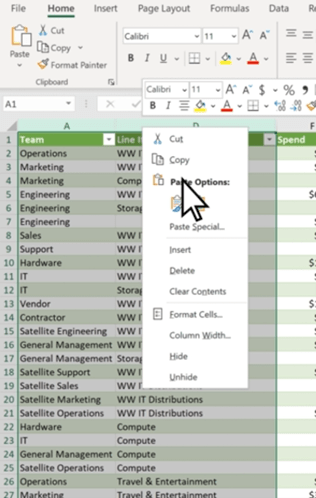
Click on the column to the right of where you want to make new columns.
Press and hold Ctrl, and click on ‘Insert Columns’ in the pop-up menu.
Enter the specified number of columns, then click Done.
Make Use of Data Validation
Data validation restricts user entry, ensuring that only correct data is being entered into the spreadsheet. For example, you can restrict entry on certain cells to only allow numerical values between 50 and 100. Or, you can only allow text that contains a certain word.
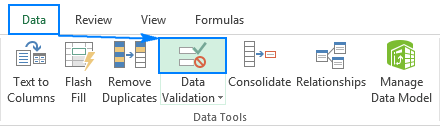
To do so, select the cells you want to validate, then head over to the ‘Data’ Tab. Then, click ‘Data Validation’. This will bring up a data validation menu which you can use to create new rules for those specific cells.
Excel has lots of shortcut keys that you can use to easily enter data or complete actions that would usually require you to type or click a few buttons. Some of the best ones are:
Start editing the current cell: F2 (This is a crucial one, as it speeds up your workflow significantly).
Insert the current time: Ctrl+Shift+:
Change a Date’s format: Ctrl+Shift+#
View all formulas in a sheet: Ctrl + `
Hide the current column: Ctrl + 0
Hide the current row: Ctrl + 9
Strike through the text in a cell: Ctrl + 5
Switch between currently open workbooks in different windows: Ctrl + F6
Flick through the sheets in the whole workbook: Ctrl + PageUp/PageDown
Get started with Excel and 365 Today
These tips will help you become an Excel master and truly enhance your workflow, and show how powerful and useful Excel actually is in the modern world. With so many features, it’s no wonder that so many companies still utilise Excel daily.
Getting started with Microsoft 365 is a great way to take your business to the next level. Including Excel, 365 has all of the programs any modern office needs to keep up with the current business world, and has many tools that will make your workplace truly shine.
Get in touch today and see how we can help you get started!
Cybersecurity threats are constantly evolving, and companies must be aware of the risks.
The risks are constantly evolving
Cybersecurity threats are constantly evolving, and it’s important to be aware of the latest ones. The risks are changing all the time. The risks are growing in number and severity.
The risk landscape is always shifting, so it’s important to stay up-to-date on new cybersecurity threats as well as known ones that might have changed or gotten worse over time.
Who is most at risk?
Small businesses, that don’t have the resources to protect themselves, are at the greatest risk. Companies that don’t have the right IT systems in place and those with a lot of data but not enough security are also vulnerable. Finally, companies that do not have a plan for dealing with a cyber attack are vulnerable because they cannot respond quickly or effectively when one occurs.
What to do about it?
Build a prevention plan. This can include:
Monitoring for suspicious activity and responding quickly to it when it occurs.
Having a response plan in place that includes solutions such as backups, antivirus software and firewalls (to name just a few).
Ensuring that you know who to contact if there is an incident or breach so they can get started on resolving the problem as soon as possible.
Training you team
Companies need prevention and detection plans.
Companies need to have a plan in place. If a company is not prepared, it could face huge financial losses and even go out of business. It’s important to know how to respond if an attack occurs, as well as how to recover from one.
The first step is understanding what cybersecurity threats are out there and how they work so that you can protect your business against them.
The Cyber Essentials scheme is an ISAMW self-assessment questionnaire process. The questionnaire will then be signed off by a member of the board or an equivalent signory. After this, it is then verified by a certification body trained and licensed to certify against the Cyber Essentials scheme (like ourselves here at The Unite Group). It is important before applying you ensure your organisation meets all the requirements. This includes having evidence ready to be provided to prove you meet the requirements.
Now the why;
Reduce the risk of falling victim to a cyber attack
Demonstrate to your customers that you take cyber security seriously
Open your organisation to the opportunities of working with the Government and the Ministry of Defence
Feel confident you have the basic levels of protection in place
Conclusion
The cyber security landscape is changing rapidly, and companies need to stay ahead of the curve. The risks are constantly evolving and there are new threats every day. The best way to protect against these threats is with a proactive approach that includes prevention and detection plans.
Cyber Essentials can help with this, and The Unite group can be the one to help you get it!
Whether it’s simply to take calls on the go or to send and receive important information, mobile devices are part of every business. Mobile Device Management can help.
However, they can bring significant challenges for businesses. These challenges are common, but some of these issues cause bigger problems if left unchecked.
In this article, we’re going to explore these issues — and explain how your organisation can solve these challenges with ease.
Security & Compliance
By nature, mobile devices can be a risk for any company. This is because of the way mobile devices can take information outside of the workplace’s system and infrastructure. With this, in mind, this can potentially lead to a breach of important information.
This is why it’s crucial to develop thorough security measures to ensure that mobile devices are safe:
Restricted access:Restrict important information behind biometrics or other forms of authentication.
Mobile Device Management (MDM): Implement Mobile Device management (MDM) software to ensure that all devices have the same security features.
Compliance:Ensure that each employee is compliant with the rules and requirements set for mobile device use.
Bring Your Own Device
Bring Your Own Device (BYOD) programs allow employees to use their own devices at work. While this has productivity benefits, it also comes with a host of challenges of its own:
Security Risks: Both with the device and the user, BYOD creates many risk factors. Bad password management, operating system vulnerabilities, and unauthorised applications are just some of the issues that can arise from this.
Compliance Issues: Even if the device is secure, BYOD has compliance issues. Due to the personal nature of the device, it’s not unusual for BYOD employees to break security compliance. This is due to having control over their own devices.
Vulnerability to attacks and malware:Unlike a managed device issued by your organisation, an external BYOD device can be vulnerable to external threats such as malware and other attacks, due to lower security.
Lack of device management/control:It’s unreasonable and unrealistic to expect BYOD employees to give you full control of their personal devices, which means that you’ll never get the same level of security as on work-issued devices.
However, implementing hard restrictions on your employees’ personal devices with MDM software isn’t a good thing either. Instead, utilising a Mobile device management solution that can distinguish different rules between work-issued devices and BYOD devices is a great way to ensure that this isn’t an issue.
For example, Microsoft Intune allows you to implement on-premises functionalities of your security network to your BYOD program, meaning that you can implement security features throughout your company’s BYOD setup without having to worry about over-restricting your employees’ use of their devices.
Patch Management
The software can — and often will — have vulnerabilities that need to be patched by the developers. This is a vulnerability that isn’t exactly in your control, but it’s vital that you ensure to install patches and fixes as soon as they become available for your organisation.
It can be easy to delay or forget to install patches throughout your organisation, but this is crucial to patch up any vulnerabilities and exploits within the software that you’re using.
Using MDM software to manage and deploy patches throughout your organisation means that you can easily stop powerful vulnerabilities from being exploited. If you don’t make sure to keep on top of this, you’re putting your organisation at risk.
Lost & Stolen Devices
Mobile devices are incredibly vulnerable to being misplaced or stolen, which has a few consequences for your organisation:
Security:If a device is stolen while not being properly secured, it can cause a security vulnerability and become a breach point for your data.
Cost:Replacing stolen and lost devices can get quite expensive, especially if it’s a regular occurrence.
Management: Having to remotely remove a device from your organisation without having access to it can be a pain when using some Mobile device management solutions.
Network Access Control
Internal data breaches are becoming more and more common with the implementation of mobile devices into the business infrastructure. Network access control will mitigate this, and minimise the risk of an internal breach.
The most commonly used control technique is the principle of least privilege (PoLP). This is ensuring that people only have access to the data that they need to be able to work, restricting unrequired access throughout your organisation. With this, you can ensure that data is only available to those who need it.
Privileged access management (PAM) will also help ensure that you can outline the restrictions and authorisations for each unique device on your network. This means that you can ensure that only the devices that are authorised to access said data can access it, instantaneously blocking other connections.
How We Can Help
Mobile devices can create some of the worst vulnerabilities and challenges for modern businesses. Ensuring you are prepared and equipped to deal with these challenges will save significant amounts of time and stress on your business’s resources and IT.
By implementing the aforementioned security and management solutions that are necessary for your network, and ensuring that the importance of compliance is emphasised throughout your team, the struggles and challenges of utilising mobile devices throughout your organisation will be greatly reduced.
Are you looking to help improve your organisation’s security posture? Get in touch with us today, and see how we can help!
Cyberattacks can be incredibly damaging for any company. So it is important to know how you can recover from a cyberattack. Even small-scale attacks can be huge for a company. Let alone a larger attack that might throw your company into a crisis.
Recovering from a cyberattack can take anywhere from a few weeks to months. This all depends on how well you prepare your business against threats online.
In this blog, we will go over the steps to take to recover from a cyberattack. Even if you’re not tech-savvy, familiarising yourself with these steps could be the difference between recovering quickly or not at all.
Steps to Recover from a Cyberattack
Involve a Trusted Advisor
No matter how much you know about cybersecurity, a trusted advisor will be the best person to consult about moving forward from a cyberattack.
They can also help strengthen your security to ensure the same doesn’t occur in the future. Getting in touch with trusted advisors like ourselves can also provide other services for your company.
Getting in touch with ourselves who can help you move forward. We can help protect your company from cyberattacks is a great way to make sure that your business isn’t crippled in the future by an incident.
We’re here to help you recover from a cyberattack! Contact us if you want to take the first step to move past a cybersecurity incident.
Create and Follow a Cyber Incident Response Plan
A Cyber Incident Response Plan is a document that outlines whats you should do in the event of a cyber incident. They are crucial to any business. Especially with the rising threat of cybercrime and an attack being possible at any moment. This will be key to helping you recover from a cyberattack.
A basic Cyber Incident Response Plan should contain:
Key Contacts: These are key IT contacts within your organisation — such as your trusted advisor, IT personnel, Senior Management, PR, HR, Legal, and Insurance. Ensure that multiple contact methods are included to avoid key personnel becoming unavailable.
Escalation Criteria: This is a criterion of when to seriously escalate an issue, to avoid false flags and other possibilities that could cause unnecessary vulnerability or waste resources.
Basic Flowchart: A flowchart of simple steps to take to ensure that personnel is aware of the priorities going forward.
A Conference Number: This should be available for urgent incident calls.
Basic Guidance on Legal or Regulatory Requirements: An overview of legal and regulatory requirements such as when to engage legal counsel and HR.
Ensuring that this plan not only exists but is regularly kept up to date is crucial.
Follow Your Business Continuity Plan
A business continuity plan (BCP) is a prevention and recovery system that helps mitigate risks. Any company should have a plan in place to ensure that they’re protected from any major incident. This includes to recover from a cyberattack within their institution.
Ensuring to follow this plan includes training colleagues, employees, and staff on the importance of the plan and how it should be undertaken. This way, everyone knows exactly what they need to be doing and all confusion in the stressful situation is eliminated.
Safely Recover Data
At this point, you’ll want to start restoring your data and infrastructure to get your company back to the point where it was before the attack. With this, you’ll want to restore data from any backups and archives you have access to.
This is why it’s imperative that you back up your company’s data regularly. In the event of a catastrophe, having an isolated backup where you can easily restore your organisation’s data is one of the best ways to ensure that you can get your company back up and running as fast as possible.
Ensure that there are no remaining vulnerabilities before recovering your data, to ensure that you don’t leave access for a possible future breach. Ensuring that you’re doing everything safely is essential, to remove any possible future risks.
Learn from the Attack
Any attack is a learning opportunity for your institution. To ensure a breach or attack doesn’t happen in the future, by analysing the attack and noting the vulnerabilities and possible causes of the breach is key.
Ensure that this is an honest and clear process. There is no point in covering up mistakes and flaws. Improving them is the only way to stop a future breach. Learning from any mistakes and vulnerabilities is the best way forwards. This ensures that your company is protected going forward, as it allows you to patch up those vulnerabilities and ensure that there are checks and balances to protect the organisation.
How We Can Help
Cyberattacks can be incredibly damaging to your business’s infrastructure, but there’s always a way forward. Ensuring to follow these steps to help your company get back to its best shape is vital. This will be the difference between a company that stumbles and a company that doesn’t when faced with recovering from a cyberattack.
Having a helping hand along the way can be so important. We are here to help, and to ensure that your company can be protected.
Have you thought about Cyber essentials? For more information on Cyber essentials and how we can help you, get in touch.
If you’re using a Gmail email for business marketing, you could be in trouble.
If you’re using a Gmail email for business marketing, you could be in trouble. The reason? It’s easy to get confused between personal and professional emails when they all come from the same address. This can lead to some embarrassing situations and even legal problems if someone thinks that they are communicating with an individual when they really aren’t.
Having a personal email and a business email can be confusing, especially if they have the same name. It’s even more confusing when your website has the same name as your personal account and vice versa–and then there are all those other accounts you may have in addition to these two!
It might seem like an easy fix: just use different emails for each of your accounts. But then what happens when one person wants to contact another person? Or when someone wants information from one company but needs help from another? If all the emails are different, how will anyone be able to find what they’re looking for?
Is Gmail the best choice for business email?
If you’re using a Gmail email for business, it’s time to make a change. In fact, if you have any kind of marketing campaign going on that involves an email address that ends with @gmail.com or @yahoo.com (or even @hotmail or @aol), this article is for you.
Why? Because if someone wants to contact your company and can’t find the right one on Google due to your choice of email provider–or worse yet, has trouble receiving emails from customers because their ISP blocks them as spam–you could lose business by default.
YOUR BUSINESS EMAIL ADDRESS MATTERS MORE THAN YOU THINK
Make the right first impression about you and your business
Gmail is a great tool for personal use, but it’s not the best choice for business email. If you’re looking for something more professional, then chat with our friendly team today and we can talk through the options of setting you up with a professional email address.
Whether you’re looking for work, expanding your network, or managing your own small business, a professional email address is a must.
Let’s cut to the chase: you need to have you @yourdomain .com
If you are looking to create a professional look for your business then get in touch to see how we can help.
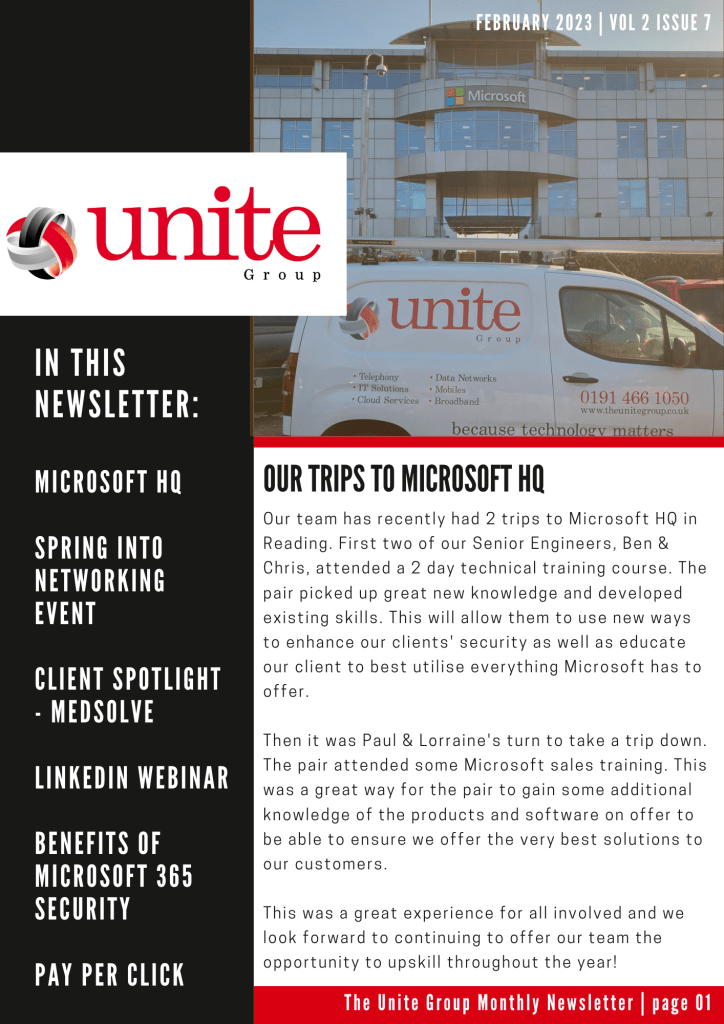
We’re back again with our monthly newsletter to keep you up to date with everything that has been going on here at The Unite Group!
In this newsletter: We tell you about our exciting trips to Microsoft HQ, Network+ announce their next event – Spring into Networking, we spotlight our client Medsolve, we offer a FREE webinar to our customers, share the benefits of Microsoft 365 security & explain the advantages of pay per click marketing.
To read The Unite Group’s February Monthly Newsletter, click on the image below!
LinkedIn is a social media platform that’s geared toward professionals, so it’s no surprise that business owners are flocking to it. It’s a great way to network with other business people, find clients and partners, and even gain new employees. Here are some of the benefits of using LinkedIn for business.
It’s free.
LinkedIn is free to use. You don’t have to pay any fees or sign up for a subscription, so you can use it as much or as little as you’d like. It’s also easy and quick to create a profile on LinkedIn, which makes it easy for professionals from all walks of life–from students looking for summer internships all the way up to senior executives at major companies–to get started with the platform.
LinkedIn offers several ways for users who are interested in connecting with one another, including sending messages directly through their inboxes or posting content publicly so that others can see it (or comment on it). This means that even if someone feels uncomfortable connecting directly over email or phone calls right away (which isn’t uncommon), they can still interact without being too formal about things like introductions before getting into more personal topics later on down the line when both parties feel ready enough
It’s an easy way to network.
LinkedIn is an easy way to network. Think of LinkedIn the same way you would if you went to a face-to-face networking event. It is a virtual space of people in business with who you can get to know and build relationships. When you have been to a networking event and met new people, connect with them. Once back in the office, you can then continue to conversation online allowing you to keep this going without waiting to have to meet again. You can learn more about them and engage with their and their business’s content only strengthening this relationship.
You can drive traffic to your website and social media accounts.
Using LinkedIn for business can drive traffic to your website, social media accounts, and blog.
LinkedIn is a great place for you to share content from your website or blog with the LinkedIn audience. If someone likes what they read on LinkedIn, they will click through and read more of it on your site or in an email newsletter. This can help boost engagement with new readers who may not have seen your work before!
LinkedIn also makes it easy for people who visit one of your posts on their mobile phone or tablet device by auto-populating links back up into their browser so they can easily share them with friends via email or other social media platforms without having to type anything out themselves!
Have you thought about how your employees could support your company’s Linkedin presence?
Having your employees a part of your digital marketing efforts can support getting the message across to your customers about your services as well as the people behind the company which will also support the customer service aspect of your business.
A few stats that can support the reasons why you should look to work with your employees on LinkedIn;
According to studies a salesperson who regularly engages on LinkedIn is 45% more likely to exceed quota?
3% of employees share content about their company, but they’re responsible for driving 30% of the total engagement a company sees.
On average, a company’s employees’ networks are at least 10x larger than a company’s follower base.
With this in mind,
LinkedIn is a great way to market your business and connect with other people in your industry. It’s also free and easy to use! If you want to learn more about how you can use LinkedIn and work with your employees to support your digital marketing efforts then why not sign up for our Employee Engagement Webinar on the 1st of March 2 pm -3pm.
To provide the best experiences, we use technologies like cookies to store and/or access device information. Consenting to these technologies will allow us to process data such as browsing behavior or unique IDs on this site. Not consenting or withdrawing consent, may adversely affect certain features and functions.
Functional
Always active
The technical storage or access is strictly necessary for the legitimate purpose of enabling the use of a specific service explicitly requested by the subscriber or user, or for the sole purpose of carrying out the transmission of a communication over an electronic communications network.
Preferences
The technical storage or access is necessary for the legitimate purpose of storing preferences that are not requested by the subscriber or user.
Statistics
The technical storage or access that is used exclusively for statistical purposes.The technical storage or access that is used exclusively for anonymous statistical purposes. Without a subpoena, voluntary compliance on the part of your Internet Service Provider, or additional records from a third party, information stored or retrieved for this purpose alone cannot usually be used to identify you.
Marketing
The technical storage or access is required to create user profiles to send advertising, or to track the user on a website or across several websites for similar marketing purposes.