
Category: Uncategorized

Uncategorized Blog Posts

  • Unlocking Seamless Communication: Embracing Voice Over IP with Microsoft Teams

    Unlocking Seamless Communication: Embracing Voice Over IP with Microsoft Teams

    Unlocking Seamless Communication: Embracing Voice Over IP with Microsoft Teams

    In today’s interconnected business landscape, communication forms the bedrock of success. The advent of remote work and the need for fluid interactions have given rise to innovative solutions. One such solution is Voice Over IP (VoIP) with Microsoft Teams, a game-changing technology that transcends geographical boundaries and enhances collaboration.

    In this article, we’ll explore the transformative power of VoIP within the Microsoft Teams ecosystem and how it’s reshaping the way businesses communicate.

    The Essence of VoIP with Microsoft Teams

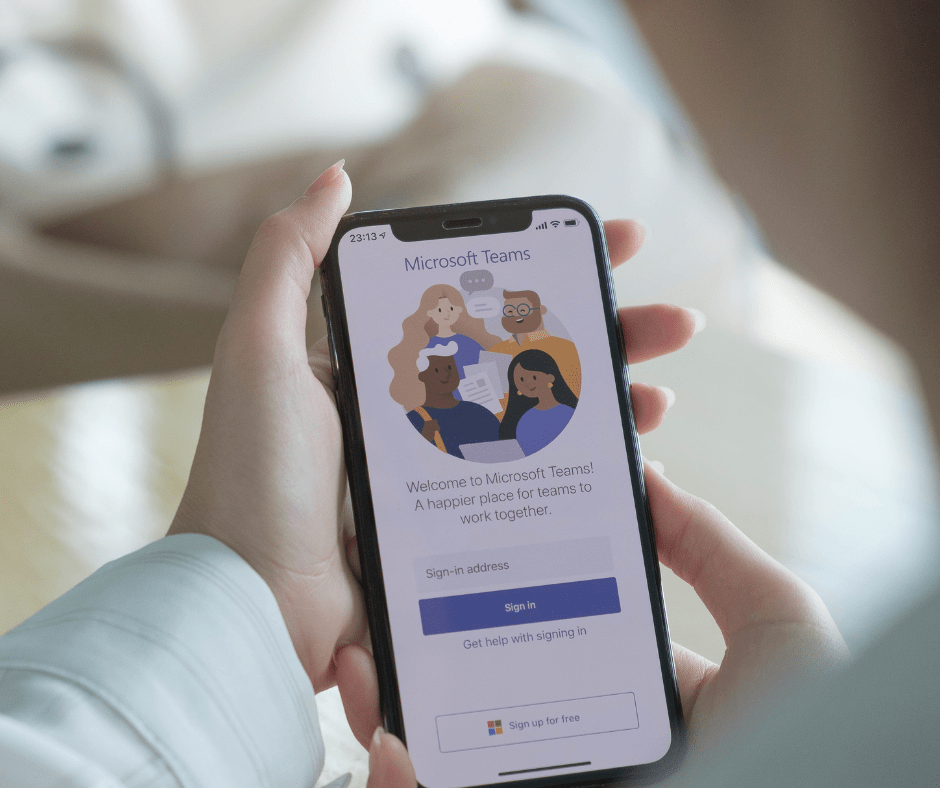
    Voice Over IP, often referred to as VoIP, leverages internet connectivity to facilitate voice communication. Microsoft Teams, a comprehensive collaboration platform, has seamlessly integrated VoIP capabilities into its suite of features. This integration allows users to make and receive high-quality voice calls directly within the Teams application, eliminating the need for traditional phone systems. The result is a unified communication hub where teams can effortlessly transition from messaging to voice calls, driving productivity and collaboration.

    Breaking Geographical Barriers

    The geographical limitations that once constrained communication are fading away with VoIP and Microsoft Teams. With VoIP, distance becomes irrelevant. Team members spread across different cities or even countries can communicate as if they were in the same room. This is particularly significant for businesses with global operations or remote teams, as VoIP fosters a sense of closeness that transcends physical locations.

    Cost-Effective Communication

    Traditional phone systems often come with substantial setup and maintenance costs. VoIP with Microsoft Teams revolutionises cost structures by leveraging existing internet connections. There’s no need for intricate hardware installations or separate phone lines. Therefore, this not only reduces upfront expenses but also leads to significant long-term savings. VoIP offers a budget-friendly approach to communication without compromising on quality.

    Seamless Collaboration

    Collaboration thrives on fluid communication. VoIP seamlessly integrates with Microsoft Teams’ collaboration features, creating a comprehensive workspace for teams. Users can initiate voice calls from chat conversations or escalate a messaging thread to a call, all within the same platform. This synergy between VoIP and collaboration tools eliminates the hassle of switching between applications, ensuring a seamless flow of ideas and discussions.

    Flexibility in Communication

    VoIP with Microsoft Teams offers a new level of flexibility in communication. Users can switch between voice and video calls, depending on the context of the conversation. For instance, a quick query might be better suited for a voice call, while a detailed project review could benefit from video conferencing. This adaptability enhances the quality of interactions, making conversations more engaging and productive.

    Enhanced Mobile Experience

    Additionally, in today’s fast-paced world, business communication often extends beyond the office walls. VoIP with Microsoft Teams caters to this reality by offering a robust mobile experience. With the Teams mobile app, users can make and receive VoIP calls on their smartphones or tablets. This untethers communication from the desktop, allowing team members to stay connected, whether they’re in transit, working remotely, or out of the office.

    Integration with Productivity Tools

    The power of VoIP amplifies when integrated with other productivity tools. Microsoft Teams’ integration with Microsoft 365 applications ensures that calls can be made directly from tools like Outlook or SharePoint. This seamless connection enhances productivity by reducing the steps needed to initiate a call. Whether it’s scheduling a call through a calendar invitation. Or reaching out to a colleague from a project document, VoIP simplifies communication workflows.

    Enhanced Security and Management

    Moreover, security is a paramount concern in business communication. Microsoft Teams prioritises security by implementing encryption and multi-factor authentication for VoIP calls. IT administrators also benefit from centralised management and monitoring tools, which ensures that communication remains secure and compliant with organisational policies.

    Conclusion

    In conclusion, Voice Over IP with Microsoft Teams is not just a technological advancement; it’s a paradigm shift in how businesses communicate and collaborate. The synergy between VoIP and Teams’ collaboration features creates a dynamic environment. Where communication transcends boundaries, costs are optimised, and flexibility thrives. As businesses continue to adapt to evolving work dynamics, embracing VoIP with Microsoft Teams becomes a strategic move toward enhanced communication and productivity.

    Empower your teams with the ability to connect effortlessly, collaborate seamlessly, and drive success through the transformative power of Voice Over IP with Microsoft Teams. Contact our team today to find out more! 0191 466 1050
  • How does a cloud phone system work?

    How does a cloud phone system work?

    A cloud phone system is a business communications solution that allows you to use your existing internet connection to make and receive calls. If you want more information on what a Cloud Hosted Phone system is you can find out in out more in our previous blog.

    The benefits of a cloud phone system include:

    • Increased productivity
    • Improved customer service
    • Cost savings

    Features of a Cloud Phone System

    A cloud phone system is a type of VoIP (Voice over Internet Protocol) technology that allows you to make calls from any device that has an internet connection. A cloud phone system offers many benefits, including:

    • Unlimited calling
    • Scalability – you can add more users as your company grows
    • Flexibility – choose the features you want, such as voicemail transcription or call analytics
      they also have many advanced features that allow users to communicate more effectively than with traditional landlines or cell phones alone:

    The Benefits of a Cloud Phone System

    Cloud phone systems offer many benefits to businesses. Some of the most notable include:

    • Cost savings. Cloud phone systems are less expensive than traditional, on-premise solutions because they eliminate the need for hardware, software and equipment maintenance costs. They also offer lower monthly fees because there’s no need for an IT team dedicated to managing the system in your office or workspace.
    • Scalability. They can be scaled up or down based on your needs at any given time–you won’t have any trouble finding a solution that fits into your budget no matter how big or small it is right now!
    • Portability/flexibility/flexibility – You can access all of your information from anywhere with an internet connection (and even without one), so if you’re looking for something that works well both at home and on-the-go then this could be perfect for you! It’s easy enough that anyone could learn how quickly too!

    How to Choose a Cloud Phone System

    You should consider the following features when choosing a cloud phone system:

    • Scalability. A good cloud phone system allows you to add or remove users on the fly, so you can grow your business.
    • Pricing. They are generally less expensive than traditional landlines, but they may not be as cheap as you think! Make sure to compare apples-to-apples by factoring in all costs such as equipment, installation, and maintenance fees before making a decision.
    • Customer service/reviews/compatibility with other services (e.g., CRM). If there’s anything we’ve learned from our years in business it’s that nothing matters more than having good customer service–so make sure whoever provides this for your new phone system has positive reviews online and works well with other apps like Google Apps or Salesforce!

    Setting Up a Cloud Phone System

    If you’re new to cloud phone systems, the process of setting up your system can seem a bit overwhelming. But don’t worry! We’ve outlined the steps below and broken them down into easy-to-follow sections. Just follow along and you’ll be talking on your new phone system in no time!

    • Choose a provider: There are many different providers offering cloud phone solutions today, so it’s important that you choose one that has all the features and functions that meet your business needs.
    • Sign up for service: After finding a provider that meets all those needs, it’s time to sign up for their services by filling out an online form or calling them directly (if possible). If there are any questions about which package is right for you or how much it will cost per month/year/etc., please ask them before proceeding further–this way there won’t be any surprises later on down the line when bills start rolling in unexpectedly high amounts due to unexpected charges like setup fees or equipment rentals which may not have been made clear upfront by sales reps during initial conversations with potential customers.”

    Managing a Cloud Phone System

    As the administrator, you’ll be able to manage settings and monitor usage. You can also manage users, monitor system performance and troubleshoot problems.

    Cloud phone systems are great for businesses of all sizes. They provide many benefits, including:

    • Increased productivity
    • Lower costs and better ROI
    • Better customer service and support
      If you’re looking for a cloud phone system that meets your needs, it’s important to choose the right provider.

    For more information on telephony solutions and how we could help you contact us today on 01914661050

  • March 2023 – Newsletter

    March 2023 – Newsletter

    [et_pb_section admin_label=”section”] [et_pb_row admin_label=”row”] [et_pb_column type=”4_4″][et_pb_text admin_label=”Text”]

    We’re back again with our monthly newsletter to keep you up to date with everything that has been going on here at The Unite Group!

    In this newsletter: We tell you about Rob’s trip to the ISAME seminar, Network+ announce their next event – Networking at Leila Lilly’s, we attended Inflo‘s global gathering, we offer a FREE webinar to our customers, Meet our new team members, and learn more about our hosted telephone system.

    To read The Unite Group’s February Monthly Newsletter, click on the image below!

    To be added to our mailing list drop us an email, info@theunitegroup.co.uk or to speak to our friendly team call us on, 0191 466 1050

    [/et_pb_text][/et_pb_column] [/et_pb_row] [/et_pb_section]
  • Cyber Security Misconceptions

    Introduction

    Cyber security misconceptions are real. It is a topic that’s been in the news a lot recently. You might have heard about hackers, data breaches, ransomware and so on. The topic might seem complicated and scary, but it doesn’t need to be! If you want to learn more about cyber security and dispel some of the myths surrounding it then keep reading!

    A firewall is enough

    Firewalls are not enough, they are not a panacea. They can be circumvented and evaded, as well as outdated and outmaneuvered by hackers who know how to exploit them.

    A firewall is only as good as its ability to keep attackers out, so if you think your company’s firewall alone will protect it from cyber criminals then you’re in for a rude awakening when they get inside your system anyway–and possibly worse: since many attacks happen through email or social media channels, it’s possible that no one would even notice if someone got through!

    The hacker is always a criminal

    Not all hackers are criminals. In fact, many are motivated by curiosity or a desire to help others.

    Some hackers may be motivated by profit and not know that their actions are illegal.

    Hackers are always in your network

    • Hackers are not always in your network.
    • Hackers can be anywhere in the world, and they don’t even need to be on your network to cause damage.
    • If a hacker has access to your computer through malware, he or she can use it as a proxy–a remote control device that allows him or her to manipulate information on that computer from afar.

    Hacking is easy

    Hacking is not always easy. In fact, it can be quite difficult. Hackers are often portrayed as criminals who break into networks and steal sensitive information. However, there are many other types of hackers with different motivations.

    In most cases, hacking requires knowledge about how computers work and how to exploit their vulnerabilities. Hacking can also include social engineering techniques that allow a hacker access to systems through human interaction instead of just technology alone.

    Data breaches are the norm

    Data breaches are not the norm, but they do happen. If you’re reading this article, it’s likely that you already know that data breaches are a big problem for businesses and individuals alike. Data breaches can have serious consequences for businesses–if their customers lose trust in them because of a breach, they may lose revenue as well and suffer other ill effects as well. Data breaches can also have serious consequences for individuals: if your personal information is stolen by an attacker who uses it to commit identity theft or some other crime against you (such as phishing), then your life will be turned upside down while the authorities try to sort out what happened and whether there was anything they could have done differently to prevent it from happening at all!

    Cyber security is not as simple as it seems.

    Cyber security is a complex area of study. It requires a lot of knowledge and experience, as well as resources and time.

    Many people think that cyber security is something they can do on the side while they are working at their day job or going to school full-time. However, this is not true! Cyber security requires constant attention and vigilance in order to keep your data secure at all times; if you aren’t able to commit yourself fully then it’s best not even starting down this path in the first place

    Conclusion

    In conclusion, there are a lot of cyber security misconceptions. In fact, cyber security can be quite complicated and difficult to understand. But with proper education and awareness, we can all work together to make sure our networks are safe from hackers!

    Here at The Unite Group, we are holding a free webinar – Webinars on Wednesday 29th March at 2 pm to give you more information on how you can keep your business safe.

  • Make the most of Microsoft Excel with these top 8 tips  

    Make the most of Microsoft Excel with these top 8 tips  

    Microsoft Excel, part of the Microsoft 365 suite of productivity and business tools, is the world’s most popular spreadsheet application. It’s used by businesses for finance, accounting, resource planning and more.

    Learning the ins and outs of Excel is one of the most effective ways to take your business to the next level, as Microsoft’s flagship spreadsheet program has been a cornerstone of the modern business world for its whole existence.

    With spreadsheeting being so important in the modern business world, we believe that knowing how to use Excel’s many features and shortcuts will save you time and truly unlock your company’s spreadsheeting potential. 

    That’s why in this article, we’re going to go over some of the top tips you should be utilising when using Microsoft Excel.

    Hide Rows and Columns

    When using Excel and going through your data, sometimes you’ll find that there are certain rows and columns that are just getting in the way. 

    Or even sometimes, there will be data that’s irrelevant currently that you want to hide for just the time being. 

    In any case, Microsoft Excel allows you to easily hide rows and columns with a few clicks.

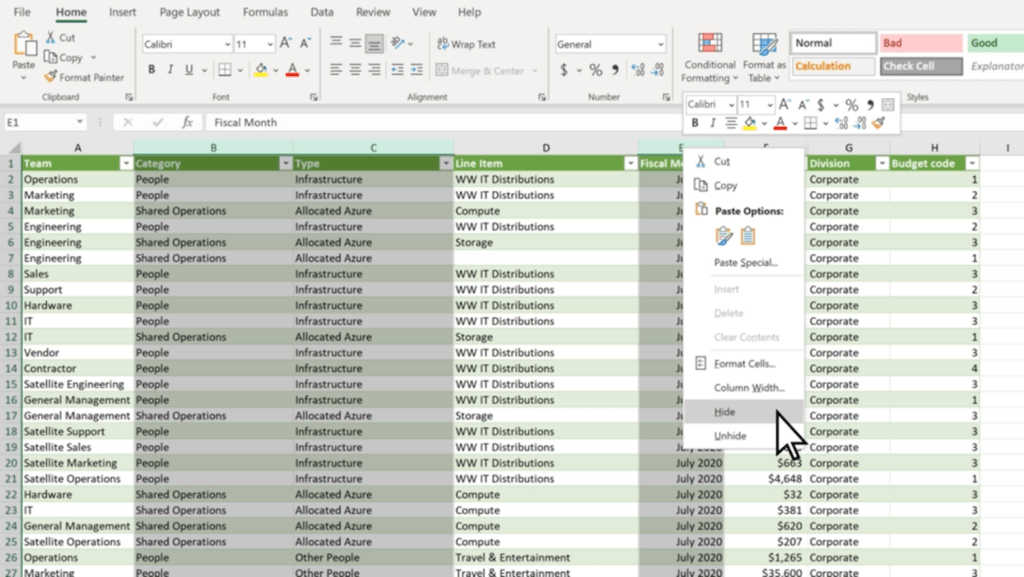
    1. Select all of the rows or columns that you want to hide. (You can use Ctrl to select columns that aren’t adjacent.)
    2. Right-click, and click ‘Hide’

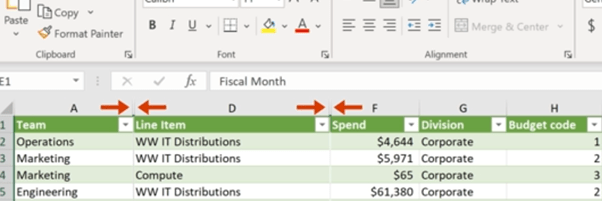
    The selected rows or columns will now be hidden, and won’t show up when you’re using the spreadsheet. 

    You can see which parts of your spreadsheet have hidden rows or columns easily too, as there will be two lines in the row or column bar to show hidden cells.

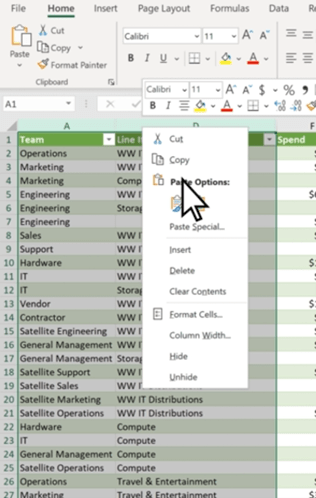
    To easily unhide rows or columns, you can double-click the two aforementioned lines. Or, you can select the two adjacent rows or columns and right-click, and select ‘Unhide’.

    Hiding rows and columns is particularly useful for long spreadsheets such as day sheets or call logs – as you avoid having to scroll down to the end of the sheet. 

    Select Using Ctrl + Shift

    Excel has many elegant tools you can use to make tasks quick and easy, and selecting cells is no different. Microsoft allows you to quickly select multiple cells using both Shift and Ctrl, which can easily speed up your workflow when working in the program.

    Clicking on two cells while pressing Ctrl will select those cells simultaneously, as will any other cell you click while pressing Ctrl. 

    Shift, on the other hand, allows you to create a box selection of cells. Simply click whatever cell you want to be on the top left corner, and then Shift-click whichever cell is desired for the bottom right corner. Excel will automatically select a rectangular box based on the selected cells.

    However, you can use both Ctrl + Shift to select whole rows and columns. By selecting a cell and holding down Ctrl + Shift, you can use your arrow keys to select all the data above (by pressing Up), below (by pressing Down) or left and right (with the respective arrow keys).

    Use Quick Analysis

    Quick Analysis is another tool you can use to save time and quickly do what would usually be a time-consuming task. This tool lets you easily format your data, or even make a chart out of a set of data, with just a few button clicks.

    1. Select the cells you want to use.
    2. Press Ctrl + Q on your keyboard or the small Quick Analysis tool on the bottom right of your selection.
    3. Choose whatever you want to format your data with, or a chart if you want to use a chart.

    This tool saves a lot of time and has many functions that can generally improve your Excel experience and workflow.

    Automate with IF Functions

    Using IF functions to easily automate your spreadsheet is one of the most useful tools in Microsoft Excel. 

    In any cell, firstly type ‘=IF’.  The = symbol indicates to Excel that you’re entering a function, of which there are many you can learn and use. Then, you want to create your new function.

    For example, this function is looking to see if C2 is Greater than B2, and will display ‘Over Budget’ if it is. Otherwise, it will display ‘Within Budget’. IF functions work with the templating =IF(Condition, Is, Otherwise), with Is and Otherwise being your two outcomes. You can use this template to simply make your own simple IF functions with ease.

    Tag Colleagues in Comments

    Collaboration is key to any modern workplace, and Microsoft knows this. This is why Excel — and the other Microsoft 365 programs — have great collaboration features.

    One simple feature you should be utilising in collaboration is being able to tag colleagues in comments. This can be super useful and helps improve communication.

    To do so, simply right-click wherever you want to comment and select ‘New Comment’. Then, @Mention whoever you want to tag in the comment. This will automatically send them an email notifying them that you’ve tagged them. 

    Add More Than One Column

    Creating multiple columns in Excel is simple, and a great way to add more columns to a finished table or easily expand your spreadsheet.

    1. Click on the column to the right of where you want to make new columns.
    2. Press and hold Ctrl, and click on ‘Insert Columns’ in the pop-up menu.
    3. Enter the specified number of columns, then click Done.

    Make Use of Data Validation

    Data validation restricts user entry, ensuring that only correct data is being entered into the spreadsheet. For example, you can restrict entry on certain cells to only allow numerical values between 50 and 100. Or, you can only allow text that contains a certain word.

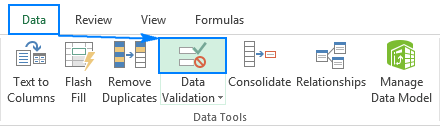
    To do so, select the cells you want to validate, then head over to the ‘Data’ Tab. Then, click ‘Data Validation’. This will bring up a data validation menu which you can use to create new rules for those specific cells.

    (Source: https://www.ablebits.com/office-addins-blog/data-validation-excel/)

    Bonus Shortcut Keys

    Excel has lots of shortcut keys that you can use to easily enter data or complete actions that would usually require you to type or click a few buttons. Some of the best ones are:

    • Start editing the current cell: F2 (This is a crucial one, as it speeds up your workflow significantly).
    • Insert the current time: Ctrl+Shift+:
    • Change a Date’s format: Ctrl+Shift+# 
    • View all formulas in a sheet: Ctrl + `
    • Hide the current column: Ctrl + 0
    • Hide the current row: Ctrl + 9
    • Strike through the text in a cell: Ctrl + 5
    • Switch between currently open workbooks in different windows: Ctrl + F6
    • Flick through the sheets in the whole workbook: Ctrl + PageUp/PageDown

    Get started with Excel and 365 Today

    These tips will help you become an Excel master and truly enhance your workflow, and show how powerful and useful Excel actually is in the modern world. With so many features, it’s no wonder that so many companies still utilise Excel daily.

    Getting started with Microsoft 365 is a great way to take your business to the next level. Including Excel, 365 has all of the programs any modern office needs to keep up with the current business world, and has many tools that will make your workplace truly shine. 

    Get in touch today and see how we can help you get started!

  • Mobile Device Management Challenges and How to Solve Them

    Mobile Device Management Challenges and How to Solve Them

    Whether it’s simply to take calls on the go or to send and receive important information, mobile devices are part of every business. Mobile Device Management can help.

    However, they can bring significant challenges for businesses. These challenges are common, but some of these issues cause bigger problems if left unchecked.

    In this article, we’re going to explore these issues — and explain how your organisation can solve these challenges with ease.

    Security & Compliance

    By nature, mobile devices can be a risk for any company. This is because of the way mobile devices can take information outside of the workplace’s system and infrastructure. With this, in mind, this can potentially lead to a breach of important information.

    This is why it’s crucial to develop thorough security measures to ensure that mobile devices are safe:

    • Restricted access: Restrict important information behind biometrics or other forms of authentication.
    • Mobile Device Management (MDM): Implement Mobile Device management (MDM) software to ensure that all devices have the same security features.
    • Compliance: Ensure that each employee is compliant with the rules and requirements set for mobile device use.

    Bring Your Own Device

    Bring Your Own Device (BYOD) programs allow employees to use their own devices at work. While this has productivity benefits, it also comes with a host of challenges of its own:

    • Security Risks: Both with the device and the user, BYOD creates many risk factors. Bad password management, operating system vulnerabilities, and unauthorised applications are just some of the issues that can arise from this.
    • Compliance Issues: Even if the device is secure, BYOD has compliance issues. Due to the personal nature of the device, it’s not unusual for BYOD employees to break security compliance. This is due to having control over their own devices.
    • Vulnerability to attacks and malware: Unlike a managed device issued by your organisation, an external BYOD device can be vulnerable to external threats such as malware and other attacks, due to lower security.
    • Lack of device management/control: It’s unreasonable and unrealistic to expect BYOD employees to give you full control of their personal devices, which means that you’ll never get the same level of security as on work-issued devices.

    However, implementing hard restrictions on your employees’ personal devices with MDM software isn’t a good thing either. Instead, utilising a Mobile device management solution that can distinguish different rules between work-issued devices and BYOD devices is a great way to ensure that this isn’t an issue.

    For example, Microsoft Intune allows you to implement on-premises functionalities of your security network to your BYOD program, meaning that you can implement security features throughout your company’s BYOD setup without having to worry about over-restricting your employees’ use of their devices.

    Patch Management

    The software can — and often will — have vulnerabilities that need to be patched by the developers. This is a vulnerability that isn’t exactly in your control, but it’s vital that you ensure to install patches and fixes as soon as they become available for your organisation.

    It can be easy to delay or forget to install patches throughout your organisation, but this is crucial to patch up any vulnerabilities and exploits within the software that you’re using. 

    Using MDM software to manage and deploy patches throughout your organisation means that you can easily stop powerful vulnerabilities from being exploited. If you don’t make sure to keep on top of this, you’re putting your organisation at risk.

    Lost & Stolen Devices

    Mobile devices are incredibly vulnerable to being misplaced or stolen, which has a few consequences for your organisation:

    • Security: If a device is stolen while not being properly secured, it can cause a security vulnerability and become a breach point for your data.
    • Cost: Replacing stolen and lost devices can get quite expensive, especially if it’s a regular occurrence.
    • Management: Having to remotely remove a device from your organisation without having access to it can be a pain when using some Mobile device management solutions.

    Network Access Control

    Internal data breaches are becoming more and more common with the implementation of mobile devices into the business infrastructure. Network access control will mitigate this, and minimise the risk of an internal breach.

    The most commonly used control technique is the principle of least privilege (PoLP). This is ensuring that people only have access to the data that they need to be able to work, restricting unrequired access throughout your organisation. With this, you can ensure that data is only available to those who need it. 

    Privileged access management (PAM) will also help ensure that you can outline the restrictions and authorisations for each unique device on your network. This means that you can ensure that only the devices that are authorised to access said data can access it, instantaneously blocking other connections.

    How We Can Help

    Mobile devices can create some of the worst vulnerabilities and challenges for modern businesses. Ensuring you are prepared and equipped to deal with these challenges will save significant amounts of time and stress on your business’s resources and IT.

    By implementing the aforementioned security and management solutions that are necessary for your network, and ensuring that the importance of compliance is emphasised throughout your team, the struggles and challenges of utilising mobile devices throughout your organisation will be greatly reduced.

    Are you looking to help improve your organisation’s security posture? Get in touch with us today, and see how we can help!

  • What is SharePoint used for?

    What is SharePoint used for?

    SharePoint

    SharePoint is a cloud-based service hosted by Microsoft for businesses of all sizes (Microsoft, 2022).

    SharePoint allows businesses to share and manage content between employees. This Office 365 product can streamline communication processes with colleagues and partners.

    At The Unite Group, we are Microsoft Partners, meaning we can seamlessly migrate our customers to Office 365.

    The Unite Group can help make informed decisions on the right subscription products to match your business’ requirements.

    One of the more common products that businesses require is SharePoint.

    What are the features of SharePoint?

    As stated, SharePoint is a cloud-based service which promotes collaboration from remote locations and devices.

    SharePoint is integrated with other Office 365 apps to give users to ability to do more in less time.

    Co-authoring allows users to edit documents at the same time. Co-authoring is enabled on supported file formats such as Word, PowerPoint, and Excel.

    Co-authors must be given permission to access and edit documents before doing so.

    Versioning provides a safety-net for human error. Versioning creates a historical record of all changes made to a document with the date, time and user who edited it.

    This means when mistakes are made, users can view, delete and restore previous versions of the document.

    What are the benefits of SharePoint?

    If you are a business owner who is constantly searching through paper trails for the right document. Then SharePoint can solve this problem.

    By uploading your files and documents to SharePoint, your files can be accessed and edited instantly. The security of your files is ensured. Everything is kept safe in the cloud and backed up with managed backups from The Unite Group.

    Productivity is increased by using SharePoint throughout your working day. Less resource and time is spent searching for documents and communicating with colleagues. All of your resources are accessed at an instant.

    Visibility for your employees is also increased as documents can be shared within the cloud between colleagues once given permission.

    SharePoint promotes collaboration in the workplace allowing users to edit and share documents simultaneously, and from any location.

    After the pandemic, there has never been a greater demand for colleagues to collaborate from different locations. SharePoint allows this with their co-authoring feature. Meaning colleagues can work effectively as a team from the comfort of their own home.

    Another key benefit is that your files can be accessed across multiple devices. From your PC to your mobile, you can work efficiently on any device. And to top this, when outsourcing your Managed IT Services to The Unite Group, we charge per user rather than device. Saving your company a mass amount of revenue.

    Day-to-day tasks such as collecting feedback and tracking issues can feel tedious. However, SharePoint can integrate common business functions, making it easier to stay on top of your daily tasks.

    How can The Unite Group assist your business in migrating to SharePoint?

    The Unite Group can create an effective and seamless migration plan for your business. We can dictate which subscription products will fulfil your business’ needs, such as SharePoint.

    If this is something that you would be interested in for your business, then contact The Unite Group on 0191 466 1050 or email us on info@theunitegroup.co.uk.

    If you would like to read more about our Managed IT Services. Click the link here to be directed to our website.

  • Office 365 Hacks that could benefit your business

    Office 365 Hacks that could benefit your business

    Office 365

    Office 365 is a suite of apps that help you stay connected and get things done.

    Microsoft Office 365 allows you to connect with colleagues, work remotely and collaboratively from any device or location.

    Most will know about the benefits of SharePoint and Teams for your business.

    However, we have gathered our top Microsoft Office 365 hacks that can increase your productivity during your working day.

    On a daily basis, we share important files and documents that may need edited or added to by our colleagues.

    Office 365 allows you to upload your file to the cloud storage and share it using Outlook.

    This automatically grants edit permission to those you are emailing, allowing the document to be edited and saved by users.

    #2 You can add signatures to your emails

    Outlook is compatible with free electronic signature apps, such as, DocuSign.

    This allows you to avoid the process of printing, signing and scanning in both an efficient and timely manner.

    Adding your electronic signature gives a sense of professionalism without the added time spent on it.

    #3 The 3D Map

    Microsoft Excel allows you to convert rows of data into images and graphs.

    If your data is geographic in nature, Power Map has the facilities to turn the data into a 3D map.

    This works great for that all important meeting or presentation!

    #4 Declutter your inbox with Outlook 

    We are all guilty of putting our emails into email lists for a 20% discount code here and there or handing out your business card to enter a competition.

    And we always regret it later! However, filtering out these emails is easy when turning on the Clutter feature in Outlook.  

    Outlook will pay attention to which emails you read and leave unopened and will filter low-priority emails into your ‘Clutter’ section once it understands your preferences.

    Allowing you to focus on work and ignore the online shopping! 

    #5 Use OneNote to keep you organised 

    Office 365 can keep you organised! Are you the kind of worker that has notes across your diary, planner, sticky notes etc? OneNote allows you to keep your notes and to-do lists all in one place! 

    #6 Get Creative with Sway 

    Not everyone has a marketing team to help them out with that big presentation that they are working on. So, if you are struggling with creativity – use Sway to help you out!

    Sway provides you with a number of templates, photos and bonus features to accelerate your content.  

    Office 365 has so many features that you may not even realise come with your package! Here at The Unite Group, we understand that every company has different requirements.

    We help our customers make an informed decision on the right subscription products to fit their business’ needs.  

    If you are considering the move to Office 365, we can create a seamless migration plan for your business.

    If you would like to discuss Microsoft Office 365 further give us a call on 0191 466 1050 or email us on info@theunitegroup.co.uk

  • How can our expert IT team support your business?

    How can our expert IT team support your business?

    Expert IT Team

    Here at The Unite Group, our expert IT team are on hand to provide you with IT Support.

    Our skilled engineers are both friendly and knowledgeable. And are here to help you with any issues on a daily basis.

    The help desk is open from 8:30am until 5:00pm. We also offer out-of-hours support when required.

    Expert Knowledge and Advice

    We provide the highest standard of service and can solve any queries that you may have. Engineers at The Unite Group are fully trained and qualified to provide you with IT support during your working day. We provide continuous professional development to ensure our expert IT team are kept up to date with the latest technology. This allows us to support your business by taking the responsibility of your IT off your hands.

    Efficient Data Management

    Our expert IT team support your business by keeping your data secure and safe. We manage your data efficiently and securely at The Unite Group. Our managed backups are the only product that can stand between your company and a complete loss of data. Our expert IT team fully manage your back ups to ensure your data is kept safe and secure. Your backups are monitored meaning we can be sure they are always successful and up to date.

    Complex Problem Solving

    Our expert IT team are experienced in solving complex technical issues. The engineers aim to solve any issues without disrupting your working day. No matter how big or small, our friendly team are ready to help on the end of the phone. But we will ask first – have you tried turning it off and back on again?!

    Cyber Security

    Here at The Unite Group, we understand the importance of security for your business. We keep all your data safe and secure through managed backups. And our expert IT team are regularly trained on Cyber Security to ensure your IT is kept in safe hands.

    Dedicated Monitoring

    Our competent IT systems are constantly monitoring your Managed IT in the background whilst you work. Our systems run automatic tests and repairs, meaning you won’t notice most of the near misses that you’ve swerved! This means we can support your business by keeping you up and running during the working day.

    Unrivalled Support

    Excellent customer service is at the heart of everything we do. Our aim is to ensure our customers leave the phone call feeling secure that their Managed IT is kept in safe hands. Our expert IT team are friendly, responsive, and reliable. If an issue occurs, they are a phone call away and on hand to help.

    We are here to provide quality advice and support for our clients whenever they need it. And our engineers are prepared to solve any queries in a timely manner.

    If you would like us to support your business through our Managed IT Services then give us a call on 0191 466 1550 or email us on info@theunitegroup.co.uk.

  • Outsourced IT Support Services

    Outsourced IT Support Services

    Outsourced IT Support Services

    Improving the efficiency of your business is easy with outsourced IT support services from The Unite Group. We cover the whole of the UK and we have experts available ’24×7′ to ensure your business is always covered and fully operational.

    Reduced Costs

    Our outsourced IT support services can keep your business running smoothly without the added overheads and impact on revenue.

    You can improve operational efficiency for your business and control your company’s costs by outsourcing your IT. Fixed per user pricing allows you to easily budget for each employee to receive full support on any device.

    Outsourced IT support services from The Unite Group allow you to avoid making major investments in infrastructure, software, and employees.

    We take into consideration cost planning for your business by splitting the cost into monthly direct debits.

    This makes your outsourced IT support services a much more manageable cost and means you don’t have to consider holiday or sick pay into your budget.

    Outsourcing IT can save a company 40% or more on their IT needs (thedailymba.com).

    Improved Efficiency

    Your company will gain access to expert knowledge without having to train and employ a full-time member of staff.

    However, we know that business isn’t always fixed to the office. Because of this, our outsourced IT support services are priced ‘per user’ rather than device, making the cost of supporting users cheaper overall.

    Our engineers are available from 8:30am until 5:00pm to provide support to your business either over the phone or on-site.

    Our Help Desk engineers can remotely access your IT and troubleshoot any issues that may arise with little down time.

    We also offer out-of-hours support 24×7 when you need us.

    Another benefit to having outsourced it support services from The Unite Group is that you can maximise your resources in-house, by leaving the responsibility of your IT in our hands.

    Outsourced IT Support Services

    Managed IT services from The Unite Group are fast, reliable, and intuitive.

    We offer in-house 24/7 support with site visits included in the monthly cost.

    As well as this, our outsourced IT support services include day to day support, proactive management, and strategic planning.

    Additionally, our systems run automatic tests and repairs whilst you work allowing us to prevent any issues from arising and affecting your working day.

    If any issues do arise, our customers can contact us by raising a ticket or giving us a phone call. Our Help Desk Engineers are here to help remotely and see it through to completion.

    Additionally, in most cases, we’re notified of any issues and have started dealing with them before you are even aware. This proactive approach is the key to keep your business operational.

    The Unite Group can support your business in making the move to Microsoft 365.

    And as The Unite Group are a Microsoft Partner, your business can be assured that your Microsoft licenses are managed by our team of fully qualified engineers. From migration technical project planning to configuration and customisation, our team are also here to provide unrivalled Microsoft 365 support.

    As part of our outsourced IT support services, The Unite Group can fully manage your backups to ensure your data is safe and secure.

    Back ups are monitored, therefore this means that we’re always sure your backups are always successful and up to date.

    Choosing a reliable and efficient IT provider is vital for your business. And the key to outsourcing successfully starts with the right partnership. So if you are considering placing your outsourced IT support services with The Unite Group or would like to know more, book your free consultation today. You can give us a call on 0191 466 1050 or emailing us on info@theunitegroup.co.uk.