
Tag: technology

  • Take business calls, from anywhere!

    Take business calls, from anywhere!

    take business calls, from anywhere

    In today’s fast-paced business environment, it is becoming increasingly expected that business calls are not missed. As we see an increase in hybrid working, it is important for businesses to adapt to ensure employees can work from anywhere. Ensuring no calls are missed. Did you know a cloud-hosted phone system could be the solution to your problems? Allowing your team to take calls from anywhere, at any time?

    In this blog, we cover exactly what a cloud-hosted phone system is. As well as, how implementing one in your business, means you’ll never miss a call again!

    What is a hosted phone system?

    A cloud-hosted phone system is a communication solution that operates over the Internet instead of relying on traditional phone lines. It involves storing and managing all phone system components. This includes hardware and software, at a remote location provided by a third-party service provider. Like ourselves here at The Unite Group. Users connect to the system through their internet connection and access features such as call management, voicemail, and virtual extensions. As a flexible and scalable solution, hosted phone systems offer businesses the advantages of cost-effectiveness, mobility, and easy management without the need for extensive on-premises infrastructure.

    Never miss a call again!

    Hosted phone systems do not require a desk phone! Therefore, the software can be added to your staff’s existing devices for example their phone, laptops etc. Saving you on the cost of expensive hardware. Not only this but also, meaning your team can take business calls anytime, wherever they are! Whether in the office, working from home, or even abroad! Since cloud-hosted phone systems work over the Internet, calls can be taken from anywhere that has access to the Internet. Correspondingly, statistics show businesses that use a cloud-hosted phone system increase productivity by up to 20%. With the ability to allow agents to take calls anywhere around the world. Meaning you can be assured your team is equipt no matter where they are working to pick up those all-important phone calls.

    Hybrid Working

    Since the Covid-19 pandemic, there has been a shift worldwide of more and more businesses accommodating hybrid working. Having a cloud-hosted phone system means your staff working from home can be on hand to take calls as if they were sat at their desk in the office. Meaning your customers will not be aware of your team’s working location. No matter where that may be.

    Moreover, this in turn ensures that your team has the ability to work efficiently. Ensuring a call is never missed! Unlike traditional phone systems, where a desk phone must be attached to a physical line. Your team can access calls on the go using their mobile phone.

    Adopting a cloud-hosted phone system is essential for any modern business that wants to ensure it can continue to provide high levels of customer service in the ever-changing current business climate.

    So, how can The Unite Group help?

    Our team here at The Unite Group has a large team of highly skilled engineers who can implement a cloud-hosted phone system into your business, stress-free. Our projects team will plan all steps of the migration to ensure a smooth shift over for your business. Whether big or small, a cloud-hosted phone system can accommodate your business.

    Want to learn more?

    If you’re interested in learning more about Cloud Hosted Phone Systems, click here to head over to the page on our website. Where we break down further the benefits of ditching the traditional telephone system.

    Or alternatively, pick up the phone and chat with our experienced team who would be happy to have a no-pressure conversation and answer any questions you may have. Call us today on 0191 466 1050.

    Ensure your business never missed a call again! Stay ahead of competitors and implement a cloud-hosted phone system in your business!
  • Does my business need a cloud-hosted phone system?

    Does my business need a cloud-hosted phone system?

    Introduction

    Cloud-hosted phone systems have changed the way businesses communicate. They are more affordable, easier to manage and scalable than on-premises systems, but they also provide many other benefits. Here are five questions you will want to ask yourself before making the decision about whether your business should invest in a cloud-hosted phone system:

    You have to address a few key questions to determine whether your business needs a cloud-hosted phone system.

    • What are the specific needs of your business?
    • How much is this going to cost? Is it worth the investment?
    • How much time will it save? Can you afford not to have that extra time in your day and week? Or do you need it for other things like growing the business or taking care of employees who work remotely (or both)? If so, then maybe investing in a cloud-hosted phone system is worthwhile for you!

    A cloud-hosted phone system can reduce employee travel costs, especially if you have remote workers.

    With the rise of remote working and telecommuting, employers are looking for ways to make their employees more productive while reducing travel costs and carbon footprint. Cloud-hosted phone systems offer many benefits for this purpose:

    • Employees can be more productive by working from anywhere that has internet access.
    • Cloud-hosted phone systems allow companies to set up virtual offices. In other countries or towns without having physical offices there – so they don’t need to pay for office space or equipment upgrades (such as a new server).

    Cloud-hosted phone systems are more affordable and easier to manage than on-premises systems.

    There are several reasons why cloud-hosted phone services cost less than an on-premises system:

    • No hardware to buy. You don’t need to purchase servers, routers or switches for your business. The cloud service provider does all of this for you.
    • No software to install. Cloud providers provide all the software needed for your business’ phone system right out of the box. So there’s no need for expensive training either (which can add up quickly). With some applications like VoIP or unified communications (UC), there may be additional configuration steps required such as configuring a firewall or setting up SIP trunks in order for them work properly with their new environment – but these processes aren’t difficult at all with most vendors today! And once everything’s configured correctly,…

    Your business will be able to grow as fast as it wants without getting tied down by communications technology that doesn’t scale with your growth.

    When you’re running a business, it can be difficult to keep up with all of the technology needs. You have to constantly make sure that you’re keeping things updated and upgrading as needed. This can be especially difficult when it comes to communications technology. This is because your phone system will need to scale with your business.

    Cloud-hosted solutions are inherently flexible and scalable–you don’t need any additional hardware or software onsite at all! That means no more worrying about buying more hardware as growth happens! Or needing an expensive upgrade once every few years just because it’s time for a new system (and paying someone else thousands of pounds in labour costs). Cloud hosting also removes capacity concerns from the equation. There’s no need for overprovisioning beforehand since everything is handled by servers in real time instead of locally on each device in the office space itself.

    Cloud-based systems allow for easy integration with third-party software and services, such as CRM and email marketing tools.

    Cloud-based systems are also more flexible. You can add or remove users at any time. Plus you don’t have to worry about installing new hardware or software on your computers. Cloud-hosted telephony services are ideal for businesses that want to integrate their phone system with third-party software. Such as CRM (customer relationship management), email marketing tools, and other applications.

    Modern cloud-based systems let you do everything on mobile devices, including make and receive calls and access contacts directly from the device itself. This makes managing business communications even easier, especially if you’re always on the go or need to stay connected while traveling frequently or across multiple time zones.

    You can also manage your call logs from any device! So if someone calls into work after hours but doesn’t leave a message for you, simply check your call log!

    Cloud hosted systems give you flexibility, control and ease of use that improves communication within your organisation and helps keep productivity up while lowering costs!

    Businesses that are considering a cloud-hosted phone system should take the time to understand how this technology can improve their communications and increase productivity. To learn more about the pro’s of a cloud-hosted phone system, click here!

    If you want more information about the cloud-hosted phone systems we can provide here at The Unite Group, then contact our team today!

  • The pros of a cloud-based phone system

    The pros of a cloud-based phone system

    Cloud-based phone systems are a great option for the modern business. They’re less expensive than traditional landlines, web-based, and accessible from anywhere!

    Scalability

    • Scalability
      One of the biggest benefits of cloud-based phone systems is that they can scale with your business. As you grow, so does your phone system. You don’t have to worry about buying new hardware or software. It’s all done automatically in the background by a third-party provider. This means that there’s no additional work required on your part. It also means no more expensive upgrades when you need them!
    • Accessibility from anywhere
      Another great thing about cloud-based systems is that they allow users access from anywhere in the world. If someone wants to make an important call while traveling abroad, they don’t need any special equipment. Just use their mobile device and log into their account at home base as usual.

    Accessibility

    One of the biggest benefits of cloud-based phone systems is accessibility. With a traditional on-site system, you’re limited to being in one place at a time. If you’re not there to answer the phone yourself, it will go straight to voicemail and your customers or employees will have a hard time getting in touch.
    With a cloud-based system, however, you can access your calls from anywhere with internet access. That includes mobile phones as well as computers and tablets! This makes it much easier for everyone involved. Customers don’t have to worry about missing important messages because they’re out of reach; employees can take care of business even when they’re away from their desks (which means less wasted time).

    Cost Effectiveness

    One of the biggest advantages of cloud-based phone systems is cost-effectiveness. For example, if you’re using a traditional VoIP service and need to upgrade your system, it could cost thousands of pounds in equipment and installation fees. With a cloud-based system, there are no expensive maintenance contracts or hardware upgrades required-just pay as you go! This can save companies thousands over time while still providing them with all the features they need to run their business efficiently.

    Reliability

    Cloud-based phone systems are a great choice for businesses that need reliability. With a cloud-based system, you can be sure that your calls will always be connected and your employees will be able to hear the person on the other end clearly. There’s no need for extra hardware or software because all of those features are included in your monthly subscription fee.

    Security

    The cloud-based phone system is secure. It’s a fact that you can’t deny, and it’s something you need to know before making the switch to a cloud-based phone system.
    The first thing you need to understand is that your data will be encrypted in transit between the server and client devices. This means that even if someone were able to intercept your call or text message, they wouldn’t be able to read it because it would be encrypted with an algorithm known only by those who own the key (you).
    Secondly, there are firewalls protecting against outside attacks on your system from hackers or malware bots trying to gain access into your network through other means than just logging into an account online like most people do today when signing up for new services online such as Netflix or Disney+ where all their personal information including credit card numbers are stored within one database which makes them vulnerable targets for cybercriminals looking for ways into networks where sensitive information could potentially be accessed without permission from owners themselves.

    Flexibility

    The flexibility of cloud-based phone systems means you can change your configuration as needed. For example, if you want to add a new feature or customise the way that your system works, it’s easy to do so with a cloud-based system because everything is stored online and updated automatically. You don’t have to worry about upgrading hardware or installing software on each individual machine in order for these changes to take effect–just log into your account and make the necessary adjustments!

    Portability

    You can access your phone system from any device, which means you can make calls from anywhere and at any time. If you’re on the road and need to transfer a call between devices, all you have to do is click a button!

    Ease of Use

    The cloud-based phone system is easy to set up and use. With most cloud-based systems, you can set up your own account in less than five minutes. And once you have an account, it’s easy to add users and manage their permissions.
    The interface of these systems is also intuitive so that even if someone with no technical knowledge were using it, they would be able to figure out how everything works without any problems at all. You can find out in our last blog exactly how a cloud phone system works.

    As you can see, cloud-based phone systems offer a number of benefits to businesses of all sizes. Cloud-based phone systems are a great option for businesses who want to save money, increase flexibility and scalability and more.

    For more information on telephony solutions and how we could help you contact us today on 01914661050

  • Creating Strong Passwords – World Password Day – 4th May 2023

    Creating Strong Passwords – World Password Day – 4th May 2023

    Introduction

    Today we join the celebrations of World Password Day by reminding you of the dangers of not using strong passwords. As well as, sharing top tips to create strong passwords. The internet is a dangerous place. That’s why we all need to be more careful about how we handle our online security. Strong passwords are your first line of defense against cybercrime and they’re actually pretty easy to create! So come along as we dive into the world of strong passwords and see how you can protect yourself from hackers in just five easy steps.

    Be aware of the latest threats

    You should also be aware of the latest threats and how they affect you. The first step is to stay up to date on new developments in password security, which can be done by following actively checking the National Cyber Security Centre website. Or by speaking with your IT support provider, such as our team here at The Unite Group.

    The consequences of being unaware of the latest threats are dire: if your password is compromised because it was too easy to guess or crack, then all your accounts could be hacked as well! This could result in identity theft or even financial loss.

    Use different passwords for each service you use

    • Use a password manager to store all of your passwords.
    • Use different passwords for each service you use.
    • Don’t use the same password for two services, even if they’re related (for example, don’t use the same password for both Facebook and Instagram).
    • Don’t use your email address or name as a password (it’s too easy to guess).
    • Don’t use common words that could be found in any dictionary–especially when those words are part of something personal about yourself (like your birthday).

    Use a password manager to manage your passwords

    A password manager is a tool that stores your passwords, often in an encrypted format. The benefit of using one is that it can create strong passwords for you and then remember them for each website or service you sign up for. This way, all your passwords are unique and significantly harder to crack than if they were all the same.

    You should use a password manager on all your devices so that any device has access to the same data without having to enter it manually each time (which could lead to forgetting). Most password managers also allow users to store credit card details or other sensitive information securely in case someone gets hold of their device somehow – this makes recovering from this kind of breach much easier!

    Use a unique and long password for each account

    The most important thing you can do to protect your accounts is to use a unique, long password for every account. If you’re having trouble remembering all of your passwords and login information, try using a password manager as mentioned above.

    We recommend using a range of numbers, symbols and both uppercase and lowercase letters within your password to create a complex password. Shorter passwords also become easier to guess, so try to ensure your passwords are always over 8 characters long.

    Don’t use dictionary words or personal information in passwords

    • Avoid dictionary words, personal information, and other common passwords.
    • Don’t use the same password for multiple accounts.
    • Don’t create passwords that are easy to guess (such as your birthday or pet’s name).

    Strong passwords are your first line of defense against cybercrime

    Strong passwords are your first line of defense against cybercrime. A strong password is hard to guess and easy to remember, which makes it much harder for someone else to steal your identity or break into your accounts.

    Let’s recap top tips to create a strong password that’s both secure and memorable:

    • Use a password manager
    • Use different passwords for each service you use, even if they’re all from the same company (e.g., Facebook, Gmail)
    • Make sure your passwords are at least 8 characters long
    • Change your passwords regularly (e.g. every month)

    Conclusion

    As you can see, there are many ways to create strong passwords. The most important thing is to use different passwords for each service you use and make sure they are unique and long. You should also use a password manager to help manage all of your passwords so that they are safe even if you get hacked by cyber criminals!

    If you would like to learn more about measures you can put in place to best protect your business from falling risk to cybercrime, visit our cyber security blog archive or speak to our experienced team today!

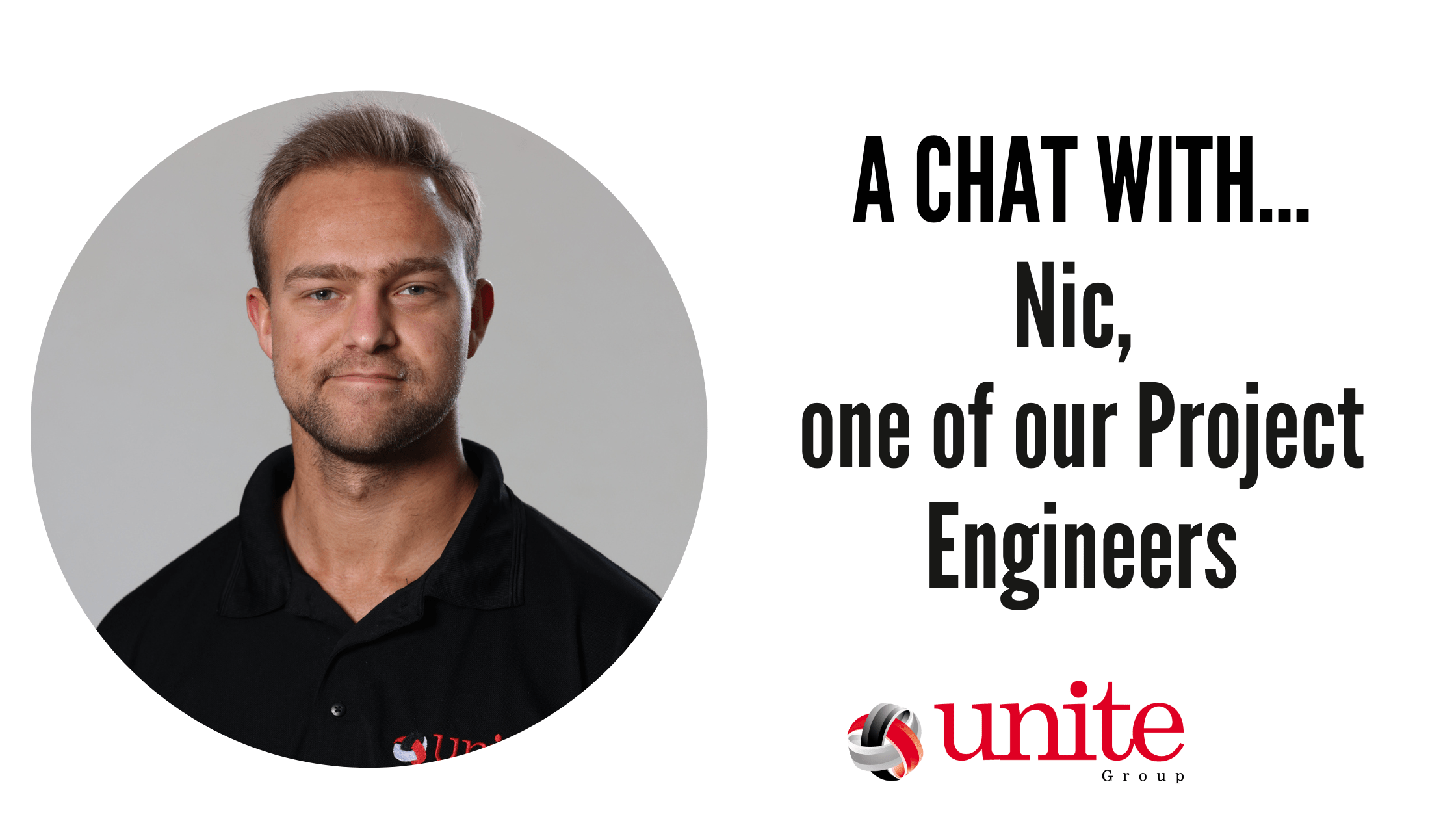
  • A chat with Nic, one of our Project Engineers

    A chat with Nic, one of our Project Engineers

    [et_pb_section admin_label=”section”] [et_pb_row admin_label=”row”] [et_pb_column type=”4_4″][et_pb_text admin_label=”Text”]

    In this blog, we introduce you to Nic. Nic is one of our Project Engineers here at The Unite Group. Nic is the newest member of our team, having been with us for a little over a month. Nic spends a lot of his time out of the office, on our customer sites. Continue reading to learn more about Nic and his role here at The Unite Group.

    Growing up, what did you want to be?

    Growing up I always wanted to be a commercial pilot for an airline.

    What is your role at The Unite Group and how did you end up where you are now?

    My role here at The Unite Group is a Project Engineer. I have worked for a few companies since starting my career, first as a Service Desk Analyst before progressing to 2nd Line Support and then most recently I worked as an Operations Engineer for a SaaS company before going travelling through Asia for the latter half of 2022.

    What does a typical day look like at The Unite Group?

    So far during my time at The Unite Group, my days have varied a lot. Between working on projects in the office such as building new servers. As well as, remotely supporting customers with issues. I also have been getting out on site to onboard new customers and deliver projects. So it’s fair to say no two days have been the same since I started at The Unite Group just over a month ago.

    What is your most and least favourite part of the job?

    This is a tricky one to answer! Since I have been here just over a month, I will reserve judgement for now 🤐

    What is your greatest achievement?

    My greatest achievement is actually still pending. But I have been working towards my private pilot’s license over the past couple of years. I will hopefully be completing it this summer. When this happens it will definitely be my biggest achievement!

    What is the best piece of advice you’ve been given?

    The best piece of advice I have been given is to take pride in what you do and try your best! I think this has helped me progress throughout my career.

    Where do you see yourself in 10 years’ time?

    I have not yet fully decided what I want to specialise in. However, I do know that I would like to be working in the cloud space, potentially either in Platform Engineering or as a Solutions Architect. So in 10 years’ time, I picture myself working in one of those areas.

    How do you unwind outside of work?

    Outside of work I enjoy going karting regularly with a friend. Also, more recently I have taken up hiking. I have climbed some local hills in Northumberland and Yorkshire. Moreover, since I enjoy travelling and visiting new places in general I have also been learning Spanish in my free time to help me on future adventures.

    Nic has fit into our team here at The Unite Group perfectly and has really hit the ground running. He is an asset to the projects team and we look forward to seeing him progress within his role with us.

    If you would like to learn more about how Nic and The Unite Group can help you with your business technology needs, contact us on, 0191 466 1050.

    Has Nic or another member of our team resolved any of your issues recently? Why not leave us a Google review and let us know about the service you received! We’d love to hear your feedback.

    https://g.page/r/CdjwcFG4AuwZEBM/review

    [/et_pb_text][/et_pb_column] [/et_pb_row] [/et_pb_section]
  • Make the most of Microsoft Excel with these top 8 tips  

    Make the most of Microsoft Excel with these top 8 tips  

    Microsoft Excel, part of the Microsoft 365 suite of productivity and business tools, is the world’s most popular spreadsheet application. It’s used by businesses for finance, accounting, resource planning and more.

    Learning the ins and outs of Excel is one of the most effective ways to take your business to the next level, as Microsoft’s flagship spreadsheet program has been a cornerstone of the modern business world for its whole existence.

    With spreadsheeting being so important in the modern business world, we believe that knowing how to use Excel’s many features and shortcuts will save you time and truly unlock your company’s spreadsheeting potential. 

    That’s why in this article, we’re going to go over some of the top tips you should be utilising when using Microsoft Excel.

    Hide Rows and Columns

    When using Excel and going through your data, sometimes you’ll find that there are certain rows and columns that are just getting in the way. 

    Or even sometimes, there will be data that’s irrelevant currently that you want to hide for just the time being. 

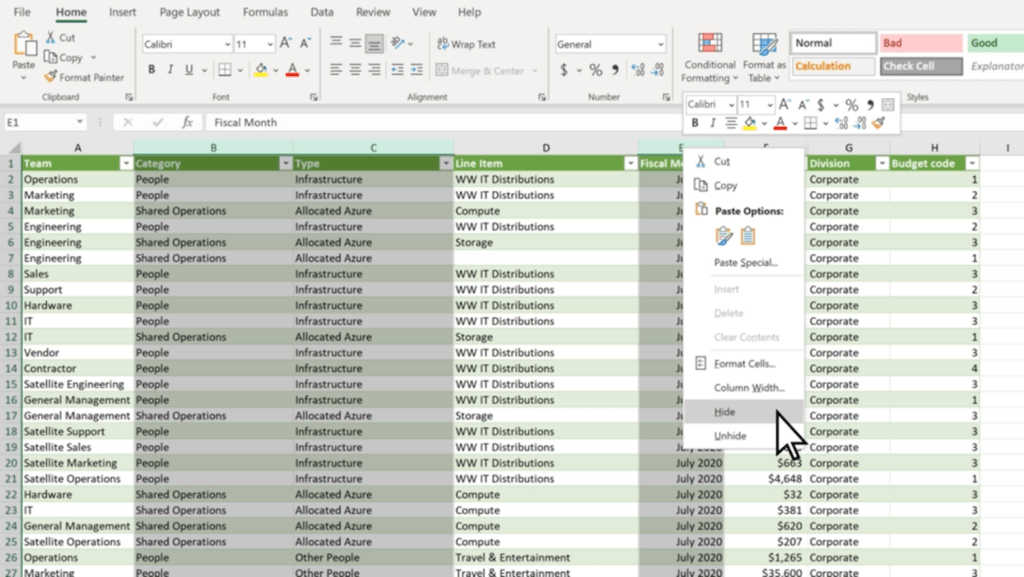
    In any case, Microsoft Excel allows you to easily hide rows and columns with a few clicks.

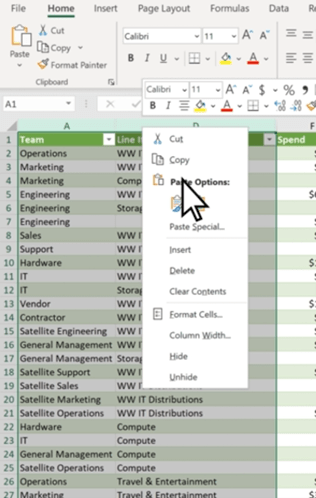
    1. Select all of the rows or columns that you want to hide. (You can use Ctrl to select columns that aren’t adjacent.)
    2. Right-click, and click ‘Hide’

    The selected rows or columns will now be hidden, and won’t show up when you’re using the spreadsheet. 

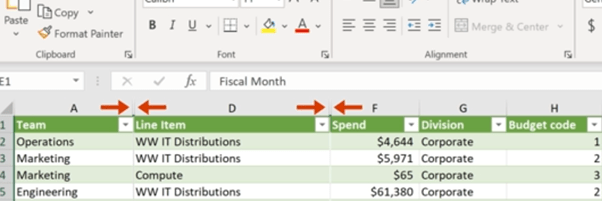
    You can see which parts of your spreadsheet have hidden rows or columns easily too, as there will be two lines in the row or column bar to show hidden cells.

    To easily unhide rows or columns, you can double-click the two aforementioned lines. Or, you can select the two adjacent rows or columns and right-click, and select ‘Unhide’.

    Hiding rows and columns is particularly useful for long spreadsheets such as day sheets or call logs – as you avoid having to scroll down to the end of the sheet. 

    Select Using Ctrl + Shift

    Excel has many elegant tools you can use to make tasks quick and easy, and selecting cells is no different. Microsoft allows you to quickly select multiple cells using both Shift and Ctrl, which can easily speed up your workflow when working in the program.

    Clicking on two cells while pressing Ctrl will select those cells simultaneously, as will any other cell you click while pressing Ctrl. 

    Shift, on the other hand, allows you to create a box selection of cells. Simply click whatever cell you want to be on the top left corner, and then Shift-click whichever cell is desired for the bottom right corner. Excel will automatically select a rectangular box based on the selected cells.

    However, you can use both Ctrl + Shift to select whole rows and columns. By selecting a cell and holding down Ctrl + Shift, you can use your arrow keys to select all the data above (by pressing Up), below (by pressing Down) or left and right (with the respective arrow keys).

    Use Quick Analysis

    Quick Analysis is another tool you can use to save time and quickly do what would usually be a time-consuming task. This tool lets you easily format your data, or even make a chart out of a set of data, with just a few button clicks.

    1. Select the cells you want to use.
    2. Press Ctrl + Q on your keyboard or the small Quick Analysis tool on the bottom right of your selection.
    3. Choose whatever you want to format your data with, or a chart if you want to use a chart.

    This tool saves a lot of time and has many functions that can generally improve your Excel experience and workflow.

    Automate with IF Functions

    Using IF functions to easily automate your spreadsheet is one of the most useful tools in Microsoft Excel. 

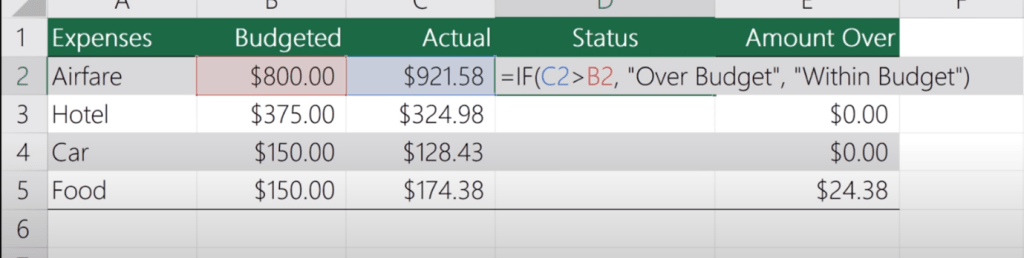
    In any cell, firstly type ‘=IF’.  The = symbol indicates to Excel that you’re entering a function, of which there are many you can learn and use. Then, you want to create your new function.

    For example, this function is looking to see if C2 is Greater than B2, and will display ‘Over Budget’ if it is. Otherwise, it will display ‘Within Budget’. IF functions work with the templating =IF(Condition, Is, Otherwise), with Is and Otherwise being your two outcomes. You can use this template to simply make your own simple IF functions with ease.

    Tag Colleagues in Comments

    Collaboration is key to any modern workplace, and Microsoft knows this. This is why Excel — and the other Microsoft 365 programs — have great collaboration features.

    One simple feature you should be utilising in collaboration is being able to tag colleagues in comments. This can be super useful and helps improve communication.

    To do so, simply right-click wherever you want to comment and select ‘New Comment’. Then, @Mention whoever you want to tag in the comment. This will automatically send them an email notifying them that you’ve tagged them. 

    Add More Than One Column

    Creating multiple columns in Excel is simple, and a great way to add more columns to a finished table or easily expand your spreadsheet.

    1. Click on the column to the right of where you want to make new columns.
    2. Press and hold Ctrl, and click on ‘Insert Columns’ in the pop-up menu.
    3. Enter the specified number of columns, then click Done.

    Make Use of Data Validation

    Data validation restricts user entry, ensuring that only correct data is being entered into the spreadsheet. For example, you can restrict entry on certain cells to only allow numerical values between 50 and 100. Or, you can only allow text that contains a certain word.

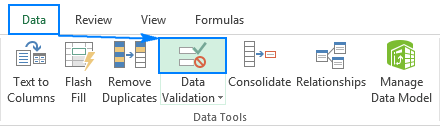
    To do so, select the cells you want to validate, then head over to the ‘Data’ Tab. Then, click ‘Data Validation’. This will bring up a data validation menu which you can use to create new rules for those specific cells.

    (Source: https://www.ablebits.com/office-addins-blog/data-validation-excel/)

    Bonus Shortcut Keys

    Excel has lots of shortcut keys that you can use to easily enter data or complete actions that would usually require you to type or click a few buttons. Some of the best ones are:

    • Start editing the current cell: F2 (This is a crucial one, as it speeds up your workflow significantly).
    • Insert the current time: Ctrl+Shift+:
    • Change a Date’s format: Ctrl+Shift+# 
    • View all formulas in a sheet: Ctrl + `
    • Hide the current column: Ctrl + 0
    • Hide the current row: Ctrl + 9
    • Strike through the text in a cell: Ctrl + 5
    • Switch between currently open workbooks in different windows: Ctrl + F6
    • Flick through the sheets in the whole workbook: Ctrl + PageUp/PageDown

    Get started with Excel and 365 Today

    These tips will help you become an Excel master and truly enhance your workflow, and show how powerful and useful Excel actually is in the modern world. With so many features, it’s no wonder that so many companies still utilise Excel daily.

    Getting started with Microsoft 365 is a great way to take your business to the next level. Including Excel, 365 has all of the programs any modern office needs to keep up with the current business world, and has many tools that will make your workplace truly shine. 

    Get in touch today and see how we can help you get started!

  • Cybersecurity – The real risks!

    Cybersecurity – The real risks!

    [et_pb_section admin_label=”section”] [et_pb_row admin_label=”row”] [et_pb_column type=”4_4″][et_pb_text admin_label=”Text”]

    Cybersecurity threats are constantly evolving, and companies must be aware of the risks.

    The risks are constantly evolving

    Cybersecurity threats are constantly evolving, and it’s important to be aware of the latest ones. The risks are changing all the time. The risks are growing in number and severity.

    The risk landscape is always shifting, so it’s important to stay up-to-date on new cybersecurity threats as well as known ones that might have changed or gotten worse over time.

    Who is most at risk?

    Small businesses, that don’t have the resources to protect themselves, are at the greatest risk. Companies that don’t have the right IT systems in place and those with a lot of data but not enough security are also vulnerable. Finally, companies that do not have a plan for dealing with a cyber attack are vulnerable because they cannot respond quickly or effectively when one occurs.

    What to do about it?

    • Build a prevention plan. This can include:
    • Monitoring for suspicious activity and responding quickly to it when it occurs.
    • Having a response plan in place that includes solutions such as backups, antivirus software and firewalls (to name just a few).
    • Ensuring that you know who to contact if there is an incident or breach so they can get started on resolving the problem as soon as possible.
    • Training you team

    Companies need prevention and detection plans.

    Companies need to have a plan in place. If a company is not prepared, it could face huge financial losses and even go out of business. It’s important to know how to respond if an attack occurs, as well as how to recover from one.

    The first step is understanding what cybersecurity threats are out there and how they work so that you can protect your business against them.

    Cyber Essentials – What is it and why do I need it?

    What is it?

    The Cyber Essentials scheme is an ISAMW self-assessment questionnaire process. The questionnaire will then be signed off by a member of the board or an equivalent signory. After this, it is then verified by a certification body trained and licensed to certify against the Cyber Essentials scheme (like ourselves here at The Unite Group). It is important before applying you ensure your organisation meets all the requirements. This includes having evidence ready to be provided to prove you meet the requirements.

    Now the why;

    • Reduce the risk of falling victim to a cyber attack
    • Demonstrate to your customers that you take cyber security seriously
    • Open your organisation to the opportunities of working with the Government and the Ministry of Defence
    • Feel confident you have the basic levels of protection in place

    Conclusion

    The cyber security landscape is changing rapidly, and companies need to stay ahead of the curve. The risks are constantly evolving and there are new threats every day. The best way to protect against these threats is with a proactive approach that includes prevention and detection plans.

    Cyber Essentials can help with this, and The Unite group can be the one to help you get it!

    [/et_pb_text][/et_pb_column] [/et_pb_row] [/et_pb_section]
  • Mobile Device Management Challenges and How to Solve Them

    Mobile Device Management Challenges and How to Solve Them

    Whether it’s simply to take calls on the go or to send and receive important information, mobile devices are part of every business. Mobile Device Management can help.

    However, they can bring significant challenges for businesses. These challenges are common, but some of these issues cause bigger problems if left unchecked.

    In this article, we’re going to explore these issues — and explain how your organisation can solve these challenges with ease.

    Security & Compliance

    By nature, mobile devices can be a risk for any company. This is because of the way mobile devices can take information outside of the workplace’s system and infrastructure. With this, in mind, this can potentially lead to a breach of important information.

    This is why it’s crucial to develop thorough security measures to ensure that mobile devices are safe:

    • Restricted access: Restrict important information behind biometrics or other forms of authentication.
    • Mobile Device Management (MDM): Implement Mobile Device management (MDM) software to ensure that all devices have the same security features.
    • Compliance: Ensure that each employee is compliant with the rules and requirements set for mobile device use.

    Bring Your Own Device

    Bring Your Own Device (BYOD) programs allow employees to use their own devices at work. While this has productivity benefits, it also comes with a host of challenges of its own:

    • Security Risks: Both with the device and the user, BYOD creates many risk factors. Bad password management, operating system vulnerabilities, and unauthorised applications are just some of the issues that can arise from this.
    • Compliance Issues: Even if the device is secure, BYOD has compliance issues. Due to the personal nature of the device, it’s not unusual for BYOD employees to break security compliance. This is due to having control over their own devices.
    • Vulnerability to attacks and malware: Unlike a managed device issued by your organisation, an external BYOD device can be vulnerable to external threats such as malware and other attacks, due to lower security.
    • Lack of device management/control: It’s unreasonable and unrealistic to expect BYOD employees to give you full control of their personal devices, which means that you’ll never get the same level of security as on work-issued devices.

    However, implementing hard restrictions on your employees’ personal devices with MDM software isn’t a good thing either. Instead, utilising a Mobile device management solution that can distinguish different rules between work-issued devices and BYOD devices is a great way to ensure that this isn’t an issue.

    For example, Microsoft Intune allows you to implement on-premises functionalities of your security network to your BYOD program, meaning that you can implement security features throughout your company’s BYOD setup without having to worry about over-restricting your employees’ use of their devices.

    Patch Management

    The software can — and often will — have vulnerabilities that need to be patched by the developers. This is a vulnerability that isn’t exactly in your control, but it’s vital that you ensure to install patches and fixes as soon as they become available for your organisation.

    It can be easy to delay or forget to install patches throughout your organisation, but this is crucial to patch up any vulnerabilities and exploits within the software that you’re using. 

    Using MDM software to manage and deploy patches throughout your organisation means that you can easily stop powerful vulnerabilities from being exploited. If you don’t make sure to keep on top of this, you’re putting your organisation at risk.

    Lost & Stolen Devices

    Mobile devices are incredibly vulnerable to being misplaced or stolen, which has a few consequences for your organisation:

    • Security: If a device is stolen while not being properly secured, it can cause a security vulnerability and become a breach point for your data.
    • Cost: Replacing stolen and lost devices can get quite expensive, especially if it’s a regular occurrence.
    • Management: Having to remotely remove a device from your organisation without having access to it can be a pain when using some Mobile device management solutions.

    Network Access Control

    Internal data breaches are becoming more and more common with the implementation of mobile devices into the business infrastructure. Network access control will mitigate this, and minimise the risk of an internal breach.

    The most commonly used control technique is the principle of least privilege (PoLP). This is ensuring that people only have access to the data that they need to be able to work, restricting unrequired access throughout your organisation. With this, you can ensure that data is only available to those who need it. 

    Privileged access management (PAM) will also help ensure that you can outline the restrictions and authorisations for each unique device on your network. This means that you can ensure that only the devices that are authorised to access said data can access it, instantaneously blocking other connections.

    How We Can Help

    Mobile devices can create some of the worst vulnerabilities and challenges for modern businesses. Ensuring you are prepared and equipped to deal with these challenges will save significant amounts of time and stress on your business’s resources and IT.

    By implementing the aforementioned security and management solutions that are necessary for your network, and ensuring that the importance of compliance is emphasised throughout your team, the struggles and challenges of utilising mobile devices throughout your organisation will be greatly reduced.

    Are you looking to help improve your organisation’s security posture? Get in touch with us today, and see how we can help!

  • February 2023 – Newsletter

    February 2023 – Newsletter

    [et_pb_section admin_label=”section”] [et_pb_row admin_label=”row”] [et_pb_column type=”4_4″][et_pb_text admin_label=”Text”]

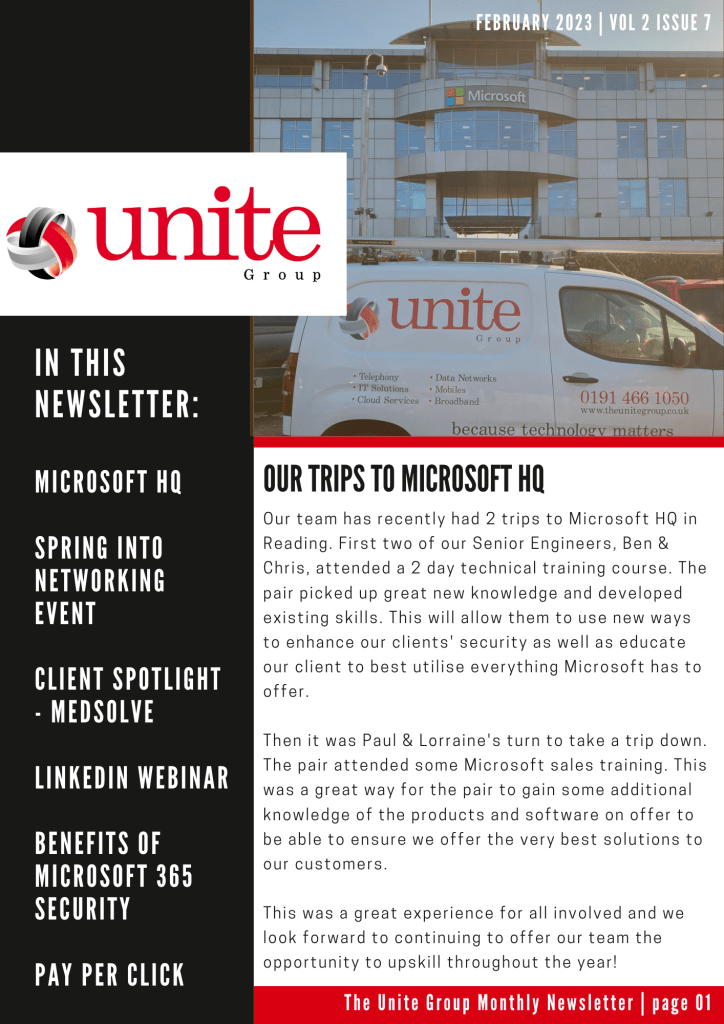
    We’re back again with our monthly newsletter to keep you up to date with everything that has been going on here at The Unite Group!

    In this newsletter: We tell you about our exciting trips to Microsoft HQ, Network+ announce their next event – Spring into Networking, we spotlight our client Medsolve, we offer a FREE webinar to our customers, share the benefits of Microsoft 365 security & explain the advantages of pay per click marketing.

    To read The Unite Group’s February Monthly Newsletter, click on the image below!

    To be added to our mailing list drop us an email, info@theunitegroup.co.uk or to speak to our friendly team call us on, 0191 466 1050

    February 2023 newsletter
    [/et_pb_text][/et_pb_column] [/et_pb_row] [/et_pb_section]
  • Why is it important for businesses to have IT support?

    Why is it important for businesses to have IT support?

    In today’s fast-paced digital world, technology is critical to the success of any business. The right IT infrastructure can increase productivity, streamline processes, and help businesses stay ahead of the competition. However, with so many different technologies and systems to manage, it can be challenging to keep everything running smoothly. This is where IT support comes in. Here at The Unite Group, we are proud to provide complete Managed IT services. So, you can relax knowing your covered by a team of highly-skilled professionals.

    IT support is an essential service for businesses of all sizes. It provides technical assistance and advice to help companies manage their IT systems and infrastructure. As businesses continue to rely more and more on IT infrastructure for the day-to-day running of their business, it is essential to ensure you have the correct support in place. If something were to go wrong.

    In this blog, we cover why IT support is so important for businesses:

    Maximizing Uptime:

    Downtime is a business’s worst nightmare, as it can lead to lost revenue, decreased productivity, and even reputational damage. IT support can help to prevent downtime by providing proactive maintenance, monitoring, and troubleshooting of IT systems. This ensures that issues are identified and resolved quickly, minimizing the impact on the business. Our clever monitoring systems, means we often can fix a fault before you even know it’s a problem. Hugely reducing the risk of downtime due to an IT fault.

    Increased Security:

    Cyber threats are a constant risk for businesses, and the consequences of a data breach can be severe. IT support can help businesses to implement the latest security measures, such as firewalls, antivirus software, and data encryption. This can help to protect against cyber threats and ensure that sensitive data is kept safe. We offer various cyber security options to further protect our customers. One being support to achieve a Cyber Essentials certification. This scheme is said to protect businesses from 80% of the most basic cyber threats. Click here to learn more about the Cyber Essentials scheme.

    Improved Efficiency:

    IT support can help businesses to identify and implement the best technology solutions for their needs. This can help to improve efficiency by streamlining processes, automating tasks, and reducing manual labour. By optimising technology, businesses can work more efficiently, save time, and reduce costs. Our team of highly qualified engineers will be able to offer recommendations for software to reduce the amount of time your staff spend doing mundane, routine tasks. Instead, being able to offer solutions to speed up processes.

    Access to Expertise:

    IT support provides businesses with access to a team of experts with a wide range of technical knowledge and experience. This means that businesses can get the help they need to solve complex IT problems, without the need to hire an in-house IT team. IT support can also help businesses stay up-to-date with the latest technology trends, ensuring that they remain competitive in their industry. Here at The Unite Group, we provide a price per user, not per device. Therefore you can be assured our team of experts will assist no matter what the issue your team faces.

    In conclusion, IT support is an essential service for businesses that rely on technology to operate. It can help businesses to maximize uptime, increase security, improve efficiency, and access technical expertise. With the right IT support, businesses can stay ahead of the competition and succeed in the fast-paced digital world. To learn more about how your businesses could benefit from Managed IT support from The Unite Group, contact our friendly team today. Or alternatively visit our IT support page to learn more!