
Tag: the unite group

  • Search Engine Optimisation (SEO)– The Basics! 

    Search Engine Optimisation (SEO)– The Basics! 

    SEO

    If you have a website for your business, the likelihood of you hearing about Search Engine Optimisation (or SEO) is high! SEO is optimising your website to make them appear in a higher position in organic search results. Organic search results are related to results that have not been sponsored (or paid for). There isn’t an advertising budget behind them to make them rank higher.

    Search Engines, much like social media platforms, use an algorithm to determine how high up they appear in the organic search results. 

    Search Engines 

    It should come as a surprise to nobody that the top search engine is Google. Goggle has a reported market share of 91.88% across the globe (figure correct as of July 2022). But there are other search engines out there to consider when optimising your website. Search engines like Bing, and Yahoo as well as privacy-orientated search engines like Duckduckgo. 

    How do Search Engines work? 

    Search engines follow links on the web using crawlers (or spiders or bots – the term differs depending on who you speak to). These crawlers trawl the internet 24 hours per day, 7 days per week. Exploring the internet for content (text, news, images, links and the like). Every time the crawler comes across a website, it will follow the links around the site. It will then save an HTML version of the website into its index (a gigantic library or database of websites). This index is changed and updated every time something changes on your website. So the more content that is added or changed, the more often the crawler will visit your site. 

    What is the algorithm? 

    As with social media platform algorithms, it is ever-changing and ever-evolving. But decades of research and experience in SEO algorithm has shown that there are two main categories the SEO algorithm looks at. 

    On-Site Factors.

    On-Site Factors looks at your website structure, the content, readability of your text, accessibility, and technical factors such as security, caching, compression and speed. Google’s algorithm now weighs quite heavily on technical factors. Google wants to serve their users with quick, accurate and efficient information and will always rank a website higher that can serve this information quicker than one which may take 4-5 seconds to load.  

    Search engines work hard to make sure that the information that they serve to their users is relevant and unique. Copying from other websites is one quick and easy way to have your website hidden deep down in search results. This means your website copy being original is a big one. 

    On-site factors no longer look for reams and reams of content with large amounts of keyword repetition. You need to be demonstrating through your website copy that you know your audience and can fulfill their needs.  

    Off-Site Factors.

    Off-Site Factors are actions taken outside your website designed to impact the search engine (and user) trust and authority in your site. Your backlinks (links from other websites) and the quality of these links form a large part of this. Backlinks should be high-value and wherever possible, natural or manually built links.  Natural links are links which are given without any input on your part. For example, if you are selling farm food products on your website, a natural link could come from a blog dedicated to food and recipes – linking your page as a supplier.  

    Manually built links are deliberately built by you or your marketing team. Linking from social media to your website, getting influencers linking to your website on their social media too. Other marketing efforts (such as email marketing) which take place independently from your website feed all feed into off-site SEO too. 

    Does SEO have a place in your digital marketing strategy? 

    The short answer to this question is yes! Your digital marketing strategy should always be full circle and aligned. SEO algorithms feed on social sharing and traffic from social media platforms as part of the off-page factors mentioned above. Creating digital content such as blogs, creating new products to sell, and adding new information and pages to your website, not only gives your website fresh new and original content to be indexed by the crawlers of big search engines. It can also provide you with lots of quality content to share with social media followers. In our opinion, feeding SEO into your digital marketing strategy is a win-win! 

    What are the top tips for creating an organic SEO strategy? 

    Creating a strategy for your SEO is treating your SEO as a long-term goal – as it should be. Short-term wins might be tempting, but search engine crawlers are intelligent little bots who are wise to those short fixes such as keyword stuffing (the filling of pages with unrelated keywords) and the process of buying backlinks. While they might get you onto the first page of Google initially, your website will be pushed down the rankings for this and once they do this, finding your way back up is even harder. 

    Sustainable SEO is key to ensuring that your website content ranks without you needing to pay for sponsored posts. We create websites for clients with SEO in mind as a starting point. With the option of maintaining their website, content and SEO monthly afterwards. If you would like to know more about our website design options or you have a website already that you need some help with – get in touch. We’d love to learn more about you, your business and your goals for the future! 
  • Answer your business line anytime, from anywhere with Voice 365 – FAQs

    Answer your business line anytime, from anywhere with Voice 365 – FAQs

    answer your business line anytime, from anywhere with voice 365

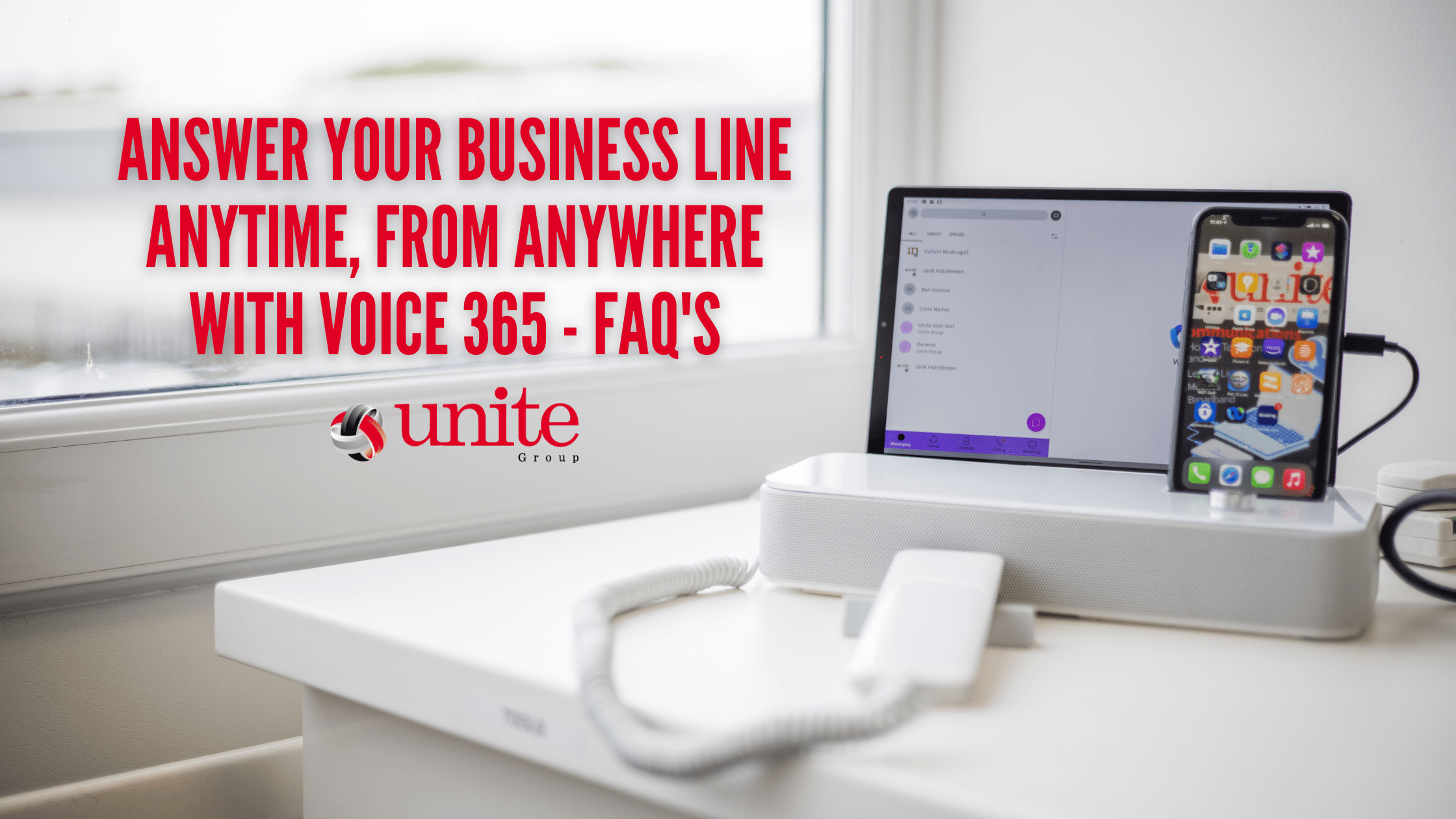
    Here at The Unite Group, we offer Voice 365 – our hosted telephony solution. Voice 365 is a cloud based telephone system that means your calls which can be accessed from multiple devices anywhere. The system offers an IP desk phone and Webex softphone for every user meaning you never have to miss a call!

    This is our telephony solution for the modern business. Making incorporating remote and hybrid working even more accessible.

    So what exactly is Voice 365?

    Voice 365 is a hosted cloud telephony solution. It has a range of features including: call center working, call recording, voicemail, call management, functionality, receptionist software and softphones.

    Will my team be able to answer calls from any location?

    Yes! As Voice 365 is a cloud-based system, it can be answered from any location. One of our engineers will help your team set up the system on all handsets, softphones, tablets & mobile devices. From then, your business line will ring on all devices meaning your team can answer the phone anytime, anywhere.

    Can I make video calls through Voice 365?

    Yes, Voice 365 now provides video calling as well as a conferencing facility. The conferencing facility now can host up to 250 participants at a time! Using our docking system working alongside a tablet, creates a professional modern-looking desk phone. Allowing you easy access to both telephone calls & video calls.

    Can the softphone be set up on any mobile device?

    The Voice 365 softphone app can be downloaded from both the Android and Apple IOS app stores. Therefore any device running either of these can instantly have access to answering your business line. Meaning you don’t have to give your teams personal numbers out.

    The softphone can also be set up on laptops & desktop PC’s meaning you really can answer the phone anywhere!

    How does the call recording work?

    Call recordings can be provided to all users or selected users. They are then stored securely in our dedicated cloud network. Recordings can then be accessed online from any location. Call recordings can be stored for either 30 days, 180 days or 7 years depending upon your needs.

    Can I monitor my team’s call stats?

    Yes, our Voice 365 solution has call-reporting features. Meaning call reporting, wallboards and daily reports are all accessible through the cloud-based system. This is particularly useful for call centers. Wallboard’s can be displayed on large screens within your office if necessary and our friendly team of engineers will be on hand to set these up.

    Does Voice 365 have integration into office communicator software?

    Yes, Voice 365 can provide office communicator software in a monthly subscription for all users. Providing a live presence display and integration into basic Microsoft products including Outlook. The software can also support integration into your existing CRM to display information based on incoming caller details. Meaning your team can have a better idea of the the call they are about to answer. Typically speeding up your answering times and meaning you can provide a more personalised service.

    Can my existing telephone number be imported into Voice 365?

    Any existing numbers can be ported to our cloud network. This process typically takes 10-20 days to complete.

    Is The Unite Group team on hand to help if I encounter any problems?

    Yes, our dedicated team of engineers provide support from our dedicated remote helpdesk facility meaning issues can be dealt with promptly. Meaning you can be confident your telephone system is in safe hands.

    What is the cost of Voice 365?

    Voice 365 starts from £15 per user. This includes 5000 minutes per month per user. All users also will receive a handset upon installation. As well as support to set up any necessary softphones.

    Are you interested in this service and want to learn more? Arrange a discovery call with one of our telecommunications managers who can discuss in further detail the best options for your business.

  • Cyber Essentials vs ISO 27001

    Cyber Essentials vs ISO 27001

    cyber essentials vs ISO 27001

    What is the difference between Cyber Essentials vs ISO 27001?

    We often get asked by companies looking to strengthen their cybersecurity which is the better option Cyber Essentials vs ISO 27001. Here at The Unite Group we always stress how different the two schemes are and that they should not be compared but instead accepted as two very different schemes which both enhance a company’s security stance.

    In this article, we discuss the two schemes and offer further information for any business looking to improve its cybersecurity.

    Cyber Essentials

    What is it?

    The Cyber Essentials scheme is a Government backed scheme that covers 5 key areas of cybersecurity; access control, software updates, firewalls & routers, secure configuration & malware protection. The aim of this scheme is to protect against the most common forms of cyber-attacks. This certification is also required to bid for Government contracts.

    What does it aim to protect?

    By completing the Cyber Essentials certificate, your organisation is effectively protecting itself against approximately 80% of the most common cyber-attacks. This is because this scheme protects your data and programs on hardware such as computers, networks, servers and any other elements in your IT infrastructure.

    Who should consider being a part of the Cyber Essentials scheme?

    All organisations who want to protect their businesses should partake in the scheme. Not only does it protect your business. But it also demonstrates to your clients that they can be confident their data will be in safe hands. Therefore any business that is looking to implement basic cybersecurity measures should look into achieving the certification.

    Also, for any businesses that wishes to bid for Government contracts this certification is a prerequisite. Therefore, if you wish for your business to be considered for such opportunities you should begin the process of achieving this as soon as possible.

    ISO 27001

    What is it?

    ISO 27001 is a set of standards that have been designed to keep information assets secure. This certification allows you to manage the security of assets including financial information, intellectual property, employee details and any information entrusted to you from third parties. ISO 27001, therefore, has more elements within its scope. ISO 27001 has 10 clauses and 114 generic security controls grouped into 14 sections

    What does it aim to protect?

    ISO 27001 differs from Cyber Essentials as it aims to protect all information and data regardless of where it is found. Meaning the certification covers hard copies, digital & data stored within information systems.

    Who should consider achieving ISO 27001?

    Similarly to Cyber Essentials, any business that wishes to demonstrate that they take data protection seriously should work towards achieving the certification. Some organisations sometimes choose to implement the standard to ensure they are following recommended guidelines. Others however choose to complete the certification to reassure their customer’s and client’s.

    So, is Cyber Essentials the same as ISO 27001?

    In short, no. However, the two complement one another.

    We recommend anyone without both a Cyber Essentials certification and ISO 27001 consider achieving both certifications at the same time. In terms of time & money, this proves to be the most effective.

    However, if this is not an option, we suggest you opt for achieving Cyber Essentials first. This scheme follows a simpler process and will introduce you to the world of certification and data protection.

    How can we help?

    Here at The Unite Group, we are certified Cyber Essentials assessors. Therefore, we can guide you throughout the process as well as assess your application for certification. Our friendly team is on hand to assist throughout the self-assessment questionnaire.

    Want to learn more? Book an appointment with our Cybersecurity team today!

  • Are your Microsoft 365 mailboxes backed up?

    Are your Microsoft 365 mailboxes backed up?

    are your mailboxes backed up

    In today’s business world, email is the backbone of communication. Complete365 reports that Microsoft Office 365 Email is the most popular 365 product among medium-sized companies. Ontech claims emails contain 60% of business-critical data. 

    No doubt, emails are incredibly important, so having a robust system for storing your email data in case of catastrophe is a good idea. In fact, emails may contain sensitive information that shouldn’t be lost or destroyed under GDPR. 

     Most modern companies make regular backups of their most important data. Backing up data can make the difference between a salvageable error and a catastrophic one.

    In this article, we’re going to discuss how to make sure that your Microsoft 365 mailboxes are backed up and protected for your benefit.

    What is a backup?

    Backups are copies of data stored in an alternate location that is accessible in the case of corruption, destruction or inaccessibility of the primary data. 

    The most traditional backup is the 3-2-1 backup, which ensures there are three versions of data – one is the primary and two backups. One backup should be stored offsite, and each should be stored on different media. This ensures that the original data is always accessible, even in the event of a catastrophe. 

    With the advent of cloud-based systems, UniTrends notes that the 3-2-1 system has become a 3-2-2 system, with a cloud-based copy serving as another ‘offsite’ backup.

    In today’s modern workplace, the cloud plays an integral role in storing and protecting files and preventing data loss in the event of hardware failure. 

    Are Microsoft 365 mailboxes automatically backed up?

    The Microsoft 365 platform does preserve your email to a certain extent, but it does not back it up. Microsoft 365 provides support for protection against major events affecting their data centres; physical and network security for data centres; privacy controls to protect users; and replication, redundancy, and storage of data. 

    Email data, however, is the responsibility of the enterprise if it is accidentally or maliciously deleted. That’s exactly why you should consider a mailbox backup solution.

    Why does Microsoft not automatically back them up?

    It is important to note that, when it comes to Microsoft 365, they operate on a model of Shared Responsibility. 

    This means Microsoft are not responsible for your data. Instead for the operation and infrastructure of Microsoft’s Global Infrastructure and systems as a whole. 

    Intuitively, this makes sense. Handling your backups is a big undertaking, so they avoid automatic backups. As a result, Microsoft is free to focus on providing you with the best service possible.

    This does mean your mailboxes aren’t backed up by default. Microsoft also offers tools for archiving emails and files, and for restoring files and data after accidental or malicious deletion. 

    This means that anything haphazardly deleted can be recovered within a short period of time — if noticed within 14 days (adjustable up to a maximum of 30 days). 

    However, restoring files can be destructive. Data is restored to the same place, meaning that any additional data will be overwritten, with no rollback capabilities.

    Once these temporary backups are overwritten or cleared, any important information that is stored on these emails will be lost forever. There are no redundancies.

    Therefore, to keep your business emails secure, you should invest in a mailbox backup solution.

    Why invest in a backup solution?

    The importance of backups cannot be overstated when it comes to protecting and archiving your files, especially if they are stored in the cloud. We believe the best way to ensure your emails are kept safe is by investing in a cloud-based backup solution

    Here are some key benefits of a mailbox backup solution like Acronis:

    • Avoid loss of productivity: Businesses use emails to share important information, communicate with clients and collaborate. Losing this information can destroy your productivity and lead to months of lost work. Moreover, a cloud solution cuts down your recovery time from a cyberattack or data loss – as you can quickly restore emails within a few clicks. 
    • Improved cybersecurity: Many on-site email servers and backup solutions suffer from poor security infrastructure. Cloud backup services like Acronis use advanced security measures to keep your sensitive emails safe. 
    • Ensure compliance with data protection: As mentioned before, emails can hold personal information. Negligent deletion of these emails could put your business at risk of fines under GDPR.

    Investing in a backup solution also mitigates the risk of losing data when an employee leaves a Microsoft Office 365 account, which is standard procedure within most companies when an employee leaves. 

    As a result, any important data stored in that account will never be recoverable. With a backup, a copy of that data is stored elsewhere and is accessible even after the account has been deleted.

    You can also secure and encrypt your data in the cloud when you use a cloud-based backup solution so that even if you experience a hardware failure, your data won’t be lost or corrupted. 

    Get your mailbox backup strategy right with an MSP

    A cloud-based email backup solution is the best way to keep your important emails safe. Setting up backup rules and configuring your software solution can be tricky. Get this wrong and the consequences could be dire. 

    Why not leave it to the professionals? Working with an MSP affords you access to our great wealth of experience. 

    We’ll be able to walk you through which platform to invest in and guide you on how to get started!

    Are you ready to take charge of the security and safety of your data? Get in touch with us now, so we can help you deploy your Microsoft 365 mailbox backup solution.

  • A chat with Jack, our newest Helpdesk Engineers

    A chat with Jack, our newest Helpdesk Engineers

    [et_pb_section admin_label=”section”] [et_pb_row admin_label=”row”] [et_pb_column type=”4_4″][et_pb_text admin_label=”Text”]
    jack - helpdesk engineer

    In continuation of our Meet The Team blog series, we introduce you to Jack. Jack is one of our Helpdesk Engineers here at The Unite Group. Jack is the newest member of our team having started with us just a few weeks ago. He has settled in great and we can’t wait for our customers to get to know him a bit better!


    We recently had a chat with Jack to find out a bit more about him and the role he will be undertaking here at The Unite Group…

    Growing up, what did you want to be?

    It’s a little unorthodox, but I wanted to move to Scotland when I was 16, be a footballer during the day and work in a Kebab shop during the night. I think the footballer hope is long gone, but I still might end up making Kebab wraps on the Bigg Market one day.

    What is your role at The Unite Group and how did you end up where you are now?

    My role is as a Helpdesk Engineer. This means I mainly work alongside Chris & Jack Hutchinson. I ended up where I am now due to always having an interest in IT. As well as having the willingness to learn about the many different aspects of IT.

    What does a typical day look like at The Unite Group?

    I think like everyone has said previously there isn’t really a ‘typical’ day in the office here at The Unite Group. Each day brings new challenges and obstacles to overcome which always keeps you on your toes.

    What is your most and least favourite part of the job?

    My favourite part of the job is definitely being able to help users resolve issues and being able to interact and communicate with them while resolving their issues. It’s always nice to have a little chat with new people.

    I’d say my least favourite part of the job is Lidl being next door! I’ve already started eating too much from the bakery and it’s not looking good for my waistline…

    What is your greatest achievement?

    I would say my greatest achievement to date is learning to be myself and getting over my fear of meeting new people. This has allowed me to make new friends and fit into new environments much easier.

    What is the best piece of advice you’ve been given?

    The best piece of advice I have been given is to set lots of small achievable goals rather than setting one huge goal that is lightyears away. I think this helps to keep me motivated by seeing achievements along the way.

    Where do you see yourself in 10 years’ time?

    In 10 years’ time, in an ideal world, I’d like to be on a beach in the Maldives. Realistically, I’d hope to be further advanced in my career. I’d also like to hopefully have a house and just be happy with life really.

    How do you unwind outside of work?

    I usually either play football or go to the gym. I also really enjoy going out for different types of food or going to the cinema. Unfortunately, I have a partner who is a picky eater and hates the cinema so I usually just eat at restaurants that I’m told to and watch movies at home…

    If you would like to learn more about how Jack and The Unite Group can help you with your business technology needs, contact us on, 0191 466 1050.

    Has Jack or another member of our helpdesk team resolved any of your issues recently? Why not leave us a Google review and let us know about the service you received!

    https://g.page/r/CdjwcFG4AuwZEBM/review

    [/et_pb_text][/et_pb_column] [/et_pb_row] [/et_pb_section]
  • October 2022 – Newsletter

    October 2022 – Newsletter

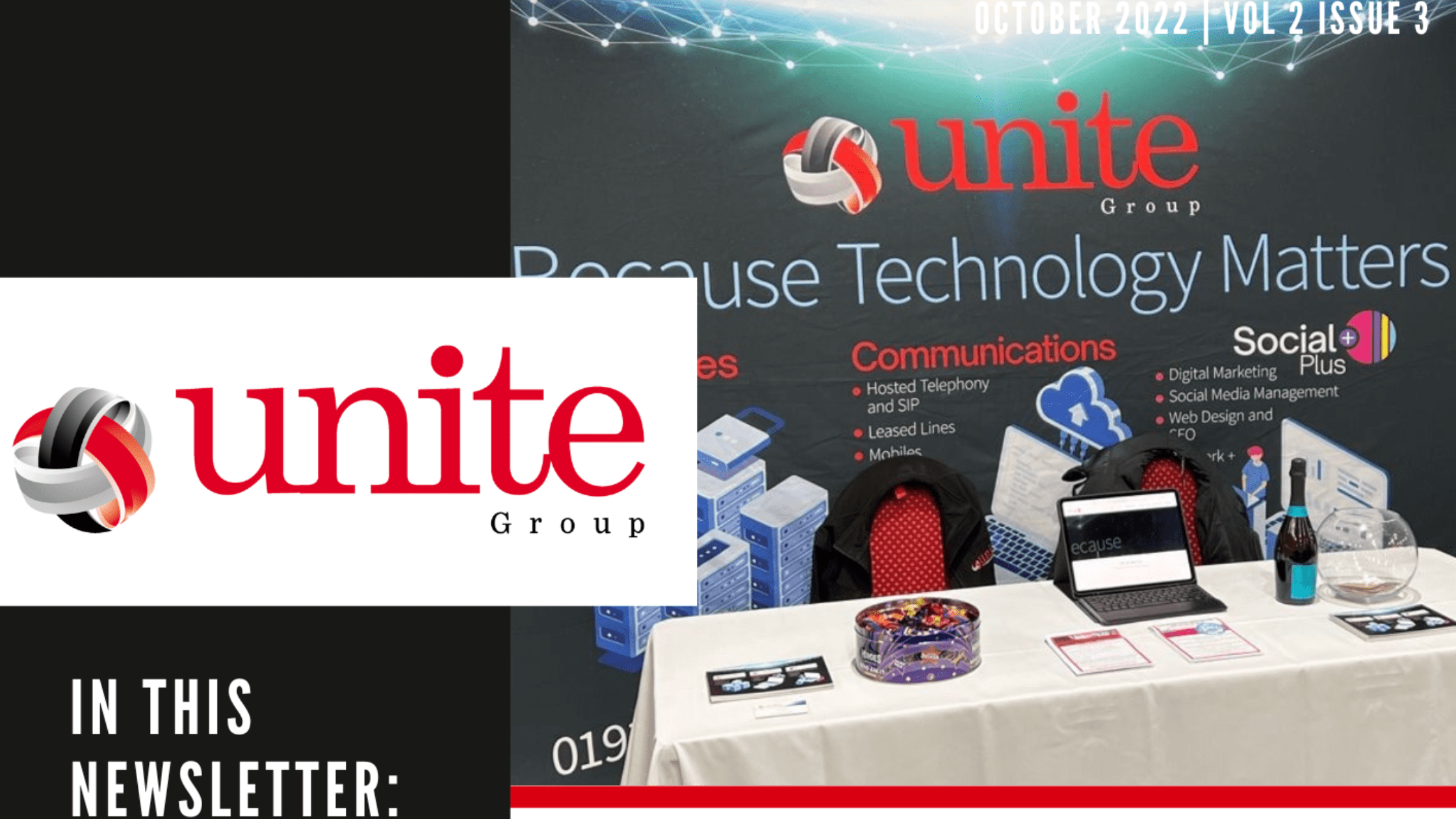
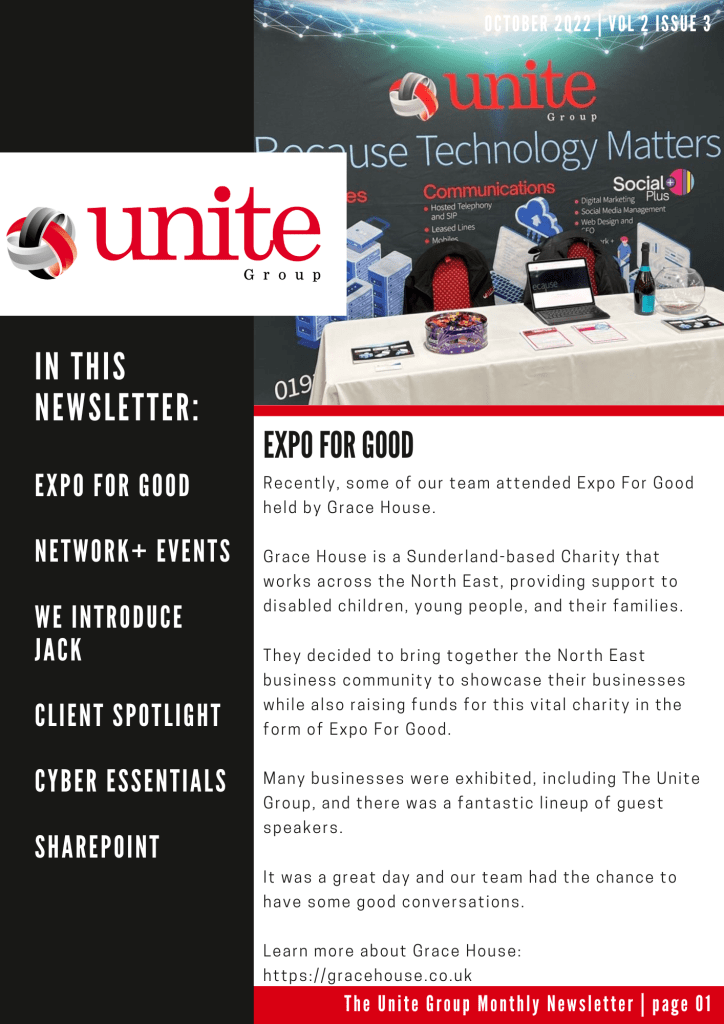
    We’re back with our monthly newsletter! As The Unite Group we love keeping our customers up to date with the latest deals, tips, industry news as well as what our fantastic team are getting up to! Read our October issue to see what we have got up to in the past month!

    In this newsletter: We attended the Expo for Good in support of Grace House, we attended Fall into Networking event hosted by Network+, we welcome Jack to our team, we spotlight our clients Trust Red, share info about the Cyber Essentials scheme & explain the benefits of SharePoint in comparison to a traditional server.

    To read The Unite Group’s October Monthly Newsletter, click on the image below!

    To be added to our mailing list drop us an email, info@theunitegroup.co.uk or to speak to our friendly team call us on, 0191 466 1050

    October 22 Newsletter
  • A chat with Paul, our Sales Director

    A chat with Paul, our Sales Director

    a chat with paul our sales director

    In continuation of our Meet The Team blog series, we introduce you to Paul. Paul is our Sales Director here at The Unite Group having started The Unite Group back in 2009. Paul is often out networking and usually finds a way for it to be on the golf course!


    We recently had a chat with him to find out a bit more about the role he plays here at The Unite Group and what you can expect from a typical day in Paul’s life…

    Growing up, what did you want to be?

    Growing up, I wanted to be a professional footballer or a golfer! Ability unfortunately got in the way of either becoming a reality!! I have always had an interest in technology so I guess my 3rd choice has turned out ok! Still practicing the golf as much as possible you never know might make the senior tour yet!!

    What is your role at The Unite Group and how did you end up where you are now?

    My role here at The Unite Group is the Sales Director. I have worked in technology since leaving school but really enjoy meeting new and current customers and developing our ongoing strategy with the marketing team. So I guess I have the perfect job!

    What does a typical day look like at The Unite Group?

    In one word a typical day here at The Unite Group is busy! There is always a buzz in the office. We are very lucky to have a great hardworking team who are always customer focused and give 100%. This makes the busy days so much easier!

    I also run the FORE biz Newcastle group so I am lucky enough that golf is part of my working day every few weeks. It’s great to network with such a good group of business owners and FORE biz opens opportunities nationwide.

    What is your most and least favourite part of the job?

    My favorite part of the job is always providing a solution that I know will make a difference to our customers. It’s very rewarding to be able to efficiently and cost-efficiently fix the problems customers have sometimes been facing for years.

    My least favourite part of the job however has got to be paperwork of any kind!

    What is your greatest achievement?

    My greatest achievement has got to be that I once made two holes in one at golf in a 2 week period! I have not been even close to getting another one since!

    What is the best piece of advice you’ve been given?

    Believe in yourself and be confident, everyone has self-doubts and it’s normal to feel that way.

    This has been very relevant over the last 13 years as there have been times myself & Callum have had to take big leaps to grow The Unite Group and without self-belief, it would have never worked!

    Where do you see yourself in 10 years’ time?

    In 10 years’ time, I see myself hopefully winding down a little and traveling to some of the places on my wish list. I would love to try and see as much of the world as possible with my wife Lorraine.

    How do you unwind outside of work?

    It’s well known I like a round of golf or two!! So outside of work, you will often find me on the golf course. I am a member at Backworth however I love to visit other courses too as often as possible.

    If you would like to learn more about how our Sales Director Paul and The Unite Group can help you with your business technology needs, contact us on, 0191 466 1050.

  • Top 9 Tips to Work Smarter in Microsoft Teams

    Top 9 Tips to Work Smarter in Microsoft Teams

    Companies are rapidly implementing Microsoft Teams to be able to enrich their businesses’ communications structures, and it’s proving successful. Teams is by far the most rapidly growing unified communications solution, and is not looking to stop anytime soon.

    With Teams being such a crucial part of the modern workflow, it’s important to make sure that you know exactly how to use it to its maximum potential. After all, failing to do so could waste lots of time, and can just be an inconvenience for you when trying to get important work done.

    We believe that everyone should learn how to use Microsoft Teams to its fullest potential. That’s why in this article, we’re going to go over some of the top tips to work smarter in Microsoft Teams in 2022.

    Top 9 Tips to Unlock Teams’ Full Functionality

    Send Urgent Messages

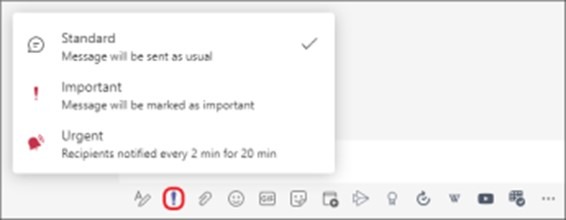
    Sometimes, it can be easy to miss messages coming in. Especially when your recipient has a busy inbox, it’s important to mark your message as urgent to make sure that whoever’s on the other end knows that it’s a time-sensitive matter.

    Luckily, doing so in Microsoft Teams is incredibly simple. Press the exclamation mark in the toolbar below the textbox in the chat interface, and select ‘Urgent’. Your message will now be marked as urgent for the recipient. Type in your message and send it, and that’s it!

    mark a message as urgent

    Use Meeting Reactions

    Sometimes you want to show your approval of something in a meeting, but don’t want to interrupt the flow of conversation or presentation. Sometimes, you just want to laugh at a joke without unmuting your microphone.

    Meeting reactions make this simple. Just click on the Reaction menu during the meeting and click a reaction, and they’ll pop up on the side for everyone to see.

    reactions on teams

    Create Polls

    Asking everybody how they feel about a topic can just take up time and be a mess. Chances are, people will start a discussion in the chat and it’ll make it hard to be able to see the information you need.

    Polls are a great way to easily get opinions without hassle. They’re easy to set up, and can be a great way to collect data without having to sift through discussions to work out what people think. To make a Poll — click the ‘Microsoft Forms’ button in the taskbar and fill in the relevant information, and you’re done!

    Automate Tasks with Power Automate

    Automation is powerful. Rather than having to manually do a list of tasks, automation takes care of it for you. This can save hours of time and effort, and ensure the tasks are all done correctly and uniformly every time.

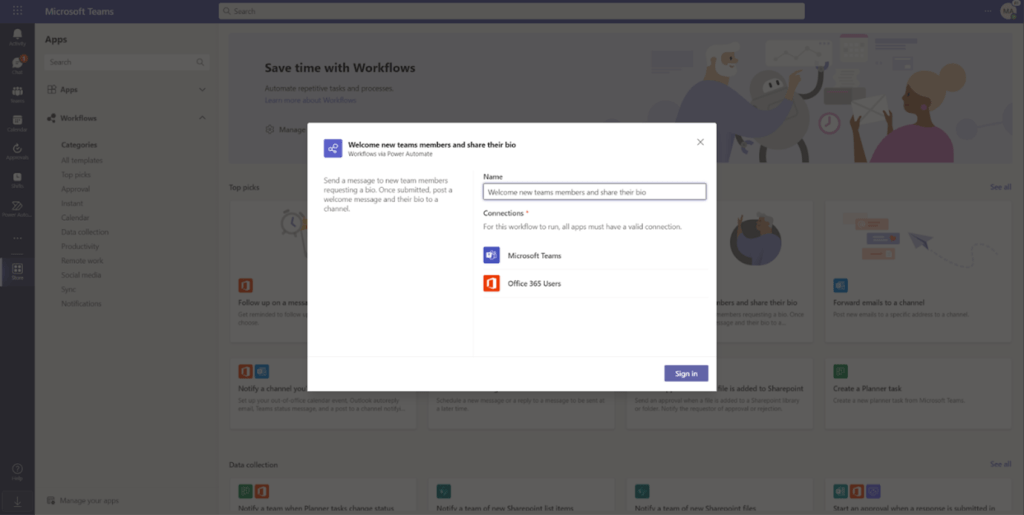
    In Microsoft Teams, you can easily set up buttons to do multiple things automatically, without needing to manually input. 

    1. Go into the Store tab on Microsoft Teams.
    2. Select ‘Workflows’, and select a template to create a workflow.
    3. Fill in each parameter, and you’re good to go!
    automate in teams

    Use Live Transcripts

    Live transcription is a great way to ensure that hard-of-hearing employees can stay in the conversation. It’s also just a good thing to have, as even a slightly poor connection quality can turn a Teams meeting into robotic gibberish.

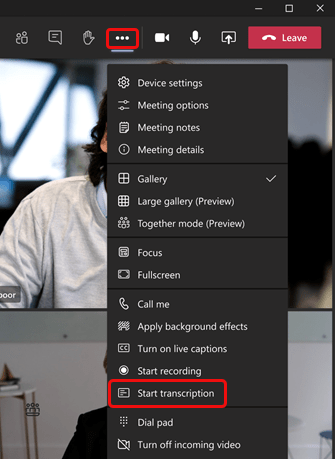
    To turn on live transcription, press the three dots on the meeting controls to view ‘More actions’, and click “Start Transcription”.

    using live transcripts in teams

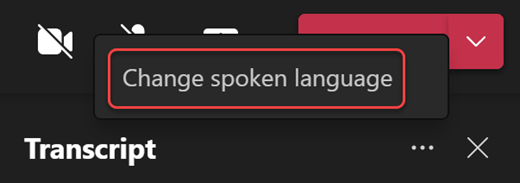
    You can also change the transcription language. To do so, click the three dots on the right of the transcript window and click “Change Spoken Language”.

    change the transcript language

    Reorganise your Teams

    Sometimes, you want to put a specific team at the top of your teams for ease of access. Or, maybe you just like alphabetical order and want to organise your teams that way. Whatever the reason may be, it’s simple to reorganise your teams.

    Just click and hold your cursor on the team that you want to move, and drag it to its new place on the teams list.

    Use Loop Components

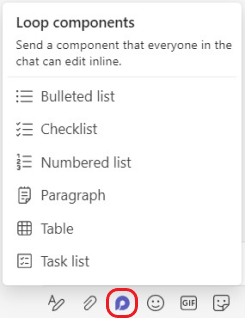
    Microsoft’s groundbreaking Loop is the future of collaboration in the workplace. And, you can make use of Loop in Teams — with Loop components. With Loop components, you can collaborate with your team on anything — from agendas, to ideas, to simple checklists.

    By sending a Loop Component into a chat, you allow anyone in that chat to be able to work on it collaboratively. To do so, click on the Loop components button in the taskbar. Then, enter whatever you want into the component, and press send. 

    People will instantly be able to inline edit the component in the chat, and you can even send the same component to multiple chats. 

    use loop components in teams

    Bookmark Important Conversations

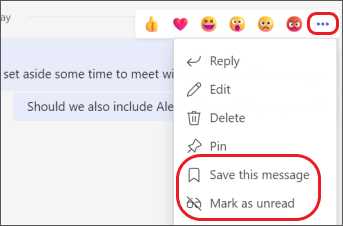
    Sometimes, you’ll find that someone in your team says something that’ll be important later. Rather than having to dig back and search for it, it’s much easier to save these messages.

    To do so, hover over those messages and click on the three dots next to the reactions, then click “Save this message”. This will save that message to your saved messages, for easy reference. You can also pin messages to the channel here.

    bookmark important conversations in teams

    Create Teams Templates

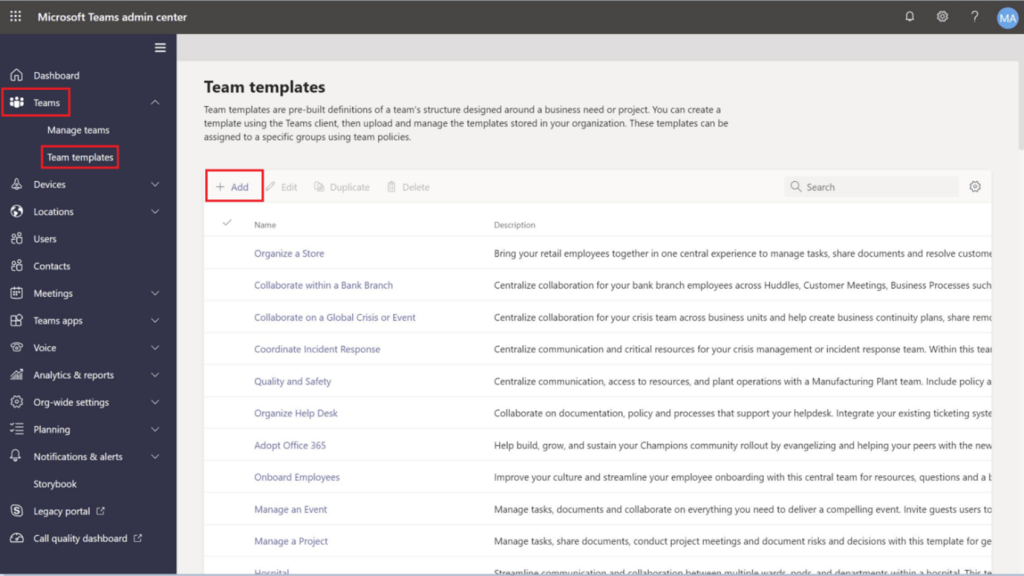
    Creating a team from scratch can take a lot of time and effort. Microsoft Team’s templates are an easy way to circumvent this hassle. You can either create a template for use in all of your teams from scratch or turn a team you already have into a template.

    Create a template from scratch

    1. Go to the Teams menu, and into ‘Team Templates’.
    2. Click ‘Add.’ and then ‘Create a brand new template.’
    3. Fill in the template-builder with the template name and description.
    4. Add any channels you may want to the template.
    5. Your template is created!
    create team templates in teams

    Create a template from an existing team

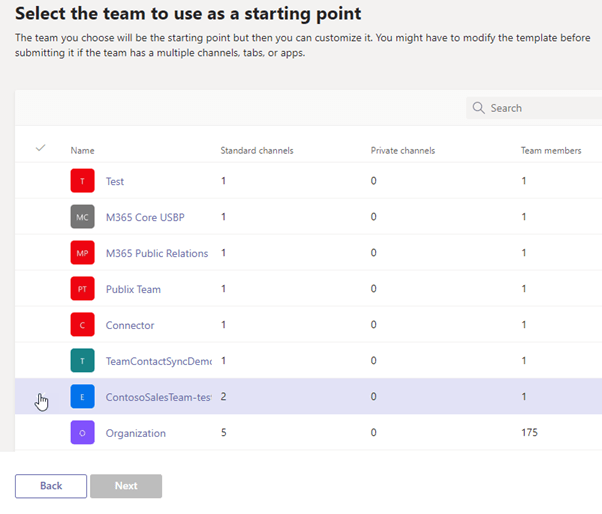
    1. Go to the Teams menu, and click on ‘Team Templates’.
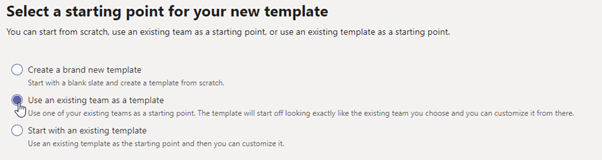
    2. Click on ‘Add’, and then select ‘Use an existing team as a template.’
    how to create team templates
    • Select the team you want to use as a starting point.
    how to create new template in teams 2
    • Fill in the template name and details.
    • If need be, you can add new channels or edit existing channels in the template.
    • Your new template is done!

    Get Started with Microsoft Teams!

    Microsoft Teams is a powerful communications tool that can open up new collaborative workflows for your organisation. 

    Following these tips & tricks will help unlock Microsoft Teams’ full potential. After all, Teams is rammed with brilliant quality-of-life features that can save you time and help you work better together. 

    Of course, as Microsoft Teams expands in functionality, its suite of features will only get more in-depth. So, making sure to stay up to date regularly is important. A managed service provider can make sure that all of your 365 applications and tools are up to date, and can ensure that they’re set up properly – just like ourselves here at The Unite Group.

    Interested in getting started with Microsoft Teams’ rapidly growing platform? Get in touch today, and see how we can help you! 

  • What is the difference between Cyber Essentials & Cyber Essentials Plus?

    What is the difference between Cyber Essentials & Cyber Essentials Plus?

    difference between CE & CE plus

    Are you interested in achieving a Cyber Essentials certification but unsure as to what level of certification is best for you? In this blog, we break down the main differences between Cyber Essentials & Cyber Essentials Plus. As well as offer recommendations for which level of certification businesses should consider.

    Let’s recap what Cyber Essentials is

    As mentioned in our previous blogs, Cyber Essentials is a government-backed scheme aimed to protect businesses from 80% of the most common cyberattacks. There are 2 levels of certification that we will discuss later; Cyber Essentials & Cyber Essentials Plus. Certification must be renewed annually and cover 5 main areas of checks. Businesses who have a Cyber Essentials certification not only can be assured they comply with the latest cybersecurity measures but also have a clearer picture of their company’s cyber security level.

    So, what is Cyber Essentials?

    This is the basic level of certification. Achieving Cyber Essentials involves the completion of a self-assessment questionnaire. This questionnaire involves 8 sections and has a total of 70 questions. Here at The Unite Group, we can provide support before taking the assessment to ensure all expected standards are met. As well as providing assistance throughout the application. Upon completion, the business owner or board-level representative must then sign a declaration that all answers are completed correctly. This is then reviewed by a Cyber Essentials assessor and successful applicants will receive their certification.

    Who do we recommend Cyber Essentials to?

    We recommend the Cyber Essentials certification to all businesses who want to demonstrate that they take cybersecurity seriously. Having this certification can also open new doors for business opportunities as it is a requirement to bid for Government contracts. We recommend this to smaller corporations that want to ensure they are complying with recommended safety measures.

    Now let’s compare this with Cyber Essentials Plus

    The Cyber Essentials Plus certification involves the same first steps as the Cyber Essentials scheme. Therefore, meaning they both include the completion of the self-assessment questionnaire. However, Cyber Essentials Plus then goes on to further include a vulnerabilities assessment and an on-site assessment. The assessment covers the controls your organisation has in place. As well as, your employee’s work-from-home locations. Also assessing any third parties who may have access to your premises or IT infrastructure. These assessments are undertaken by a trained and qualified Cyber Essentials Plus assessor.

    Who do we recommend the Cyber Essentials Plus scheme to?

    Here at The Unite Group, we recommend this scheme to those businesses that want to demonstrate higher levels of cybersecurity protection. Whilst Cyber Essentials is a great starting point, the added levels of assessment included in this scheme increase a business’s protection far more. Those who hold a Cyber Essentials Plus certification can bid for Ministry of Defence contracts.

    Recap

    To recap, the main difference between the two schemes is that the Cyber Essentials Plus certification covers more areas of assessment. It includes a more rigorous test of an organisation’s cybersecurity systems. Experts carry out vulnerability tests and as a result, ensure organisations are well protected against basic hacking and phishing attacks. Therefore, we strongly recommend this option to businesses who want to ensure they best protect their data and that of their customers.

    Let us help!

    Here at The Unite Group, we can guide you through Cyber Essentials and help you protect your business. We have in-house Cyber Essentials assessors to not only approve certifications but also provide support throughout the application process. We are a friendly voice on the other end of the phone to support you through the certification from start to end.

    To find out more, book a quick call with our team today!

  • The 6 worst cyberattacks of 2022 (so far!)

    The 6 worst cyberattacks of 2022 (so far!)

    6 worst cyberattacks

    As expected, in the first 10 months of 2022, there have been multiple major cyberattacks that have resulted in a loss of productivity, revenue or large-scale data leaks. Whilst some of the largest attacks have been in countries such as America and Ukraine. There have also been some major cyberattacks within the UK. Although these cyberattacks are the ones that receive media coverage, there are many more attacks on smaller businesses that cause major devastation. So far in 2022, 39% of UK businesses have identified cyberattacks within their business. Fortunately, this number is significantly less than in 2020, as 46% of businesses identified cyberattacks. Without further ado, here are the 6 worst cyberattacks of 2022 so far.

    KP Snacks – Ransomware Attack

    KP Snacks, the maker of KP Nuts, Hula Hoops, Nik Naks, Tyrell’s, Pom-Bears and more, fell victim to a ransomware attack in January of this year. The gang behind this attack was Conti, an infamous cybercrime group from Russia. Shortly after the attack was detected, KP Snacks released a statement explaining that it could not ‘safely process order or dispatch goods’ due to the incident. Following this, there were supply chain issues until the end of March.

    As is now expected, the Conti gang operate double extortion, whereby they would release stolen data if KP Snacks did not pay the ransom. Initially, a small number of staff documents were posted online. These had a 5-day countdown. That when the clock hits zero, all data will be released, unless the ransom is paid. However, the post on the Conti website was removed soon after. This potentially indicates that the ransom was paid, or the two parties were in negotiation. With this being said, neither party disclosed whether or not the ransom was paid.

    UKVCAS – Data Breach

    In April, the UK Home Office’s visa service had to apologise for a data breach in which the email addresses of over 170 customers were mistakenly copied into an email. The email was informing a customer of a change in the time of their appointment. The emails included in this breach were a combination of personal emails and lawyers working on behalf of customers. This data breach was particularly noteworthy as UKVCAS is run on behalf of the Home Office by a private contractor. Therefore it was not directly the Home Office’s fault. The breach was likely a case of an accidental malicious insider. Businesses can decrease the likelihood of these forms of breaches through regular cybersecurity awareness training.

    The Works – Presumed Ransomware Attack

    UK Retail chain, The Works, was forced to shut down a number of its stores in April due to a widespread cyberattack. Although the retailer did not go into much detail about the nature of the attack, it is believed to have interrupted deliveries, extended online order fulfilment times and compromised the safety of payments on their POS systems. After the attack was remediated, it was found that no customer data was exfiltrated. However, it is believed that the attack was a ransomware attack. Although it is unknown how much the ransom amount was, or how The Works restored their systems.

    The real-world impact of this attack was the fact that the share price for The Works fell by 10% the day they announced the cyberattack. There was also a loss of revenue from the stores that were unable to open due to the attack.

    Crypto.com – Account Compromise

    In January, one of the largest cryptocurrency exchanges, Crypto.com, released a statement explaining they were the victim of an account compromise attack that resulted in 4,836.26 Ethereum and 443.93 Bitcoin being stolen, totalling approximately $35 million. The attack affected 483 users, and the threat actors performed unauthorised withdrawals from the victims’ wallets to their own. Interestingly, the attackers were able to perform the withdrawals without the MFA authentication control being inputted by the user. After the attack, Crypto.com suspended all withdrawals and migrated to a new MFA infrastructure.

    Crypto.com was able to prevent some of the unauthorised withdrawals before it was too late, and the company reimbursed customers so there was no loss of customer funds. Crypto.com has now implemented a new program, the Worldwide Account Protection Program, which will prevent this from happening again. The program includes controls such as the use of MFA and anti-phishing codes.

    Ukrainian Government – Website Hacks & DDoS Attacks

    Throughout the first quarter of 2022, Russian hackers targeted many Ukrainian websites, including multiple government and financial services websites. In January, around 70 websites were hacked, including the Ministry of Foreign Affairs, Cabinet of Ministers and Security and Defense Council. The majority of these hacks only involved changing the text on the website to display pro-Russia sentiments.

    Shortly after, Russian threat actors targeted multiple government, non-profit and information technology organisations throughout Ukraine with a piece of malware disguised as ransomware. The malware had all the features of ransomware, but lacked a recovery feature, meaning that it simply destroyed all files on the victim’s computer.

    Early in February, there were several large distributed denial of service (DDoS) attacks. These brought down the websites of the Defense Ministry, Army and Ukraine’s two largest banks. Later in the month, there were more DDoS attacks, but the organisations were able to recover quickly from these.

    From March until the present day, there are still many cyberattacks being launched against Ukrainian citizens and businesses. Most of these attacks are phishing attacks, with the goal of launching widespread malware attacks.

    Ronin – Account Compromise

    In March, one of the largest cyberattacks in recent history occurred. A threat actor stole approximately $600 million worth of digital assets. These were stolen from a blockchain network, Ronin, that is connected to a popular online game, Axie Infinity, created by Sky Mavis. This attack was possible as there were some outdated Sky Mavis accounts with dangerous permission levels. The attacks were able to compromise these accounts and subsequent nodes. Therefore allowing them to authorise fake transactions on the network or bridge that handles converting tokens, Ronin. The hackers were able to steal 173,600 Ether and 2.5 million USD Coin, totalling over $600 million. In 2021, there were many similar attacks on bridges and Decentralised Finance platforms, totalling $2.3 billion.

    Whilst this form of attack is not viable for most businesses, it acts as a cautionary reminder for businesses looking to adopt new Web 3.0 technologies.

    Added Bonus – Two Largest Bug Bounties

    Although the media is awash with stories of malicious actors exploiting vulnerabilities and targeting organisations, there is a community of ethical hackers actively trying to find exploits to responsibly disclose them to the affected organisation. Many organisations offer a monetary reward for finding these vulnerabilities, called a bug bounty program. So far in 2022, we have seen two of the largest bug bounties paid out. One totalling $6 million, and another totalling $10 million.

    The $6 million bug bounty was awarded to the ethical security hacker by the name of pwning.eth who found a critical vulnerability in the Aurora Engine, a bridging and scaling solution for the cryptocurrency Ethereum. If pwning.eth was to have exploited the vulnerability it could have cost the company $200 million.

    The $10 million bug bounty was awarded to the bug hunter Satya0x after discovering a vulnerability in Wormhole cryptocurrency bridge. Wormhole is the message-passing protocol that connects blockchains such as Ethereum, Terra and Binance Smart Chain. If the vulnerability was exploited, it could have resulted in $736 million worth of digital assets being lost forever.

    How to Keep Your Business Safe

    The past few years have taught us that all businesses, regardless of size, industry or location, are at risk of falling victim to cyberattacks. Although there is no way to ensure that your business is immune to cyberattacks, there are controls and solutions that can be implemented to significantly decrease your cyber risk, as well as making detection and remediation as effective as possible.

    We strongly recommend achieving a Cyber Essentials certification to best protect your data. If you want to find out more about how your business can reduce its risk of a cyberattacks in 2022, contact us today or arrange an appointment with our team.